GameStop Price Match Policy: What Actually Works in 2026
Learn the real GameStop price match rules, how to request one in-store and online, and get expert tips to actually save money on your next purchase.
11 min read
Your phone shows a lower price for the same game or console, and GameStop's cart is open on your other screen. You're deciding whether to ask for a match, buy elsewhere, or head to the store and risk hearing no. The sensible move is to check how strong your request is before you spend time making it.
GameStop's price-match practice isn't a dependable, published guarantee. A good request can still be declined, and a successful match at one store doesn't promise the same result at another. Your best advantage is preparation: verify the listing, save the details, and approach the employee as someone ready to buy, not as someone demanding an entitlement.
Table of Contents
- What You Are Actually Trying to Do
- Why GameStop's Policy Is Hard to Pin Down
- How to Request a Match In Store
- Online and Post-Purchase Adjustments
- Rating Your Request Before You Ask
- Habits That Quietly Improve Your Odds
- When the Match Is No and What Comes Next
What You Are Actually Trying to Do
Before you ask, make three adjustments to your expectations.
First, treat a GameStop price match as a discretionary request, not a standard benefit you can count on. The public record and customer reports don't establish a consistent nationwide promise. That means you shouldn't build your purchase plan around getting a lower competitor price accepted.
Second, understand that the employee or manager in front of you is the practical gatekeeper. Even when a competing listing looks persuasive, the store may interpret eligibility differently, or the person checking may not be able to approve it. A polite request gives them room to help; an argument about what the policy “has to” allow usually doesn't.
Third, preparation matters more than confidence or volume. Bring the exact product page, check who sells the item, and confirm that it matches the GameStop product in condition and contents. If your evidence is unclear, the employee has an easy reason to decline. If it's clean, you've made the decision easier, even though approval isn't guaranteed.
A realistic goal: Know whether your request is strong enough to make, then ask once without turning a declined match into a dispute.
This guide won't promise a magic phrase or a guaranteed outcome. It gives you a way to assess your odds, present the comparison clearly, and decide what to do if the store says no. One store's refusal doesn't prove every other store will refuse, but it also isn't a reason to assume the next one will approve.
Why GameStop's Policy Is Hard to Pin Down
GameStop's public position has been narrower than many shoppers assume. The Verge reported that GameStop didn't publish an official price-matching policy in November 2020. In 2022, GameStop said it would match products sold and shipped by Amazon, but that statement didn't create a broad, formally documented program for matching every competing retailer (The Verge's reporting on retail price-matching policies).
That distinction changes what happens at the register. “Sold and shipped by Amazon” means the product is offered by Amazon itself and shipped by Amazon, not merely displayed on Amazon's marketplace. A third-party seller's listing may show the same product and a lower price, but it isn't the same kind of comparison. The seller, fulfillment, stock, and offer terms all matter.
Reports that shoppers sometimes received matches for Target or other retailers don't establish a universal rule. Those accounts describe individual experiences, not a promise every store must honor. If a friend got a match, that's useful as a reason to ask, not proof that your employee will approve the same request.
The public picture grew murkier later. Employee and customer discussions in 2025 described a practice that may have been suspended or discontinued, while also noting that eligibility and approval could vary. Those discussions aren't an official corporate announcement, so they show uncertainty rather than a definitive nationwide end date (customer and employee discussion about GameStop price-match questions).
A remembered policy is not the same as a rule a store has to follow. Ask about your specific item and listing.
That's why “just ask” is the practical rule, but asking well still matters. For collectible purchases, it's also useful to understand whether the competing listing is a comparable retail offer at all. You can find current Pokemon box pricing as a reference point while comparing the exact product and seller. For another retailer's approach, compare how Best Buy handles price matching, but don't assume its rules apply at GameStop.
How to Request a Match In Store
Walk in with the evidence already open on your phone. A screenshot is useful if a price or stock status changes, but be ready to show the live product page too. Check the listing before you leave: confirm the seller, the item condition, the product identifier if available, and whether the offer depends on a coupon or membership.
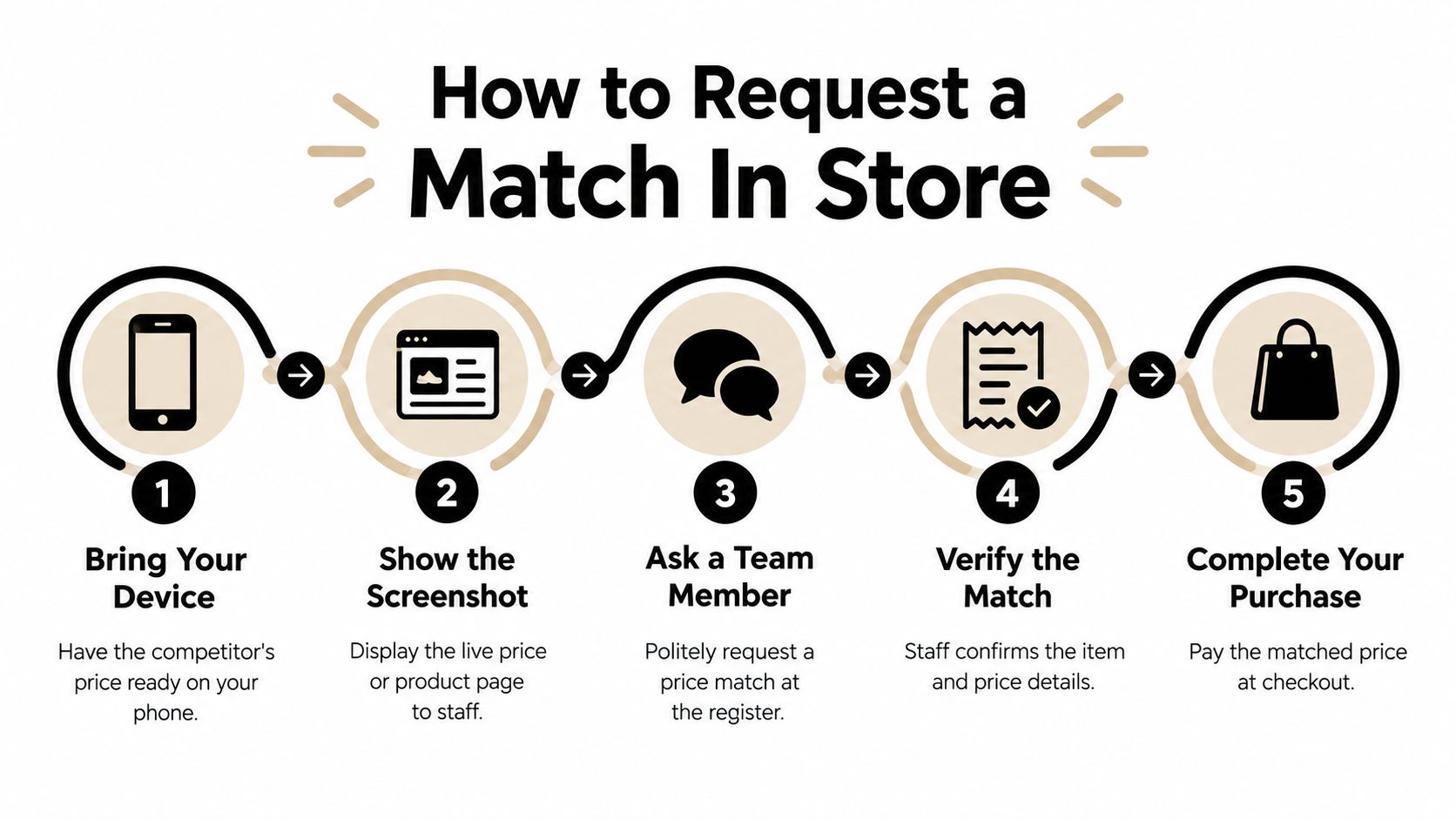
At the register, keep the request simple: “I'm ready to buy this here today. I found the same item for less at this retailer. Could you check whether you can match it?” Then show the listing and let the employee compare it. You're making it easy to verify, not asking them to take your word for it.
If the employee says the store no longer matches prices, don't launch into a debate about what a different location did. You can ask politely whether the manager on duty can confirm the current practice for that item. If the answer is still no, thank them and decide whether buying at GameStop is worth the difference. A calm exit preserves goodwill; pushing after a clear refusal rarely improves the conversation.
Pro membership has appeared in customer and employee accounts as a factor in past eligibility, but it doesn't guarantee approval. If you already have membership, mention it naturally. If you're considering joining solely for a possible match, ask the store whether membership affects this specific request before paying for anything.
The smoothest encounter is brief: present the exact product, show the competitor's offer, answer questions about seller and stock, then accept the decision. Don't lead with a speech about policy. Lead with a purchase the store can verify.
Online and Post-Purchase Adjustments
Online requests are less predictable than an in-store conversation because you can't show a local employee the product and listing side by side. If you're considering a purchase, contact customer service through an available support channel, such as chat or phone, and ask whether the exact listing qualifies before checking out. Keep the product page and seller details handy.
A lower price after you've paid is a separate problem. Don't assume GameStop will automatically refund the difference: the public record doesn't establish a general post-purchase adjustment guarantee. Contact customer service with your order details and the competing listing, but treat the request as an appeal, not a promised benefit.
Returning an item and buying it again at a lower price may seem like a workaround, but it only makes sense if the return is allowed and the total effort is worthwhile. Check the terms that apply to your purchase before you rely on that plan. A return route isn't a substitute for approval of a price adjustment, and repurchasing could introduce stock or timing problems.
For example, if the difference is $20 on a $300 console, a quick call may be worth your time. If it's $5 on a $25 preowned game, chasing a retrospective adjustment may cost more effort than it saves. The right choice depends on the gap, the return conditions, and how much friction you're willing to tolerate.
For a useful comparison of how merchants handle after-purchase price changes, see this guide to Amazon price adjustments. Its details aren't GameStop's policy, but the distinction between a pre-purchase match and a post-purchase adjustment is worth keeping clear.
Rating Your Request Before You Ask
Use this confidence score to decide whether it's worth visiting the store or making the call. It isn't an acceptance percentage. There's no reliable public success-rate statistic for GameStop requests, and a numerical prediction would imply a level of certainty the available evidence doesn't support. Think of the rating as a checklist of how easy your offer is to verify.
| Signal | Boosts Approval | Lowers Approval |
|---|---|---|
| Product identity | Same model, SKU, and included contents | Different version, bundle, or unclear listing |
| Seller | Named retailer sells the item directly | Marketplace or third-party seller |
| Availability | Competitor listing is in stock, and GameStop has the item available | Online-only, unavailable, or uncertain local stock |
| Price terms | Ordinary listed price with no special conditions | Coupon, membership-only offer, rebate, or clearance |
| Condition | New item compared with the same new item | Used, refurbished, or different condition |
High confidence: The product and SKU match, the competitor is selling and shipping it directly, the listing is in stock, and the offer doesn't rely on a promotion. Verify GameStop's local availability before you go. This is a well-supported request, not a guaranteed yes.
Medium confidence: The item matches, but local stock or a condition of the competitor offer is uncertain. Call first or ask through customer service rather than making a special trip.
Low confidence: The listing comes from a marketplace seller, includes a different bundle, applies only after a coupon or trade credit, or compares a used item with a new one. You can still ask, but don't plan your purchase around approval.
A lower displayed price isn't always a lower comparable price. Check the final checkout terms and what's included, then decide whether the savings justify the effort. For broader context on how retailers set and apply adjustment rules, use this overview of price-adjustment policies, while judging your GameStop request on its own facts.
Habits That Quietly Improve Your Odds
Preparation and tone do more for you than pressure. Save a screenshot before you leave, but don't rely on it alone: online prices and stock can change, so keep the live page available too. Confirm the retailer is the actual seller and that the offer isn't dependent on a coupon or other condition.
If you can choose when to visit, a quieter time may make it easier for staff to check the listing without juggling a line. That isn't a promise that a manager will be available or that the store will approve the match. It's a better setup for a careful conversation than arriving in a rush.
Build a friendly relationship with the store by being easy to help. Ask clearly, listen to the answer, and don't treat one employee's refusal as a challenge to win. “I want to buy this here today if the price works” tells the employee what you're asking for without putting them on the defensive.
Avoid threats to return the item or claims that you'll complain to corporate. Those tactics don't make an ineligible listing eligible, and they can turn a straightforward question into a confrontation. If the employee can't approve it, ask whether a manager can clarify the decision, then move on if the answer stands.
Be prepared enough to make the comparison simple, and relaxed enough to accept the result.
When the Match Is No and What Comes Next
A refusal doesn't erase the savings opportunity. It means this particular request didn't work at this store, at this moment. You can compare the final price elsewhere, wait for a sale, or contact customer service if you're dealing with an online order. Don't buy at a price you don't want because you've already made the trip.
The bigger lesson is that a discretionary match at one retailer is a poor foundation for a savings strategy. Price drops can happen after checkout, and delivery or refund issues can go unnoticed if you rely on memory and manual checks. Keep receipts and order confirmations somewhere you can review them, and pay attention to return windows before they pass.
If you've already made purchases recently, check whether any prices changed afterward and whether any promised refunds or delivery credits remain unresolved. That's a more useful next move than arguing over a policy that isn't clearly published. A declined match is one closed path, not proof that there's nothing else to recover.
Compass+ monitors connected shopping, email, calendar, and financial accounts to surface opportunities such as post-purchase price drops, missed delivery credits, refunds, and recurring charges that may need attention. If you'd rather catch savings without manually revisiting every order, explore Compass+.