Does Kohl's Price Match Amazon? the 2026 Answer
Does Kohl's price match Amazon? Get the official 2026 policy. We explain why they don't and show you the 14-day price adjustment rule you can use instead.
10 min read
No, Kohl's generally does not price match Amazon's online prices. The more useful opportunity is Kohl's own 14-day price-adjustment window, which can help you recover money when Kohl's lowers its price after your purchase.
You buy a blender, jacket, toy, or small appliance at Kohl's, keep the receipt, and then spot the identical item for less on Amazon that evening. The natural reaction is to ask Kohl's to refund the difference. That request usually goes nowhere because Amazon's online price falls outside Kohl's standard competitor-price rules.
The better question is different: Did Kohl's lower its own price after you bought the item? If it did, you may have a legitimate adjustment claim, even though an Amazon comparison won't qualify. Many consumer guides focus on the simple answer, but the separate post-purchase adjustment route is the practical detail shoppers can use. Independent price-matching guidance distinguishes competitor matching from a retailer's own price adjustment, which is exactly the distinction that matters here.

The distinction that saves time
An Amazon price match asks Kohl's to respond to another retailer's online price. A Kohl's price adjustment asks Kohl's to honor a lower price that Kohl's itself later publishes. Those are separate mechanisms, with different eligibility rules and different odds of success.
If Amazon is cheaper, check whether returning and rebuying makes financial sense under Kohl's current return rules. If Kohl's itself is cheaper after your purchase, pursue the adjustment instead. A purchase-monitoring tool such as Compass+ Money Leak Finder can also help surface overlooked savings opportunities, but you still need to verify Kohl's policy and submit the request.
Table of Contents
- The distinction that saves time
- Kohl's Official Price Match Policy Explained
- The Better Strategy Price Adjustments
- How to Request a Price Adjustment at Kohl's
- Who Kohl's Actually Does Price Match
- Automate Savings and Never Miss a Price Drop
Kohl's Official Price Match Policy Explained
Kohl's policy is built around a specific distinction: stores match a competitor's in-store price or Kohl's.com pricing, but they don't match competitors' online pricing. Kohl's states this directly in its official price-matching policy, so an Amazon listing normally doesn't meet the requirement.
That rule explains why shoppers often receive conflicting advice. Amazon may show the same product, the same brand, and a lower price, but the comparison still comes from an online-only competitor. Kohl's policy isn't asking merely whether the item is identical. It also considers the type of competing price and where that price is offered.
Why Amazon falls outside the usual rule
Kohl's traditional competitor policy is aimed at retailers with physical stores and verifiable local pricing. The associate can compare an in-store competitor's advertised price or check Kohl's own website price. Amazon's marketplace pricing doesn't fit that structure in the ordinary checkout scenario.
This also explains why a screenshot alone usually won't solve the problem. A phone showing a lower Amazon price may prove that Amazon charges less, but it doesn't override Kohl's exclusion for competitor online pricing. The issue is policy eligibility, not proof quality.
Practical rule: Before asking for a match, identify whether the lower price comes from a qualifying physical-store competitor, Kohl's.com, or an excluded online retailer.
Treat third-party claims about Amazon exceptions cautiously. Consumer-policy pages don't always agree, while Kohl's current official language gives shoppers the clearest answer for a normal store transaction. If an associate confirms a special exception for a particular item, ask what documentation and conditions apply before relying on it.
The Better Strategy Price Adjustments
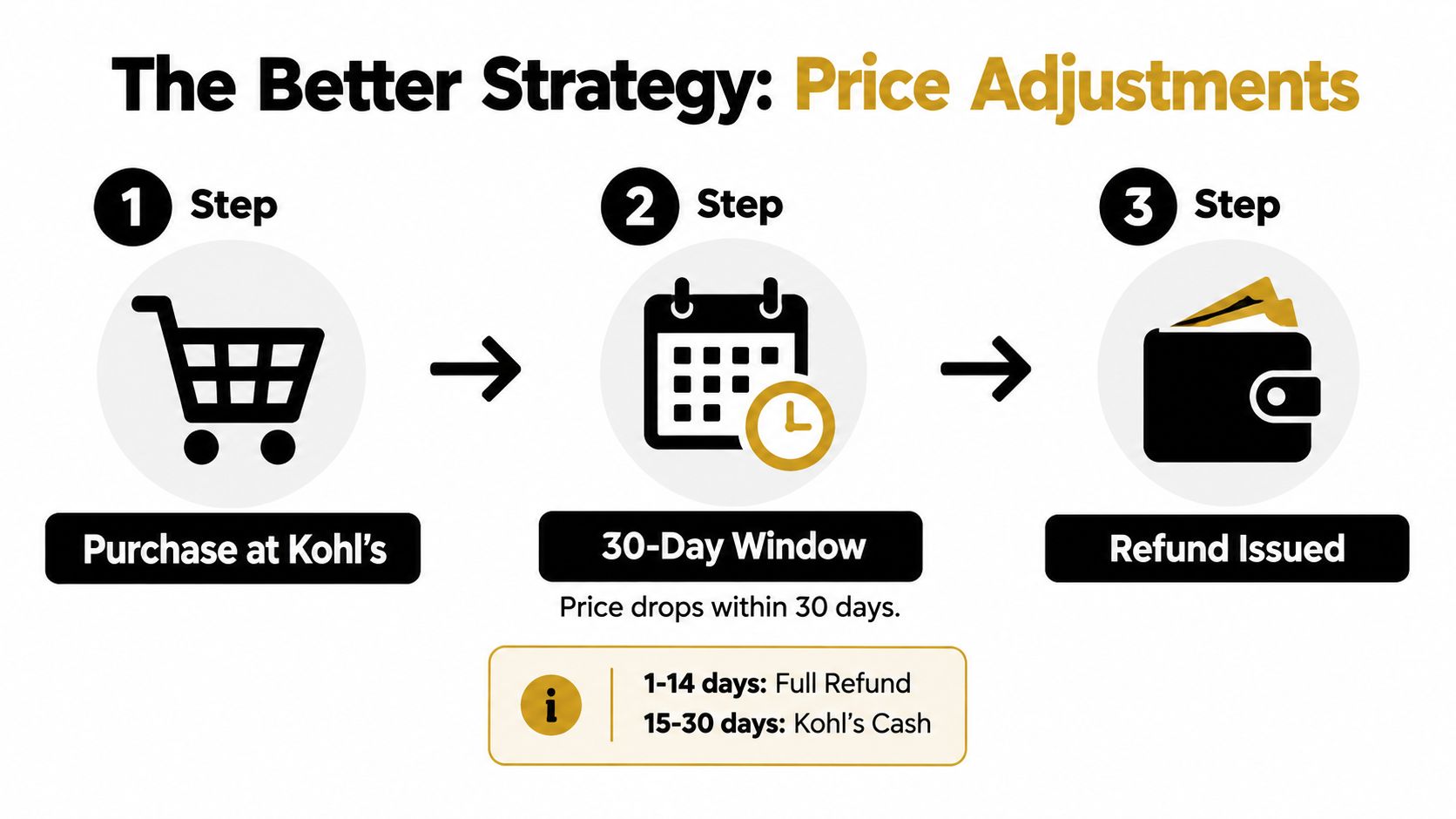
A price adjustment is the route worth checking after a Kohl's purchase. If Kohl's own price falls within 14 days of purchase, Kohl's may refund the difference under its policy, subject to eligibility and exclusions. Retail policy summaries describe this separate adjustment window and note that promotional timing can affect qualification.
That changes the shopping workflow. You don't need to keep arguing that Amazon should count as an eligible competitor. You need to monitor the product page, confirm that Kohl's lowered the price, and contact Kohl's while the adjustment window remains open.
What to check before you ask
Start with the exact item. The product should match the original purchase in the details Kohl's uses for eligibility, rather than merely looking similar. Keep the purchase record, confirm the current Kohl's price, and make sure the lower price is active when you submit the request.
Timing matters. A lower Kohl's price found after the 14-day window won't normally create the same adjustment opportunity. Promotional periods can create another barrier. Independent summaries note exclusions connected with periods such as Thanksgiving week and Black Friday/Cyber Monday, so a lower event price isn't automatically treated like an ordinary price drop.
The strongest claim has three parts:
- Same Kohl's item: Verify that the product identity and relevant specifications match the purchase.
- Current Kohl's price: Capture the lower Kohl's price while it's visible and available.
- Eligible timing: Submit the request within the applicable post-purchase window and check whether a promotion is excluded.
The image's visual timeline includes a longer 30-day concept, but the verified Kohl's rule for the strategy discussed here is 14 days, not a general 30-day adjustment promise. Don't use an infographic or an old guide as a substitute for the retailer's current terms.
If Kohl's approves the request, the retailer refunds the eligible difference according to its process. If the lower price exists only on Amazon, this strategy doesn't apply, because the opportunity comes from a Kohl's price drop, not an outside online listing.
How to Request a Price Adjustment at Kohl's
Act quickly once you notice a lower Kohl's price. Your goal is to give customer service a clean record of the original purchase, the current Kohl's price, and the item's identity without forcing the associate to reconstruct the transaction.
Use this sequence
Find the original purchase record. Locate the receipt for an in-store purchase or the order confirmation for an online order. The original transaction connects the request to the item, purchase date, and amount paid.
Capture the current Kohl's listing. Save the product page or other visible proof showing the lower Kohl's price. Check that the listing describes the same product, not a similar color, size, bundle, or model.
Contact the appropriate support channel. For a store purchase, ask an associate or customer service desk about a price adjustment. For an online order, use Kohl's customer-support route for order assistance and provide the order details.
State the request plainly. Say that Kohl's own price has dropped and that you're requesting an adjustment for the original purchase. Don't frame it as an Amazon match, because that sends the request into the wrong policy category.
Ask about exclusions. If the lower price is tied to a major promotional event, clearance treatment, or another special offer, ask whether that price qualifies before assuming approval.
Keep the result. Save the confirmation, adjustment reference, or updated transaction record. If the refund doesn't appear as expected, you'll have a clear trail for follow-up.
You don't need a complicated argument. A concise request supported by the receipt and current Kohl's price is more useful than a long comparison with Amazon. For broader guidance on organizing refund evidence and deadlines, see how to track a refund.
Who Kohl's Actually Does Price Match
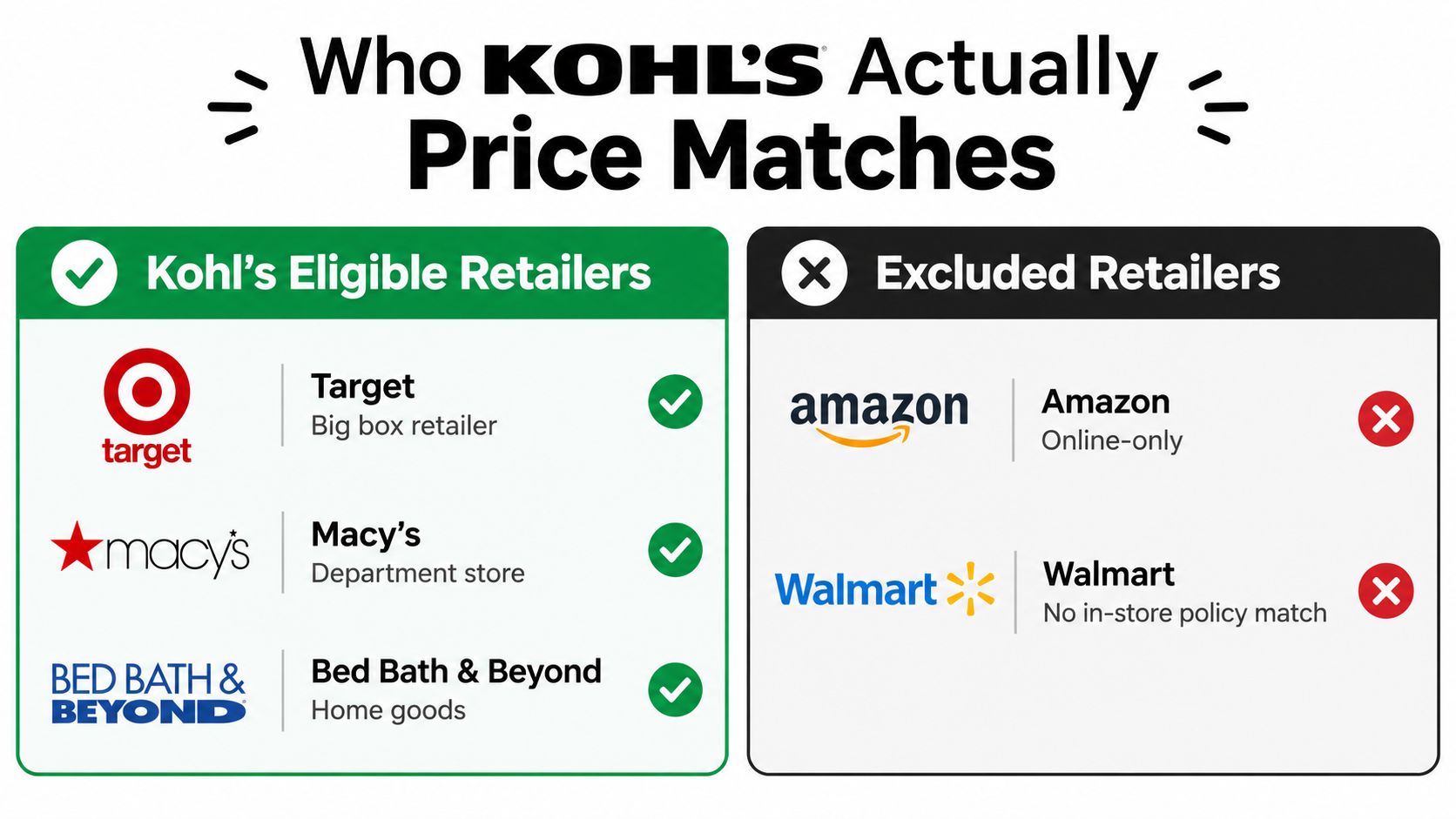
Kohl's matching policy generally fits physical-store competitors, not online-only retailers. Consumer policy guidance describes the operational rule as requiring a competitor with physical stores for most matching scenarios.
That means eligibility depends on more than the retailer's name. The item usually needs to be identical, the competing price needs to be verifiable, and the offer must fit Kohl's conditions. A retailer with stores may still have exclusions for a particular promotion or product category.
| Price source | Usual treatment at Kohl's | What to verify |
|---|---|---|
| Kohl's.com | Often part of Kohl's own pricing process | Confirm the item and current price |
| Physical-store competitor | May qualify under the in-store competitor rule | Verify the store, item, price, and offer |
| Amazon listing | Generally excluded as competitor online pricing | Don't assume a phone screenshot creates eligibility |
| Online-only retailer | Usually outside the core match category | Check Kohl's current policy before purchase |
| Marketplace seller | Requires extra caution | Confirm who sells the item and whether the offer qualifies |
The chart's examples should be treated as retailer types, not a permanent guarantee for every product or promotion. Kohl's policy can depend on the exact offer and the terms in force when you shop. If your goal is to recover money after buying, the retailer's own price adjustment remains the cleaner path when Kohl's later lowers its price.
Automate Savings and Never Miss a Price Drop
The manual method works, but it has an obvious weakness: you have to remember what you bought, revisit the Kohl's price, notice the change, check the deadline, and contact support. Receipts get buried, promotional prices disappear, and a valid adjustment can expire before you look again.
Compass+ is one option for reducing that manual checking. It can monitor connected shopping and financial information for opportunities such as post-purchase price drops and missed refunds, then present a concrete next step. For this topic, that means a Kohl's purchase could be surfaced for review when a lower Kohl's price appears, while an Amazon-only price would still require a different decision because Kohl's generally doesn't match it.
Put the rule into a repeatable routine
Keep receipts and order confirmations in one searchable place. When a notification identifies a possible price drop, verify the product, current Kohl's price, purchase date, and promotional status before contacting the retailer.
You can also use a simple manual reminder for important purchases, especially items bought during a sale. The key is to treat the post-purchase period as an active review window, not as a reason to chase an Amazon match that Kohl's policy doesn't normally support. More broadly, finding money you're owed or wasting starts with connecting the purchase, the deadline, and the action required.
The bottom line is clear. Kohl's generally won't match Amazon's online price, but Kohl's own price drop may support an adjustment within 14 days. Check Kohl's first, act before the window closes, and reserve a return or reorder decision for cases where the competitor price is the only lower offer.
Compass+ monitors connected shopping and financial information for post-purchase price drops, missed refunds, and other recoverable savings opportunities. Visit Compass+ to learn how it can help you identify a Kohl's adjustment opportunity before the deadline passes.