Why Is My Refund Taking So Long? Timelines and Fixes
Why is my refund taking so long? See typical timelines by payment method, where refunds stall, and how to escalate or track them.
16 min read
What if the refund email you're trusting only proves the merchant agreed to pay you, not that anyone sent the money? That's the gap most advice misses, and it's usually why you're asking why is my refund taking so long. A refund isn't one action. It's a chain of handoffs, and approved, submitted, and posted mean three different things.
Once you separate those three statuses, the next question gets easier. You can work out who has your money, what proof to ask for, and whether you're still inside a normal window or chasing a refund that never left the merchant.
Table of Contents
- Typical Refund Timelines by Payment Method
- Your Legal Refund and Dispute Deadlines
- The Stages Behind Every Refund
- Common Reasons Refunds Stall
- Work Out Which Stage Has Stalled
- How Monitoring Catches Refunds You Forget
- Escalate an Overdue Refund Step by Step
Typical Refund Timelines by Payment Method
Start with the window for your payment method. Count from the date the merchant issues the refund, not the day you posted a return or clicked cancel. That one distinction explains many false alarms.
| Payment method | Typical window after merchant issues refund | Usual cause of delay |
|---|---|---|
| Credit card | 2-30 days | Batch submission and issuer posting |
| Debit card | 5-10 business days | Bank posting and holds |
| PayPal | 3-5 business days | Funding source posts after PayPal processes |
| Apple Pay or Google Pay | Same as the underlying card | Card network and issuer posting |
| Bank transfer | 3-5 business days | Bank processing and cutoff times |
| Store credit or gift card | Usually same day | Merchant holds for return inspection |
| Cash or check | 2-4 weeks | Mailing time and check clearing |
How to read the window
The low end is what's possible when every handoff is quick. The top end is your action date. If you're on day six of a card refund, waiting is reasonable. If you've passed the top of the range and there's still no credit, stop waiting and start diagnosing.
Notice that Apple Pay and Google Pay don't have their own timeline. They're wallets sitting on top of a card, so the refund follows that card's network and issuer. If you paid through a platform, the same logic applies, which is why a focused explainer on how quickly Shopify refunds arrive is useful for seeing how a store's release date differs from your bank's posting date.
Practical rule: Don't count from the return date. Ask for the merchant's refund date, then count the window from there.
Store credit feels instant because the merchant controls it directly, with no bank in between. Checks sit at the other extreme because mail and clearing add days nobody can compress. Platform refunds can add their own review step too, as the rules for an Apple refund request show.
If your wait is still inside the window, note the end date and recheck then. If it's past the top, you've got a stalled stage to find.
Your Legal Refund and Dispute Deadlines
Some waits run on a legal clock, and that clock rarely starts when you first ask for your money back. Each deadline works like a stopwatch that starts on a specific event: delivery for cancellations, the statement for billing errors. In the UK, GOV.UK guidance on accepting returns and giving refunds gives you 14 days after delivery to tell the trader you want to cancel most online, mail, and telephone purchases, another 14 days to send the goods back, and the trader 14 days from receiving the returned item to pay you.
Add those steps together and a straightforward cancellation can legally run to 42 days from delivery before the merchant's deadline even arrives. That feels slow, but it isn't automatically a breach.
| Situation | Deadline | Applies to |
|---|---|---|
| Cancel online, mail or phone purchase | 14 days from delivery | UK |
| Send goods back after cancelling | 14 days | UK |
| Trader refunds after receiving goods | 14 days | UK |
| Report credit-card billing error | 60 days from statement showing it | US, CFPB advice |
| Issuer resolves billing error | Two complete billing cycles, no later than 90 days | US |
| Provisional credit for unresolved electronic transfer error | Owed if the investigation can't be finished promptly | US |
When a delay becomes a dispute
A legal deadline only bites once the right clock is running, so pin down where the refund sits. An approval email proves the merchant agreed to refund you. A submission reference proves they sent the credit to their processor. A posting on your statement proves your bank applied it. If the merchant can show approval but no submission, the delay sits with them, so contact the merchant first rather than your bank.
Faulty goods follow a different path because the trader may need to inspect or test the item before agreeing a refund is owed. Refunds should also go back through the original payment method unless you agree otherwise, so don't accept store credit as the default if you didn't choose it.
In the US, the CFPB Regulation Z billing-error rule requires a credit-card issuer to resolve a valid billing-error notice within two complete billing cycles and no later than 90 days, and you should report the error within 60 days of the statement showing the problem. For certain electronic transfer errors, your bank may have to give you provisional credit if it can't finish its investigation promptly.
These dispute rights sit apart from a merchant's goodwill refund. They're also separate from travel-specific rights, such as those covered by flight delay compensation rules, so don't mix the two clocks.
Keep the merchant's written refund promise. It anchors your dates if you later need to open a formal claim.
The Stages Behind Every Refund
Think of a refund like a parcel moving through sorting depots. Each depot scans it, hands it on, and creates its own record. A delay at any depot looks identical from your banking app, which just shows nothing.
The diagram below shows the broad sequence before the detail underneath it.
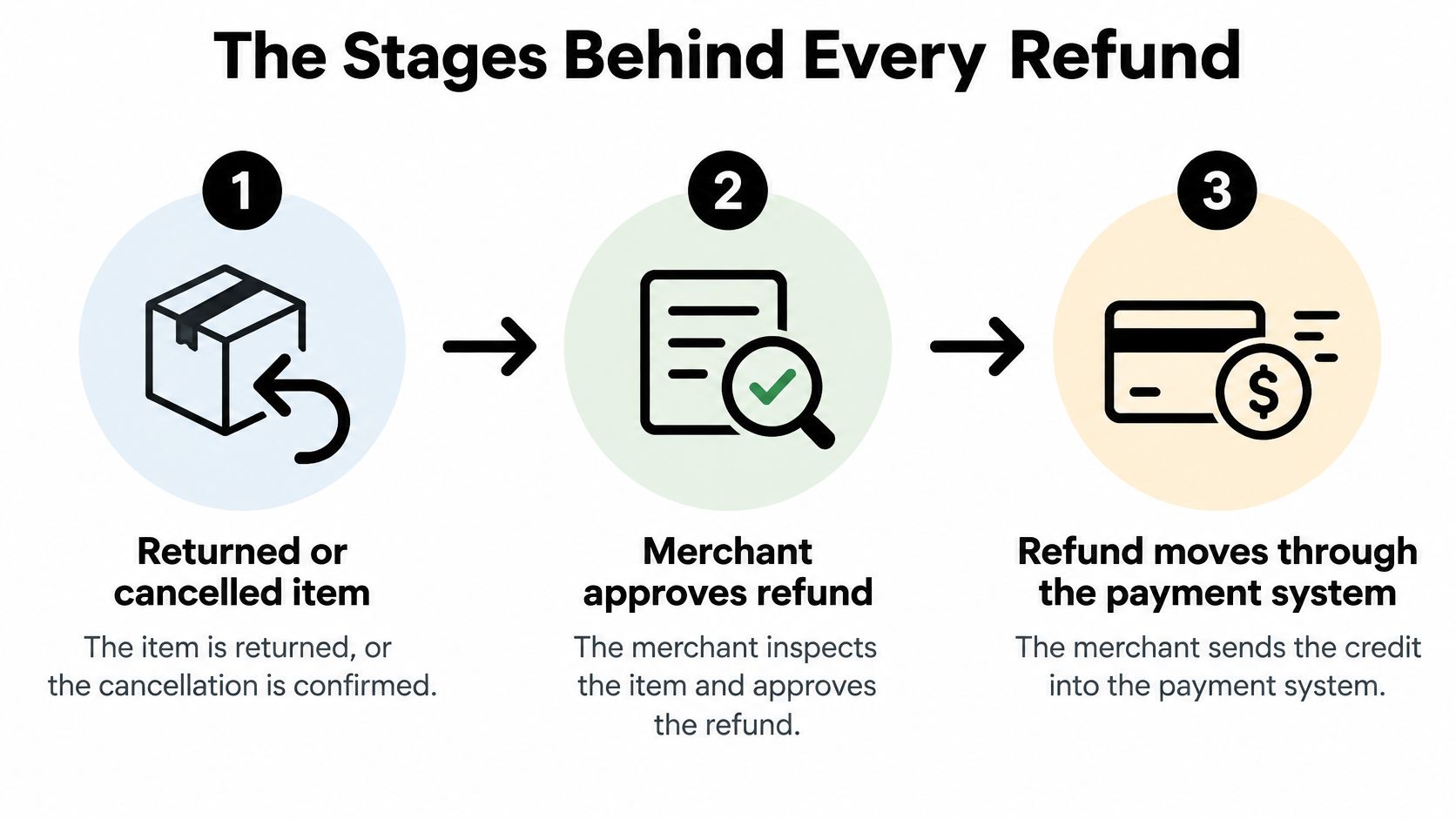
The seven handoffs
- Return or cancellation confirmed: The item is on its way back, or the order is cancelled before dispatch.
- Merchant inspection: Staff check the item's condition and match it to your order.
- Merchant creates the credit: Someone, or an automated rule, enters the refund in the merchant's system.
- Gateway batching: The payment gateway holds the credit with others and sends them together.
- Processor and acquiring bank: The credit moves through the merchant's bank toward the card network.
- Issuer posting: Your card issuer or bank applies the credit to your account.
- Statement display: The credit becomes visible in your balance or monthly statement.
Batching surprises people. Visa Acceptance Solutions refund guidance states refunds generally appear within 2–30 days after the merchant issues them, describes overnight batch settlement and a typical 2–4-day transfer from the acquirer, and notes the issuing bank controls the final posting date.
That means a "refund issued" email confirms step three. It doesn't confirm step six.
A worked example
Say your return arrives on Monday. The warehouse inspects and approves it on Wednesday, the credit is created that afternoon, and the gateway batches it overnight. The processor and acquiring bank move it over the next few days, then your issuer posts it the following week. Nobody failed, yet more than a week passed.
Keep three records as you go: the cancellation or return confirmation, the return tracking number, and the merchant's refund date. Those three items let you place your refund at a specific depot instead of guessing.
Common Reasons Refunds Stall
Most stalls happen in the gap between two stages, not because one person pressed the wrong button. Read the list for the signal that matches your situation, because each signal points to a different fix.
- Return not received or not scanned: Tracking shows delivered but the merchant has no record, or tracking hasn't moved. Fix type, wait for transit, then contact the merchant with tracking proof.
- Inspection or testing under way: The merchant confirms receipt but hasn't approved anything. Fix type, wait, then ask the merchant for an approval date.
- Approved but never submitted: You have a promise email but no refund date or reference. A failed batch or a return closed without a credit is often behind this. Fix type, contact the merchant.
- Card expired, replaced, or closed: The credit targets a card number that's no longer active, so the issuer must route it manually. Fix type, contact the issuer once you have proof of submission.
- Outdated bank details: A transfer goes to an old account number and bounces or sits unmatched. Fix type, contact the merchant to correct details, then your bank.
- Bank hold or pending authorization: A temporary hold from the original purchase hasn't cleared, which can mask or offset the credit. Fix type, contact the bank.
- Partial return confusion: You returned two items, one was refunded, and the second was logged as unclaimed. Fix type, contact the merchant with item-level detail.
- Posted but not on the statement yet: Your available balance moved but the monthly statement hasn't closed. Fix type, wait for the statement cycle.
A missing credit on your statement doesn't always mean missing money. Check the running balance and pending activity before you assume the refund never arrived.
Read the policy you agreed to
Cancellation windows can differ from return windows. A service might allow cancellation up to a start date but offer no refund after it, while physical goods are judged on return and condition. Check the refund policy shown at checkout, plus any confirmation email, before you argue a deadline.
Sale items, personalized goods, and opened software often carry narrower terms. Knowing which rule applies to your purchase stops you quoting the wrong one.
Work Out Which Stage Has Stalled
Use three words precisely. Approved means the merchant agrees you're owed money. Submitted means the merchant sent the credit into the payment system. Posted means your issuer or bank credited your account.
Before you contact anyone, sort the promise into one of those three stages. The checklist below is a quick visual prompt for that separation.
A refund can be approved yet invisible. Experian's guide to credit card refund timing notes that network routing may take days, issuer posting may take additional days, and statement visibility can take up to a billing cycle.
The refund works like a parcel handoff: approval is the label, submission is the carrier scan, and posting is delivery.
The four questions to ask the merchant
Ask in this order, in writing when you can:
- Refund date: On what date did you submit the credit?
- Amount: Exactly how much did you send?
- Original payment method: Which card or account did it go to?
- Reference number: What's the acquirer reference number, often called the ARN?
Each answer turns a vague promise into evidence. The date plus amount shows what should appear. The payment method tells you which statement to watch. The ARN lets your issuer trace the credit through card network routing. Without it, the bank is searching for a payment that may not exist yet, a problem similar to untangling a duplicate charge on a bank statement without transaction detail.
Contact the merchant first when submission has not been proven. If support says approved and cannot give a submission date or ARN, keep the case with the seller. A bank cannot trace a credit that was never sent. Sellers see the same timeline from their side, and a guide to managing Shopify returns and refunds shows how much of it sits with the merchant before a bank ever sees the credit.
This short video walks through the same merchant-first logic before you make any calls.
How Monitoring Catches Refunds You Forget
The manual method fails without warning. A refund confirmation lands in your inbox, you mean to check your statement next week, and then you don't. By the time you remember, you've forgotten the amount, the promised date, and whether anything arrived.
A monitoring service does that comparison for you. It reads the money-related email where refund confirmations arrive and analyzes the bank transactions where the credit lands. Keeping both in view separates the stages a refund passes through: the email shows what the merchant promised, and the bank entry shows what posted. When one record exists without the other, you know which side of the handoff to question.
What a monitoring service actually does
Compass+ is one example. It monitors connected bank, email, and shopping accounts, reads receipts, renewals, and refund confirmations, and surfaces findings that include refunds owed. Every find arrives with its amount and the action to take: cancel it, claim it, or get it back.
Timing matters. New transactions normally appear within about an hour of the bank reporting them, so a posted credit appears among your transactions quickly instead of at month end. Figures are as of the last refresh, which the app shows, and after two days without a refresh the app says so and shows the date your data is from.
A clear limit: Monitoring reports what your connected data shows. Access is read-only: it can view balances and transactions but cannot move money, and it doesn't control what a merchant submitted or when your bank posts.
Check anything you plan to act on against your bank. The gain is earlier detection and a dated record of what was promised, so you stop rebuilding the timeline from memory.
Escalate an Overdue Refund Step by Step
Escalation works only in order, because a refund passes through three different owners before it reaches you. The merchant approves it, the merchant's payment system submits it, and your card issuer posts it to your account. Each stage needs different evidence, so the right move is always to contact whoever currently holds the refund. Skip ahead to a bank dispute before the merchant can prove submission and you will be sent back anyway, several days poorer in time.
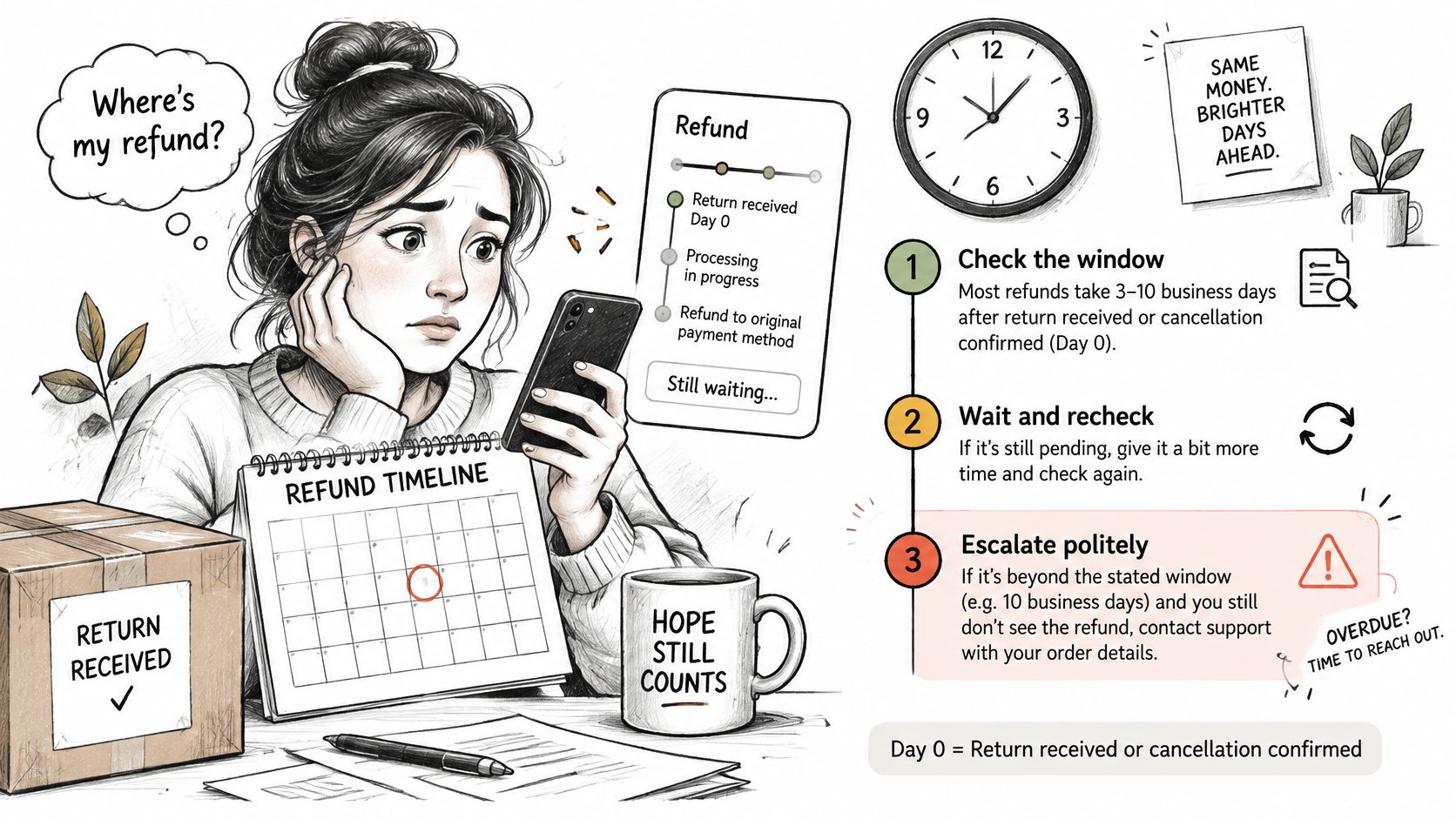
The five steps
- Check the window: Count from the date the merchant issues the refund, then check where you sit in that payment method's range. Inside the window, wait and recheck on the final day. Past the top of the range, continue to step two.
- Write to the merchant: Give the order number and return tracking, then ask for the submission date and reference number. If the merchant cannot prove submission, the refund never left their side, so press for a firm date and hold off on the bank.
- Ask the issuer to trace it: Once you have a reference, hand it to your card issuer or bank along with the refund date and amount, and ask specifically for a trace. A reference number turns a vague complaint into a transaction they can locate in their systems.
- Open a formal claim: If the issuer cannot trace the refund or the merchant will not act, open a billing-error claim and supply your order, cancellation, and confirmation records. Keep a chargeback as the last resort, since a documented resubmission usually resolves faster than a dispute.
- Use the app store route for app purchases: App store purchases refund through the store's own process, using your order ID and reason. On an iPhone, requests go through reportaproblem.apple.com: sign in with your Apple Account, choose the charge, and state the reason. If an app fails to meet an applicable warranty, Apple refunds the price paid when you notify Apple. We cannot issue a refund for a store purchase itself; Apple and Google handle refund requests under their own policies.
| Stalled stage | Who to contact | Evidence to request |
|---|---|---|
| Return not received | Merchant | Tracking proof and delivery date |
| Approved but never submitted | Merchant | Written confirmation of submission date and reference |
| Submitted but not posted | Card issuer or bank | Reference number and refund date |
| Sent but never traced after repeated requests | Card issuer | Formal billing-error or dispute claim with order records |
| App store purchase | App store refund process | Order ID and reason for the request |
If a store declines a refund and you believe the charge is wrong, you can email us with the date and amount and we'll look at it with you. Our support replies to emails within two business days.
Write down today's date, the amount, and any reference number you hold. Then pick the single step that matches your stage and do that one today.
If you're tired of digging through inboxes to check whether promised refunds ever posted, Compass+ can monitor your linked bank, email, and shopping accounts, match refund confirmations to actual credits, and flag the ones that stall with the amount and next step attached. Visit us to join the waitlist and let the tracking happen in the background instead of in your head.