Subscription Cancellation App: Which Is Best for You
Compare subscription cancellation apps on features, privacy, and refunds. Find the right tool for your budget and learn how Compass+ fits in.
18 min read
The FTC received nearly 70 daily complaints in 2024 about subscriptions that were difficult to cancel, compared with approximately 42 per day in 2021, so a subscription cancellation app can solve a genuine consumer problem. The right choice depends on whether you need one-time cancellation automation or ongoing oversight of renewals, price changes, refunds, and low-use services.
That distinction matters because a free trial converting before they notice, a renewal date passing, a merchant billing after cancellation, or a price increasing without warning, they lose money. A cancellation app may help with one of those moments. A broader subscription-management assistant can watch for several of them continuously.
The practical question isn't just, “Which app can cancel subscriptions?” It's which tool can identify the right subscription, recommend the right action, and prove that the financial result did happen.
Table of Contents
- Why Subscription Cancellation Is a Workflow Problem
- Comparing Cancellation Apps and Subscription Management Assistants
- What Actually Matters When Choosing a Tool
- When to Use Each Subscription Cancellation Approach
- How to Choose and Use a Subscription Cancellation App Safely
- How Compass+ Complements Subscription Cancellation Apps
- Which Subscription Strategy Fits Your Goals
Why Subscription Cancellation Is a Workflow Problem
A subscription cancellation isn't a single click. It's a deadline-sensitive workflow that starts when a recurring charge is detected and ends only when future billing stops.
The first step is identification. A bank statement may show a merchant descriptor and a repeated debit, but it might not reveal the exact plan, signup channel, trial terms, or next renewal date. An email receipt may provide those missing details. A calendar entry may preserve the deadline that prevents an unwanted conversion. Each source answers a different part of the question.
The FTC's final Negative Option Rule covered automatically renewing subscriptions, continuity plans, and free-trial-to-paid conversions. Its requirements included clear recurring-payment disclosures, express informed consent, and a simple cancellation mechanism that stops recurring charges. The rule also supports a product model that records the merchant, billing cadence, next charge date, cancellation deadline, signup channel, cancellation method, and evidence of completion. The FTC's announcement provides the relevant regulatory context and requirements in its final click-to-cancel rule announcement.
The three failure points
A cancellation tool can fail before, during, or after the cancellation action.
- Detection failure: The app misses a recurring debit, merges two plans incorrectly, or labels an installment payment as a subscription.
- Action failure: It finds an outdated cancellation page, reaches the wrong account, or stops at instructions without completing the merchant's required steps.
- Verification failure: It doesn't capture a confirmation email or account-state change, and it never checks whether the next transaction disappears.
The complaint trend makes the consumer impact clear. The FTC reported nearly 70 complaints per day in 2024, up from approximately 42 per day in 2021, an increase of about 67%. The rule was later vacated by the Eighth Circuit Court of Appeals in July 2025 on procedural grounds, but the complaint data still shows why cancellation friction deserves more than a casual feature comparison. These figures are summarized with the relevant regulatory timeline in subscription cancellation statistics from Apprupt.
Practical rule: Treat “cancellation instructions provided” and “cancellation confirmed” as two different statuses.
That distinction also changes how you audit your own finances. Before choosing a tool, use a cross-account process to find all your subscriptions, then check whether the app can identify renewal dates and evidence of completion. If you're evaluating the customer side of recurring revenue, Mara's guidance on how businesses can save churning customers is useful context because it highlights the tension between retention efforts and a consumer's need for a clear exit.
A simple cancellation helper works well when you already know the merchant and want help navigating its website. It becomes inadequate when you don't know what you have, when several household members share accounts, or when the money problem involves a refund, price increase, pause, downgrade, or missed deadline.
Comparing Cancellation Apps and Subscription Management Assistants
The market has two overlapping but distinct categories.
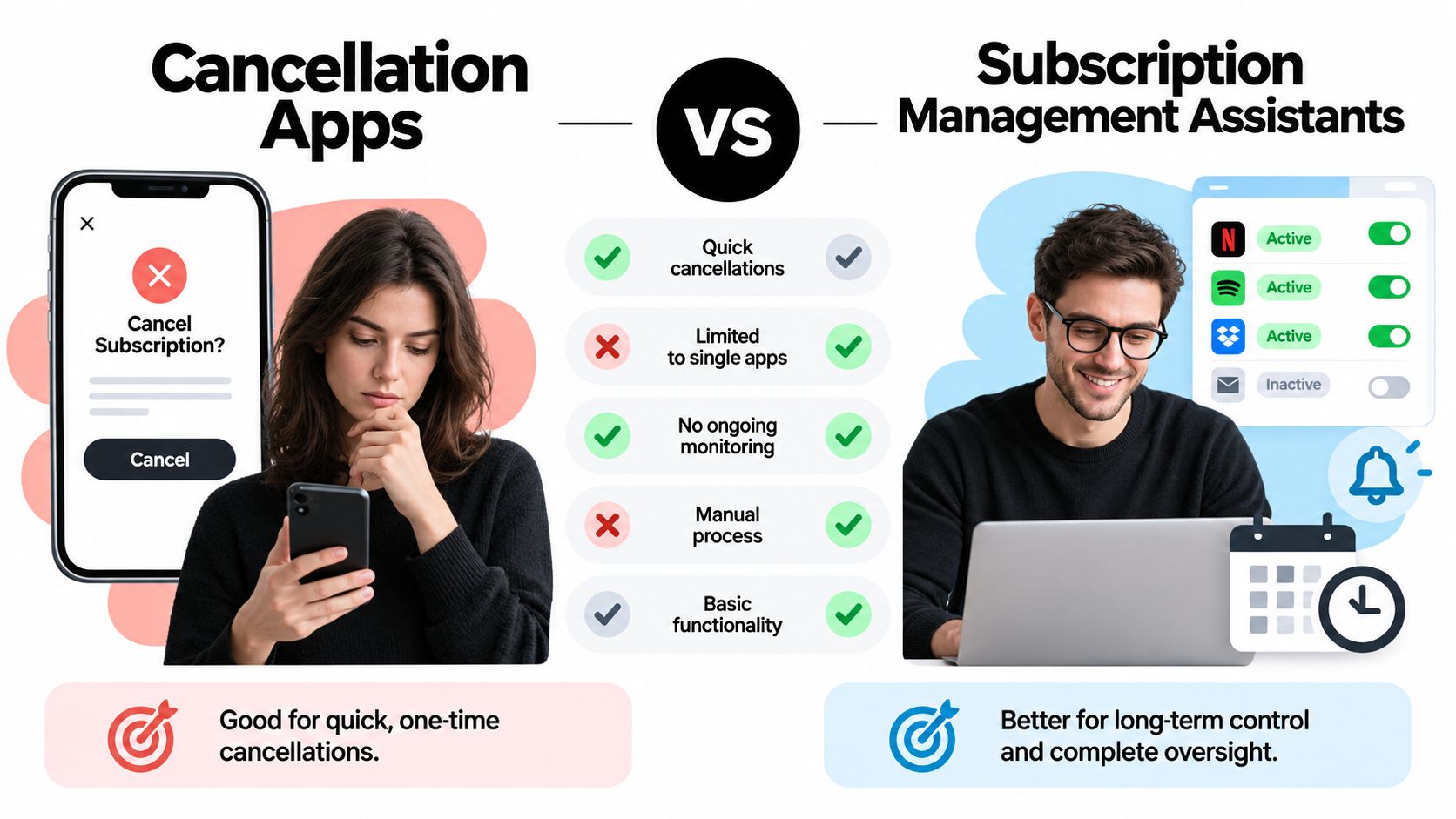
A standalone cancellation app focuses on the exit. It may search for a merchant's cancellation path, provide instructions, automate browser steps, contact support, or request a refund. These tools are useful when the user knows which service should end and wants to reduce the time spent navigating an inconsistent account journey.
A subscription-management assistant starts earlier and continues longer. It monitors recurring charges, renewal dates, forgotten trials, bill increases, and sometimes related refunds or post-purchase savings. Its main job isn't just to press the final button. It's to identify a financial decision before the next charge and give the user enough context to decide whether cancellation is the best move.
Cancellation Apps vs Subscription Management Assistants
| Capability | Cancellation App | Management Assistant |
|---|---|---|
| Primary job | Find and complete an exit path | Monitor subscriptions and recommend actions |
| Best starting point | A known merchant you want to cancel | An incomplete or changing picture of recurring spending |
| Detection | Often based on user input or selected accounts | Combines transactions with receipts, renewals, and calendar context |
| Automation | May guide or automate cancellation steps | Usually surfaces the next step, with automation varying by product |
| Refund support | Sometimes requests or tracks refunds | Can flag refund opportunities alongside subscription decisions |
| Renewal protection | May handle the selected cancellation | Watches upcoming deadlines across multiple services |
| Privacy trade-off | May need account or browser access | May need financial, email, or calendar access, often with narrower permissions |
| Verification | Depends on confirmation capture | Can reconcile later transactions if it monitors bank activity |
The categories overlap. Some cancellation apps detect recurring charges, and some management assistants link users to a merchant's cancellation page. The meaningful difference is scope. A cancellation-focused product is action-led. A management assistant is monitoring-led.
Detection accuracy also differs by access model. A tool looking only at bank data can find periodic charges but may not know whether a payment is for a streaming plan, a family tier, an annual renewal, or a temporary installment. Email parsing can identify the plan and renewal terms, but it introduces a different privacy decision. Calendar access can preserve a deadline, although it won't prove that billing stopped.
Refund support is another dividing line. A cancellation app may help you ask for money back after an unwanted renewal. A management assistant may flag the renewal, locate the relevant receipt, and connect it to a refund or credit action before the user contacts the merchant. For a product-level comparison, readers can also review Compass+ versus Rocket Money without assuming that the two products serve exactly the same primary job.
What Actually Matters When Choosing a Tool
Feature lists hide the risks that matter most. A polished interface doesn't compensate for missed renewals, false subscription labels, incomplete cancellation flows, or a lack of evidence when a merchant bills again.
Start with detection, not the cancel button
The tool should distinguish recurring charges from one-time payments, installment plans, transfers, and household purchases. It should tolerate variable billing dates and changing amounts instead of looking only for identical debits on a fixed schedule.
A sound detection pipeline normalizes merchant names, groups charges by account and cadence, and evaluates signals such as interval, amount stability, descriptor similarity, and renewal-email evidence. It should also preserve provenance. The amount might come from a bank transaction, while the next renewal date might come from an email. Those fields shouldn't appear equally certain if they came from different sources.
A 2023 U.S. consumer survey cited by the Subscription Creep Index found average actual subscription spending of $273 per month, compared with $237 in 2018, an increase of roughly 15%. It also found that 89% of consumers underestimated total subscription spending, 66% underestimated it by more than $200, 48% had been charged after forgetting to cancel a free trial, and 42% were still paying for a subscription they had forgotten entirely. The same research reported that 67% experienced at least one subscription price increase during the preceding year. These figures appear in the Subscription Creep Index report.
That evidence favors continuous monitoring over an occasional manual review. If people don't know the combined total, they may not know which plan is creating the problem either.
Check the access model carefully
Read-only bank connectivity is useful for finding charges, but it doesn't automatically reveal cancellation links or trial conditions. Email access can fill that gap by parsing receipts, renewal notices, and refund confirmations. Calendar access can protect return and renewal deadlines.
The trade-off is data scope. Ask whether the tool stores banking credentials, whether financial access is read-only, which email categories it can inspect, and whether each connection can be revoked independently. A narrow permission model is easier to understand and easier to trust than broad access with vague explanations.
Measure outcomes, not automation theater
“Automated cancellation” can mean several different things. It might open the right page, submit a request, send an email, or complete the entire merchant workflow. Before relying on the claim, ask what evidence the product saves.
- Confirmation evidence: Does it capture a confirmation page, email, ticket number, or account-state change?
- Billing follow-up: Does it check the next transaction feed for continued charges?
- Refund handling: Does it distinguish a refund request from a refund received?
- Decision support: Does it compare cancelling with pausing, downgrading, or keeping the service until the current period ends?
- Error visibility: Does it tell you when confidence is low instead of presenting an uncertain match as fact?
The FTC rule's recordkeeping requirements, including records of affirmative consent for at least three years, also reinforce the value of durable subscription histories and user-action logs. Product teams should measure precision and recall separately for recurring-charge detection, trial conversion prediction, deadline extraction, and post-cancellation billing suppression. A single accuracy score can hide an expensive missed renewal or a false positive that incorrectly labels an installment payment as a subscription. The technical implications are discussed in this analysis of the FTC rule and subscription systems.
The best cancellation tool isn't the one that clicks fastest. It's the one that leaves you with a defensible record of what changed.
When to Use Each Subscription Cancellation Approach
The right approach depends on whether the problem is a known service, an unknown charge, or a deadline approaching before the next renewal.
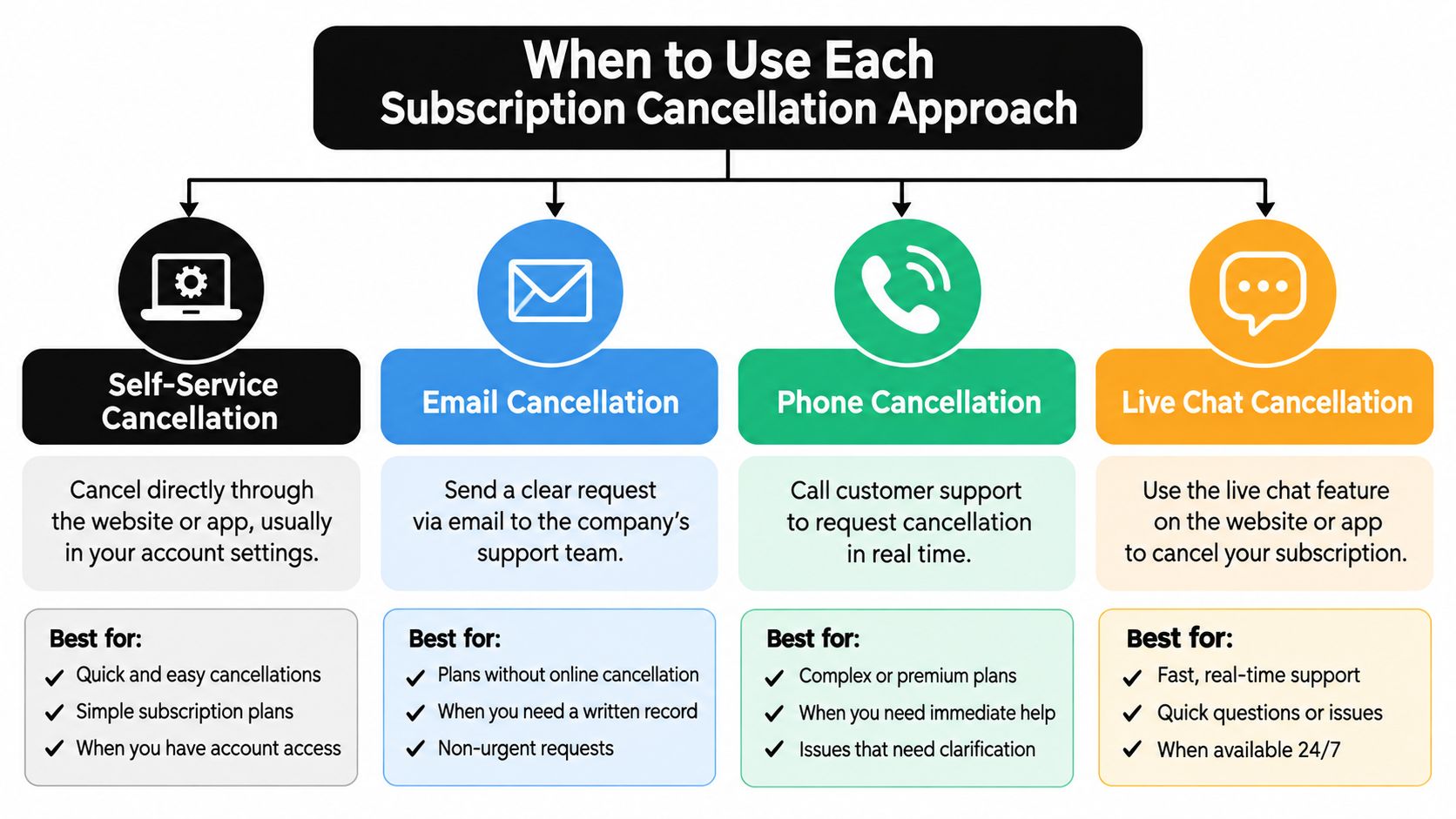
A user who knows exactly what should go can usually use a cancellation app. They subscribed through the merchant's website, still know the account email, and have already decided to leave. The app can locate account settings, clarify whether cancellation stops future renewal or ends access immediately, and help save the confirmation.
A household with several unfamiliar services has a different problem. A free trial may convert soon, one bill may have increased, and no one may have a complete subscription list. A standalone cancellation tool starts too late because the user has not yet decided which services deserve attention. A subscription-management assistant can first assemble the evidence, flag deadlines, and identify price changes. Compass+ can complement either approach by keeping the broader review connected to the cancellation decision.
Four practical situations
A known, unwanted subscription is the simplest case. Use a cancellation app when the decision is clear and the main obstacle is a confusing merchant journey.
A missed refund needs a separate response. Cancelling may stop future billing, but it does not necessarily recover an earlier charge. The tool should retain the receipt, identify the charge date, and help the user request or track the refund separately. A management assistant may add value by connecting the charge to the relevant account and transaction history.
Quiet bill creep calls for monitoring. The Subscription Creep Index reported that 67% of consumers experienced at least one subscription price increase during the preceding year, so a tool that only watches for new merchants can miss an existing plan becoming more expensive. Review the Subscription Creep Index research when assessing this risk.
Renewal pressure is deadline-sensitive. Someone may want to keep a service through the current period while avoiding another charge. The appropriate assistant should show the next renewal date, the cancellation deadline, and whether cancelling now changes access.
Best Tool Fit by User Situation
| Situation | Best Approach |
|---|---|
| You know the exact service and want to end it | Cancellation app |
| You need help with a merchant website or support process | Cancellation app |
| You do not know all recurring services in the household | Management assistant |
| A free trial or renewal deadline is approaching | Management assistant with deadline alerts |
| A price increased and you want to assess alternatives | Management assistant |
| You were charged after cancelling | Either tool, with confirmation and transaction follow-up |
| You want a refund rather than immediate cancellation | A tool with refund support |
| You use a seasonal service worth keeping temporarily | Management assistant with pause and downgrade context |
Affordability can change the choice. A 2025 Mastercard survey reported that 33% of consumers expected to cancel a subscription within six months. Among U.S. consumers who gave a reason, 42% cited affordability, while 54% identified price increases as the primary cause of rising subscription spend. The findings appear in this Mastercard subscription economy report. Cancellation is not automatically the cheapest answer. Pausing, downgrading, renegotiating, or changing the billing cadence may preserve useful benefits at a lower cost.
The cancellation path also affects trust. A 2025 academic scoping review identified 44 dark-pattern types across 10 categories in subscription cancellation flows and reported lower trust and usability when users encountered heavily manipulative designs. The findings are summarized in this review of dark patterns in subscription cancellation. A good tool should document the path and pause before an irreversible action.
The video below shows the practical methods a user may encounter when trying to cancel.
How to Choose and Use a Subscription Cancellation App Safely
Use a cancellation tool as an assistant, not as a substitute for financial judgment. The safest process begins with a small audit and expands only after the product proves that it can identify and verify changes accurately.
Build a baseline
Start by listing the services you already recognize. Check bank transactions, receipt emails, app-store subscriptions, and shared household accounts. Record the merchant, plan, billing cadence, next charge date, expected amount, and whether you want to cancel, pause, downgrade, or keep the service.
Then compare that list with what the app detects. Look for omissions and false positives. A legitimate tool should let you inspect why it classified a charge as recurring rather than forcing you to accept an unexplained label.
Grant the narrowest useful access
Read the permission screen before connecting anything. If the product needs bank access to detect recurring charges, confirm that the connection is read-only. If it parses email, check whether the scope is limited to receipts, renewals, and refund confirmations rather than general correspondence. Calendar and shopping connections should be optional when they aren't relevant to your goal.
Don't connect every account on the first day. Test the workflow with a service you understand, then review the findings and revoke access if the results or controls aren't clear.
Verify the action
Before cancelling, check the practical consequences:
- Access end date: Will you retain the service until the paid period ends?
- Refund eligibility: Does cancellation affect a refund or prorated-credit request?
- Termination fees: Could ending early create a charge?
- Confirmation record: Will the merchant provide an email, page, or ticket?
- Next transaction: Can you check the account after the expected billing date?
A tool should distinguish future-renewal cancellation from immediate termination, refund requests, and account deletion. Those actions have different financial consequences.
For merchant-specific instructions, a focused Stripe subscription cancellation guide from Suby can help clarify the difference between a cancellation request and the merchant's actual billing behavior. Use such guidance as a reference, then rely on the merchant's confirmation and your transaction history as the final evidence.
The safest operating loop is simple: detect, decide, act, capture proof, and reconcile. If another charge appears, preserve the original confirmation and contact the merchant promptly. When the dispute involves an unauthorized renewal or a merchant that ignores a completed cancellation, those records are more useful than a screenshot of an app's recommendation.
A broader walkthrough of the user-side process is available in this guide on how to cancel subscriptions. The important principle is to avoid over-automation when the service is seasonal, shared, difficult to replace, or subject to a refund condition.
How Compass+ Complements Subscription Cancellation Apps
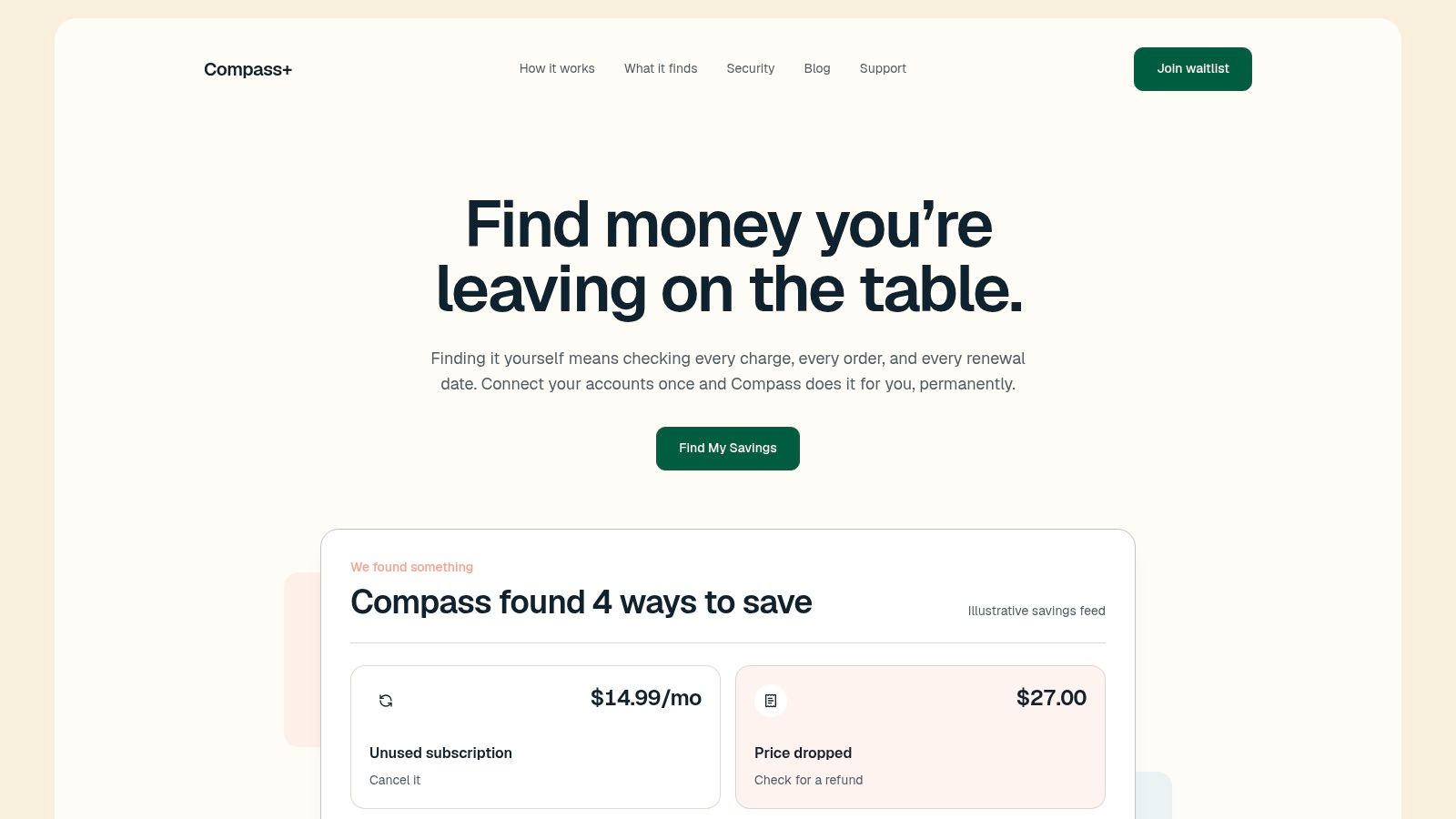
Compass+ fits best as a monitoring and savings layer around cancellation tools, not as a cancellation-only replacement. It connects to financial, email, calendar, and shopping data to surface low-use subscriptions, upcoming renewals, duplicate or increased charges, missed refunds, post-purchase price drops, and delivery credits.
Its bank connection uses read-only Plaid access, so it can view balances and transactions without moving money, and banking passwords aren't stored by Compass+. Email parsing is limited to money-relevant messages such as receipts, renewals, and refund confirmations. Users can opt into connections individually and revoke them separately.
Where the extra context helps
A cancellation app may tell you how to end a known service. Compass+ can first identify the recurring charge, connect it to a receipt or renewal message, check the calendar for the deadline, and present cancellation as one possible next step. It can also surface an estimated amount, which makes the decision more concrete.
That context matters when cancellation isn't the obvious answer. If a household still uses a service occasionally, the better action might be a pause or downgrade. If a plan has just increased, the user may want to compare the revised cost with the benefit before ending it. If a merchant promised a refund, the right action may be a follow-up request rather than cancellation.
The same cross-account approach extends beyond subscriptions. Order tracking can identify a price drop after purchase or a delivery that missed a stated guarantee. Those findings belong in the same savings workflow because the user still needs an explanation, an estimated value, and a specific next action.
What it doesn't replace
Compass+ doesn't eliminate the need to verify a merchant's cancellation. A recommendation isn't proof that the merchant accepted the request. Users should still follow the cancellation path, save the confirmation, and check the next transaction feed.
It also isn't a reason to grant unlimited access. The useful setup is the narrowest combination of bank, email, calendar, and shopping connections that supports the user's goal. Someone investigating recurring charges may begin with read-only bank data and add renewal emails only when the extra context is necessary.
The product is currently available through a waitlist as a standalone experience and is also available as an embedded assistant inside Gerald for users in the United States. Its practical role in this category is to reduce manual monitoring and turn scattered account signals into decisions such as cancel, request a refund, claim a credit, or review a price change.
Which Subscription Strategy Fits Your Goals
Choose a cancellation app when you know the merchant and need help completing one exit. Choose a management assistant when the bigger problem is subscription sprawl, forgotten trials, renewal deadlines, price changes, or missed refunds. In either case, use this checklist: confirm the cancellation, protect refund eligibility, save evidence, and monitor the next billing event. If the service is seasonal or shared, compare pausing and downgrading before ending it permanently.
Compass+ monitors linked financial, email, calendar, and shopping accounts to surface low-use subscriptions, renewal deadlines, refunds, price drops, and other savings opportunities with a concrete next step. Visit Compass+ to join the waitlist or explore how its monitoring approach can complement a subscription cancellation app.