Personal Finance Account Types and How to Organize Them
Learn what a personal finance account is, compare checking, savings, credit and investment accounts, and organize them for budgeting and monitoring.
15 min read
Your paycheck has arrived, but part of it already belongs to rent, the card bill, and a subscription you meant to cancel. Meanwhile, a refund you were promised still hasn't appeared, and your savings balance looks available even though it's meant for emergencies.
The problem may not be a lack of accounts. It may be that their jobs aren't clear. A useful personal finance account setup separates money by purpose, then uses transaction records and monitoring to catch problems while you can still act on them.
Table of Contents
- Personal Finance Account Types at a Glance
- What a Personal Finance Account Really Is
- Matching Each Account to a Money Job
- How to Organize Accounts for Budgeting
- Automating Account Monitoring Without Losing Control
- Tracking Price Changes, Refunds and Claim Deadlines
- Set Up Your Account Map This Week
Personal Finance Account Types at a Glance
A personal finance account is any account that holds, moves, or helps grow your own money. Most households use several together, with each serving a different purpose.
Personal finance account types by job, money flow and risk
| Account type | Main job | How money moves | Main risk |
|---|---|---|---|
| Checking account | Pay bills, receive paychecks, cover daily spending | Paycheck deposits, debit card purchases, transfers, and bill pay | Overdraft fees and a weak savings buffer |
| Savings account | Hold an emergency fund and money for short-term goals | Deposits and transfers in and out of linked accounts | Easy access can tempt withdrawals |
| Credit card account | Make purchases, provide short-term payment float, and help build credit history | Purchases charged against a credit line, followed by repayments | Interest on carried balances |
| Investment (brokerage) account | Hold investments for long-term goals such as retirement or wealth building | Transfers in, purchases and sales of holdings, and withdrawals | Market value can fall below what was invested |
| Digital or mobile-money wallet | Make payments, transfer money, and sometimes save, including where bank access is limited | Funds loaded, received, held, spent, or transferred through an app or mobile provider | Provider-specific transaction limits, withdrawal conditions, and access rules |
Choose by purpose, not by the app
For many people, checking and savings are the starting pair: one supports everyday commitments, while the other separates money intended for later. Credit cards and investment accounts add specific capabilities, but neither replaces accessible money for bills and unexpected expenses.
The interface can be misleading. An app might display a spending balance, a credit limit, and an investment balance together, but those amounts aren't interchangeable. A credit limit is borrowing capacity, not money you own, and an investment balance may change before you need to withdraw it.
Likewise, a wallet that looks like a bank account may operate under different rules. Before relying on it for essential payments, check how withdrawals work, what happens if access is interrupted, and which protections apply.
Practical rule: Choose the account for the job first. Compare convenience, fees, and features second.
Fees, withdrawal conditions, consumer protections, and account rules differ by institution and country. Check your own provider's terms rather than assuming that a familiar account name guarantees familiar treatment.
List your accounts under the rows in the table. If you can't place one confidently, write down what you use it for, not what the provider calls it.
What a Personal Finance Account Really Is
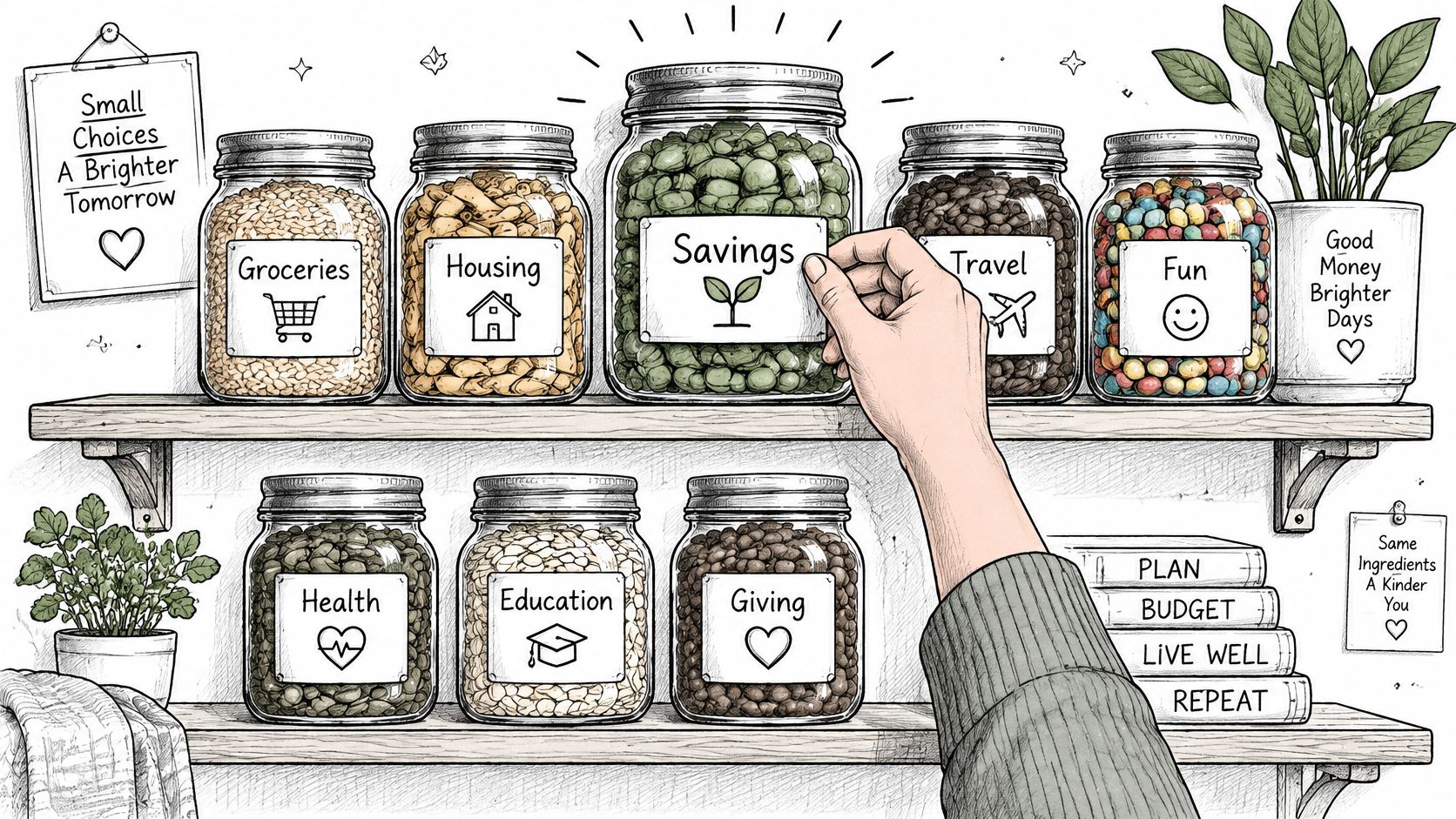
Think of your accounts as labeled containers in a kitchen. The containers hold ingredients, but the labels tell you whether you're reaching for dinner supplies or something reserved for a special occasion.
The same idea applies to money: the label should explain the purpose before you use the contents.
Holding, moving, and recording value
Accounts perform some combination of three functions: holding value, moving value, and recording what happened. Say you receive pay, transfer money toward a goal, and purchase groceries. Your account records connect those events, showing what arrived, what left, and what remains.
The World Bank's Global Findex 2021 found that 76% of adults globally held an account at a bank, credit union, microfinance institution, or mobile-money provider, while ownership in developing economies rose from 42% in 2011 to 71% in 2021.
That definition reaches beyond traditional bank branches. Regulated digital and mobile-money accounts also belong in the picture, although their permissions and protections need individual checking.
For another way to approach the topic, the video below offers a companion viewing option.
The records matter as much as the balance
A balance tells you where you stand at a moment. Transaction histories, statements, recurring charges, and payment descriptions help explain how you got there. Budgeting tools and monitoring systems work from those records, so incomplete or stale records can produce an incomplete picture.
Run a simple inventory:
- List every login: Include accounts you rarely open.
- Mark its functions: Note whether it holds, moves, or records money.
- Flag forgotten accounts: Check their balances, permissions, and recent activity.
A login that does none of those things probably isn't a financial account itself. It may still hold useful supporting evidence, such as a shopping receipt or refund confirmation.
Matching Each Account to a Money Job
Give each account a primary job, even if it supports related tasks. This doesn't mean opening a separate account for every expense. It means being able to explain why an account exists and what money belongs there.
A bills account, for example, can cover rent, utilities, and everyday purchases without becoming a storage place for long-term emergency reserves. The distinction is purpose, not the number of accounts.
A household example
Say a household receives a monthly paycheck. It arrives in checking, where the household reserves enough for bills, planned spending, and upcoming card repayments. A fixed payday transfer moves money toward an emergency-fund goal.
The credit card handles purchases already included in the spending plan. The household pays the statement balance in full rather than treating the credit limit as extra income. Once the household has established its chosen cash buffer, it considers what money can remain invested for longer-term goals.
This is an illustrative sequence, not a universal recommendation. Existing debt, employer retirement benefits, income stability, and other circumstances can change the priorities.
The reason to make the buffer explicit is practical: in the Federal Reserve's 2023 household survey, 63% of U.S. adults said they could cover a hypothetical $400 emergency expense using cash, savings, or a credit card paid off at the next statement, while 13% said they couldn't pay it by any method.
Money needed for an emergency should be available when the emergency happens, not dependent on selling an investment at a favorable price.
Common wrong-job mistakes
Use the account map to catch these mismatches:
- Shared charges without an owner: Assign someone to review each household subscription and handle changes. Shared access doesn't automatically create shared responsibility.
- Free trials treated as future problems: Record the end date when you sign up, along with the cancellation route and confirmation requirements.
- Savings treated as spending money: Rename the account for its goal and move it away from the everyday spending view if your app allows it.
- Minimum payments treated as the plan: Where affordable, pay the statement balance. If you already carry debt, build a repayment plan rather than relying on a payment setting alone.
- Forgotten accounts left running: Check for balances, fees, pending payments, and linked deposits before closing or consolidating them.
Some mismatches are visible in ordinary activity. Repeatedly paying routine bills from savings suggests that the spending plan or account funding needs attention. Keeping emergency money entirely in a brokerage account suggests that immediate access and market risk haven't been separated.
Look for those patterns without blaming yourself. An account's job can become unclear after a move, a change in income, or a new household arrangement. Rename the role and adjust the flow.
How to Organize Accounts for Budgeting
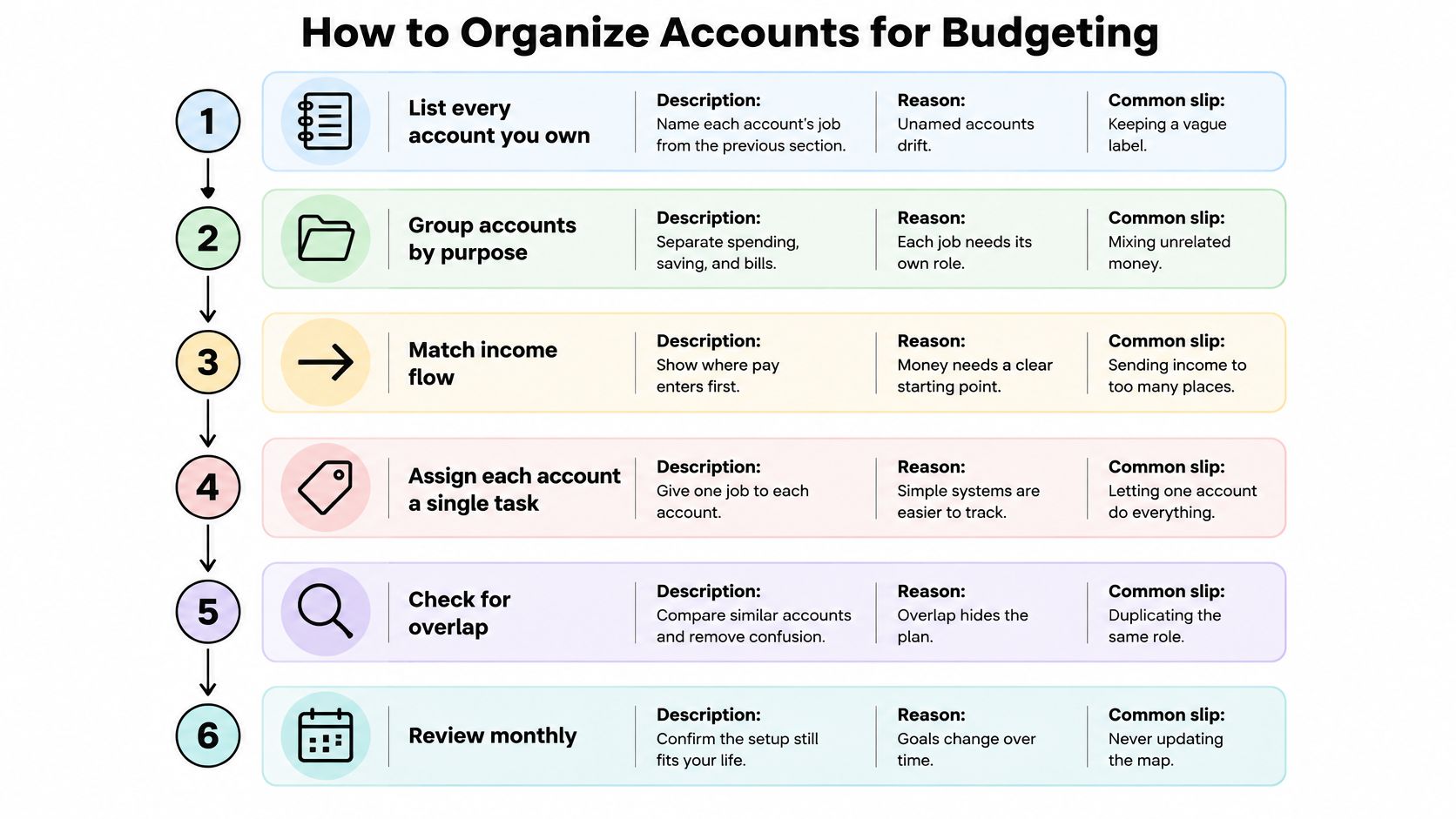
An account map should show where income arrives, where commitments are paid, and where reserved money goes. A spreadsheet, a notebook, or a secure budgeting app can do the job. Don't put passwords or full account credentials in the map.
Use this visual as a guide to organizing the roles.
Build the flow
List every account and name its job. Record the provider, an identifying nickname, and its purpose. Avoid vague labels such as extra account, which don't explain when to use it.
Designate the main bills account. Route income there if that suits your setup, and reserve money for scheduled commitments before treating the remainder as spendable. Splitting pay across accounts can work, but document the split so you don't lose sight of total income.
Schedule a savings transfer after payday. Choose an amount that fits both the goal and the bills due before your next pay. The common slip is either saving only leftovers or automating more than the account can safely support.
Give card spending a defined boundary. Link purchases to a budget category and arrange full statement payment where affordable. If you're carrying balances, Toya AI debt payoff planning offers a related resource for organizing repayment rather than treating debt as ordinary monthly spending.
Review linked accounts monthly. Compare actual spending with the plan and investigate unfamiliar entries. Don't count transfers between your own accounts as new income or new spending.
Remove accounts without a useful role. Redirect deposits and payments, resolve pending activity, and download needed statements before closing anything. Keeping an account solely to avoid paperwork leaves another place to monitor.
Check timing as well as totals
A monthly budget can balance while the bills account runs short between paydays. Put deposit dates and payment dates on the same calendar, and use this guide to avoiding overdrafts through bill timing to examine gaps.
Timing check: Before moving money out, look at what must clear before the next deposit, not just today's displayed balance.
After the setup has run through a pay-and-bill cycle, check whether every account has a clear purpose and whether reserved money stayed reserved. Aim for a review that's easy to repeat, not an elaborate system you'll avoid opening.
Automating Account Monitoring Without Losing Control
Monthly totals can look reasonable while individual charges deserve attention. A renewal may arrive under a changed merchant description, a bill may increase, or an apparent duplicate may need checking against pending and posted transactions.
A useful monitoring system groups related transactions, estimates billing intervals, and compares new amounts with earlier charges. Its alerts should help you distinguish an expected payment from something worth investigating.
Start with permissions
The Consumer Financial Protection Bureau's data-aggregation principles and stakeholder insights identify read-only access and tokenization as controls that can limit credential exposure and the consequences of unauthorized access. Read-only access permits viewing balances and transactions without permission to initiate transfers; tokenized access avoids relying on stored, reusable banking passwords.
Before connecting, make these checks:
- Access rights: Confirm whether the connection is read-only. A spending review shouldn't require permission to move money.
- Data categories: Identify what the service collects and why. Receipt access shouldn't become access to unrelated correspondence.
- Retention: Find out how long imported information remains, including after disconnection.
- Revocation: Confirm how to stop future access to an individual source without unnecessarily disabling everything else.
Read-only doesn't mean risk-free. Transaction histories can reveal sensitive habits, relationships, and locations, so narrow access still matters.
Treat alerts as leads to verify
Compass+ is one example: we connect to bank and card accounts, read transaction history, and identify recurring charges, subscriptions, upcoming renewals, and price increases. Our access is read-only, and we can't move money, make payments, close accounts, or cancel subscriptions with merchants.
Only connect financial accounts you own or are authorized to access. For shared household finances, agree who may view each source and who will handle an alert before connecting it.
You can also use a manual subscription-finding routine to check services paid through other accounts or app stores.
For our service, disconnection stops the connection, but transactions already imported remain until you delete the account. That distinction matters: stopping future collection and deleting existing records are separate actions.
Always check anything you intend to act on against your bank. A similar-looking charge isn't automatically a duplicate, and a monitoring finding is information to investigate, not financial advice.
Tracking Price Changes, Refunds and Claim Deadlines
An alert becomes useful when it tells you what to check, what evidence to gather, and when to act. A price drop alone doesn't establish a refund entitlement, just as a delayed delivery doesn't automatically qualify for a credit.
For subscriptions, the Federal Trade Commission's consumer guidance explains arrangements in which billing continues automatically unless the consumer takes action to stop it. That makes renewal terms, cancellation records, and confirmation messages important evidence, not just inbox clutter.
Keep a small claims queue
Save the terms at purchase. Record the return window, any price-adjustment policy, and applicable delivery promises. When a merchant later promises a refund, add the expected completion date to the same record.
Compare an increased charge with the agreement. Check the original order, sign-up price, renewal notice, and any change you approved. Separate a disclosed promotion ending from an unexplained increase.
Match promises to completed credits. A refund email isn't the same as money returned. Compare the merchant's confirmation with posted account activity and its stated processing period.
Contact the merchant with a concise record. Include the transaction date, amount, order identifier, and the promise or policy involved. State the remedy you're requesting and retain copies of the exchange.
Use the issuer's dispute process when appropriate. If the merchant doesn't resolve the issue, check the card issuer's requirements and submission window. Don't assume a merchant conversation pauses that deadline.
Make deadlines visible
Use calendar reminders alongside the evidence folder. For a possible post-purchase adjustment, check the exclusions and eligibility conditions in the merchant's policy; this guide to price-adjustment policies explains what to look for.
Save the evidence when the promise is made. Don't rely on finding the right email after the deadline approaches.
Mark a claim resolved only when the expected credit appears or the merchant gives a final answer you've reviewed. Confirm every remedy's terms with the merchant or issuer, because return rights, voluntary adjustments, and payment disputes are different processes.
Set Up Your Account Map This Week
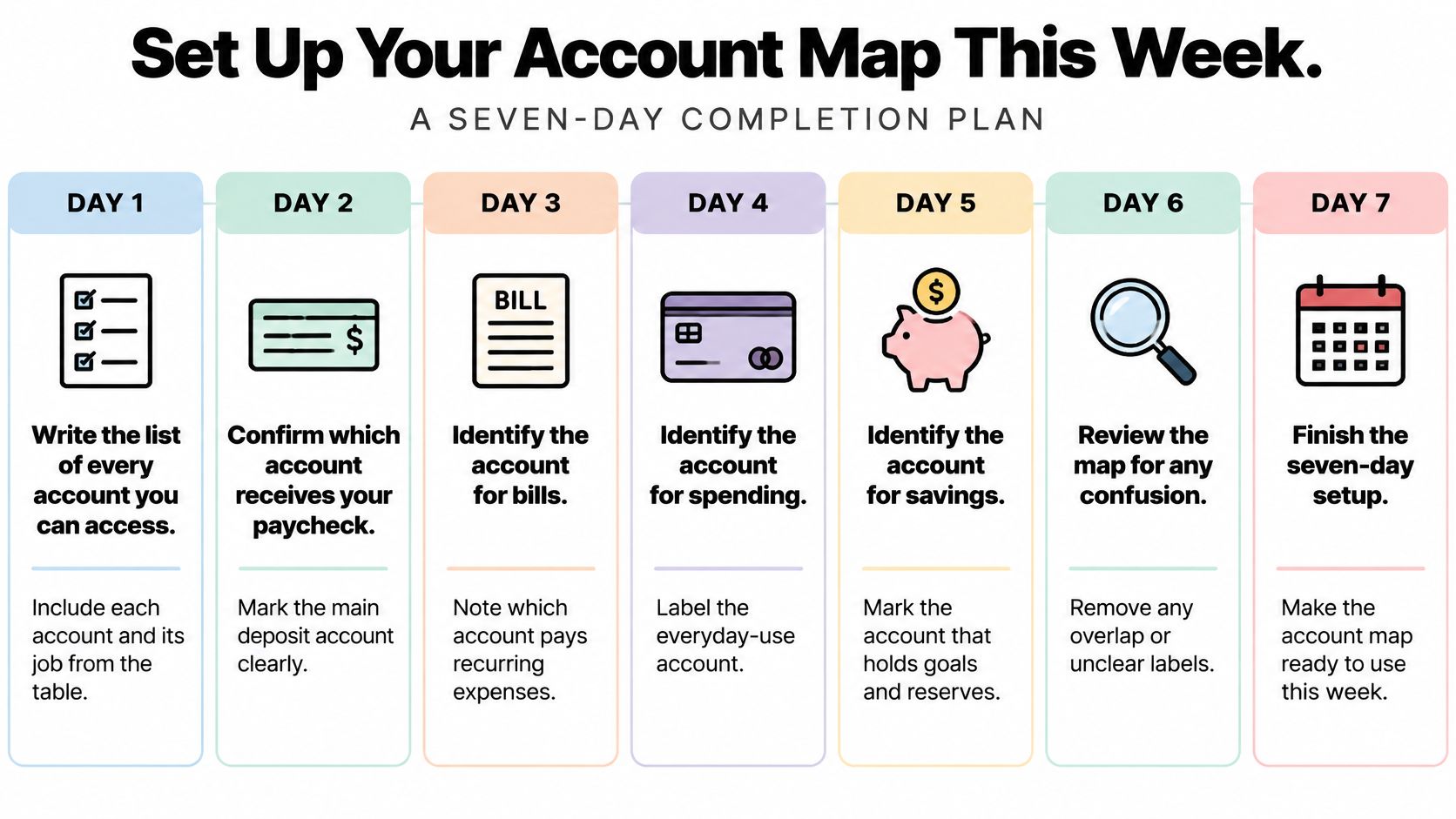
You don't need to redesign your finances in a sitting. Start with a usable map, then correct unclear roles and missing information as you work through it.
Use this checklist to spread the work across the week.
Complete the essentials
- Write the account list. Include every account you can access and assign its primary job.
- Trace income and bills. Mark where your paycheck arrives and which account pays recurring commitments.
- Set a realistic savings transfer. Match it to your emergency-fund goal and payment calendar.
- Check card repayment. Confirm whether the statement balance is being paid in full, and flag any carried balance for a separate repayment decision.
- Review repeating charges. Mark unfamiliar entries and assign someone to investigate shared subscriptions.
- Choose your monitoring approach. If connecting a tool, review access scope, retention, and revocation before authorizing it.
- Book the monthly review. Put the appointment in your calendar and keep the account map somewhere you can find it.
Know what still needs your judgment
A monitoring tool watches the arrangement you've created and flags activity that may need action. It doesn't decide which household expenses matter, establish whether you qualify for a refund, or replace your responsibility to check a transaction before challenging it.
Keep unresolved items separate from ordinary spending. A short list containing the merchant, evidence, next action, and deadline is more useful than leaving the same suspicious charge highlighted indefinitely.
This information is general education, not financial, tax, legal, or investment advice. Our service provides information about your own data, and decisions that depend on your circumstances should be confirmed with your institution or a qualified adviser.
Before the next bill date, open your account list and name each account's job. Start with the account you use most, then work outward until no balance is left without a purpose.
Compass+ reads connected bank and card transaction histories to surface recurring charges, renewals, and price increases worth investigating. Visit Compass+ to explore how monitoring can support your account map and help turn overlooked activity into a clear next action.