Money Monitoring App: What It Finds and How to Choose
Learn how a money monitoring app finds refunds, duplicate charges and forgotten renewals, and which privacy safeguards to check before connecting accounts.
18 min read
The Federal Trade Commission returned approximately $337.3 million to consumers in 2024 through refunds resulting from law-enforcement actions. That figure covers formal FTC programs, not every reimbursement merchants owe. Still, it reframes a familiar money problem: sometimes improving your finances means recovering money you've already spent, not just cutting your next purchase.
A money monitoring app looks for those opportunities in connected account records. The useful question isn't whether it can spot an unusual charge. It's whether it can explain the finding, show the evidence, and help you take an action worth your time, without requesting more access than it needs.
Table of Contents
- What a Money Monitoring App Looks For in Your Accounts
- Privacy Safeguards to Check Before You Connect
- How Connected Accounts Feed the Findings
- How Duplicate and Recurring Charges Get Flagged
- Ranking Refunds and Credits by Net Recovery
- Subscription Renewals and What You Can Demand
- Test the Free Window Against the Monthly Cost
What a Money Monitoring App Looks For in Your Accounts
Ignoring recurring spending means accepting each new bill without checking what changed. The U.S. Bureau of Labor Statistics reported average annual expenditures of $78,535 for all consumer units in 2024, equivalent to approximately $6,545 per month. That's a broad spending measure, not a subscription total, but it shows why reviewing only occasional shopping purchases leaves much of your financial life unchecked.
A monitor reads records you could inspect yourself, then compares transactions across time. It can identify a repeating merchant, notice a higher bill, or locate a refund confirmation that doesn't appear to match a posted credit. What it can find depends on which records you've connected.
Match the finding to the evidence
Money signals a monitoring app detects
| Finding | Data it reads | Example | Next step |
|---|---|---|---|
| Recurring charge | Bank and card transactions | A streaming charge repeats monthly | Keep, downgrade, or cancel with the merchant |
| Duplicate charge | Bank and card transactions | Matching purchases appear at the same merchant | Check for a real second purchase, then request a reversal |
| Price increase | Recurring transaction history | A phone bill rises without an obvious plan change | Compare your plan terms and ask for the old rate |
| Refund owed | Confirmation emails | A promised refund hasn't appeared by the merchant's stated deadline | Confirm the posting date, then contact the merchant |
| Late-delivery credit | Order and delivery status | An order arrives after the promised date | Claim a credit if the merchant's policy allows it |
| Post-purchase price drop | Shopping order tracking | An item's price falls after checkout | Request an adjustment if the merchant allows it |
| Renewal or trial conversion | Calendar entries and receipts | A free trial approaches its conversion date | Cancel or confirm before renewal |
These are signals to investigate, not automatic proof that someone owes you money. A larger phone bill might reflect usage, and a cheaper item might be excluded from price adjustments. Good alerts explain those uncertainties instead of presenting every possibility as savings.
Detection helps only when the finding ends with a clear, justified action.
At Compass+, we read the transaction history of connected bank and card accounts, find recurring charges and subscriptions, and estimate income and spending. We also show findings such as upcoming renewals and price increases, with chat available for questions about your own data.
Judge the output by its usefulness, not the length of its opportunity list. You should be able to identify what happened, the amount involved, and the next action without reconstructing the analysis yourself.
Privacy Safeguards to Check Before You Connect
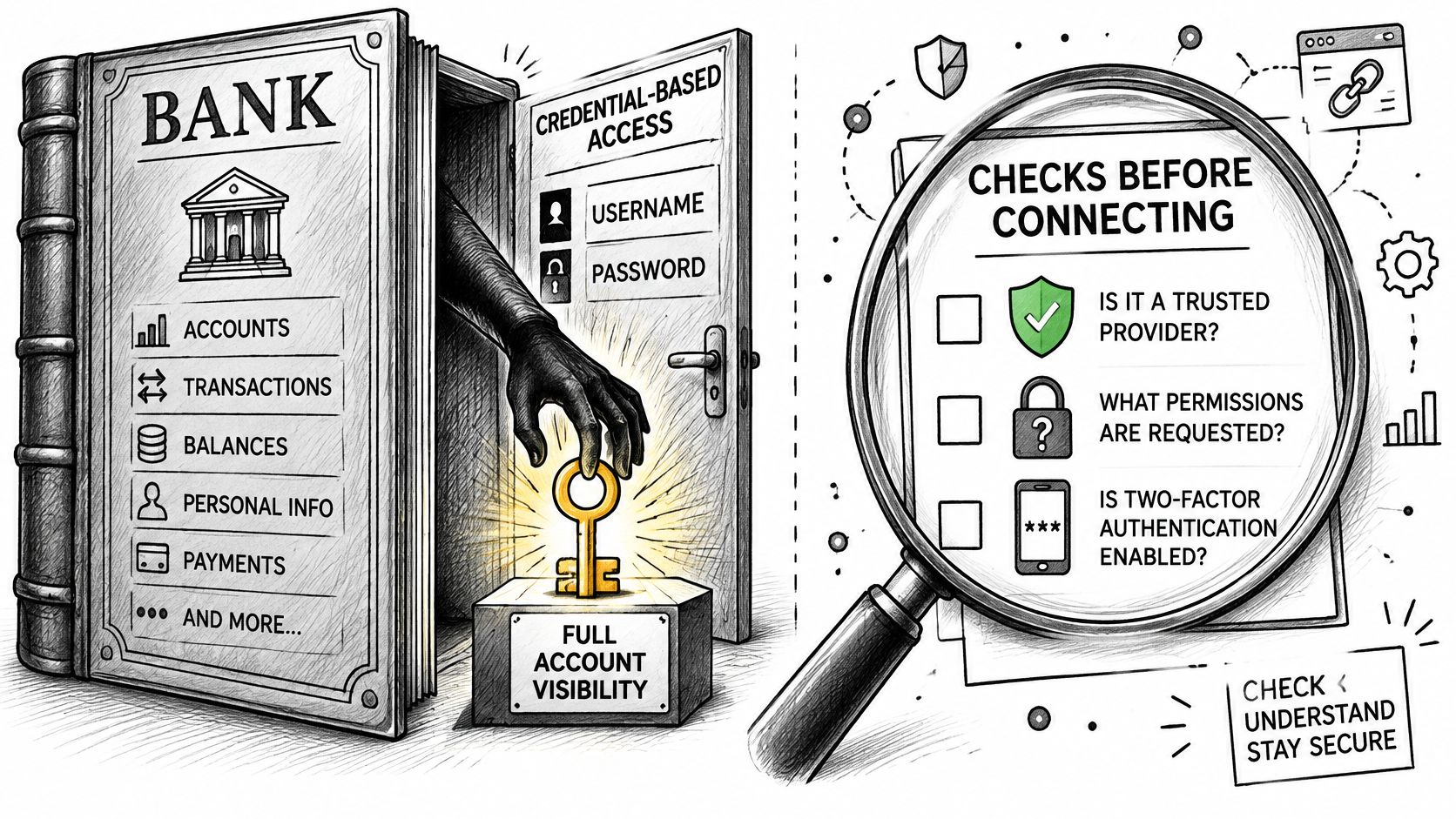
Handing an app your bank password isn't the same as granting it limited permission to retrieve transactions. A Consumer Financial Protection Bureau symposium statement describes API connections using tokenized authentication, with financial institutions retaining control of authentication. That distinction matters because permission can be narrower than everything a banking login makes accessible.
Use the illustration as a reminder to examine the connection method before accepting an authorization screen.
Access methods compared
| Access method | What it can see | Who controls access | What to check |
|---|---|---|---|
| Stored bank login, credential-based | Everything the login exposes | The app holds the password in this arrangement | Avoid stored credentials; prefer tokenized access |
| Tokenized bank link, API | Balances and transactions within the permission | The bank can revoke the token | Confirm read-only scope and revocation |
| Receipt-only email parsing | Receipts, renewals, and refund confirmations | User authorizes the inbox connection | Check whether general mail is technically excluded or merely ignored |
| Full inbox access | All messages, including unrelated correspondence | User authorizes a broad scope | Usually more access than the task needs |
| Shopping order tracking | Order, price, and delivery status | User links each store | Check linked stores and retained history |
Check scope, storage, and removal
- Read-only permission: Confirm the app can't initiate transfers or payments.
- Separate connections: Choose accounts and optional data sources individually.
- Protected storage: Look for encryption of tokens and cached financial data.
- Visible activity: Check the connection list, access records, and last successful refresh.
- Clear deletion controls: Distinguish stopping future imports from deleting information already imported.
Receipt-focused processing doesn't necessarily mean an email provider grants receipt-only permission. Read the actual authorization screen as well as the app's description.
This video accompanies the bank-access checks.
Our financial access is read-only. We don't store banking passwords, never see your payment card, and can't move money, make payments, open or close accounts, or cancel subscriptions with merchants. Only connect financial accounts you own or are authorized to access.
To remove a bank, open Connections, choose the bank, and tap Remove. New data stops immediately, but previously imported transactions remain until you delete your account.
The connection decision should be straightforward: if you can't identify what's connected, how long information stays, and how to revoke access, don't connect.
How Connected Accounts Feed the Findings
A useful finding starts with a traceable chain from an account record to a recommendation. Understanding that chain helps you spot missing information and avoid treating an incomplete account picture as a complete financial assessment.
Follow the records from connection to action
Connect the relevant financial accounts. Our bank-link process uses Plaid, which supports connections to U.S. banks and cards. The connection flow asks for checking, savings, and credit card accounts, but your practical starting point should be the accounts carrying the spending you want reviewed.
Check the refresh timestamp. The app imports transaction history and balances. Our figures are current as of the last refresh, which we show, rather than a guarantee of your bank's position at the moment you read them.
Add optional context deliberately. Email, calendar, and shopping connections can supply refund promises, renewal dates, and delivery information. Treat each as a separate opt-in decision, not an obligatory setup step.
Match related records. A subscription might appear as a merchant charge, a receipt, and a calendar reminder. The monitor should connect these records without counting the same obligation repeatedly.
Turn matches into prioritized findings. A recommendation should attach the relevant records, explain the amount, identify any deadline, and name the action. Missing evidence should remain visible rather than being filled in with assumptions.
Let background checks handle repetition. Our monitoring continues in the background after setup. You don't need to rerun the same searches manually, although consequential decisions still need your review.
Choose monitoring rather than unnecessary complexity
Personal monitoring and business bookkeeping solve different problems. If you also need employee reimbursements, business expense categorization, or accounting workflows, Allied Tax Advisors' guide can help you find the right expense tracking app for that separate job. Our service is for personal, non-commercial money management.
Start with bank and card history, then add another source only when it answers a specific question. Transaction history can support recurring-charge, duplicate-charge, and price-change checks without opening your inbox.
A narrower setup also makes mistakes easier to diagnose. If a refund check lacks the merchant's confirmation, for example, you can add the relevant evidence rather than assuming the bank record alone proves a missed payment.
How Duplicate and Recurring Charges Get Flagged
Matching amounts don't prove duplicate billing. You might buy the same item again, pay an installment, or see a temporary authorization next to the completed transaction. Spotting two identical amounts is the easy part. The key test is whether the app backs its alert with enough evidence for you to confirm the problem before you act.
Look for several matching signals
One shared field means little on its own. Several fields agreeing means something, the same way a signature match carries more weight when the date and handwriting agree too. A careful monitor first normalizes merchant descriptions and timestamps, then compares the amount, currency, account, authorization date, posting date, merchant category, and recurring cadence.
| Pattern | Appropriate treatment |
|---|---|
| Same merchant and amount, with overlapping transaction timing | Investigate as a possible duplicate |
| Similar amount but a different account or purchase context | Label for review rather than confirmation |
| Pending authorization followed by its settlement | Suppress as an expected pair when the records support that match |
| A scheduled subscription or installment | Recognize the payment schedule before flagging it |
| Card and digital-wallet representations of one purchase | Reconcile the underlying transaction |
Say you order groceries and see matching entries for the merchant. One remains pending while the other has posted, and the transaction references indicate authorization and settlement for the same purchase. A careful system should suppress the pair as an expected payment sequence, not tell you to dispute both entries.
If separate completed charges remain, the alert should show the original transaction identifiers and matching evidence. A confidence label explains uncertainty, and a correction option lets you mark legitimate purchases so the same mistake doesn't keep generating notifications. Because the monitor is read-only, it cannot move money, make payments, or dispute the charge for you. Its job ends at handing you the evidence and naming the next step, which you take with your bank or the merchant.
Separate repeating bills from repeated mistakes
Recurring-charge monitoring asks a different question: is this expected payment still useful, and has its cost changed? A renewal that rises in price deserves attention even though every charge was authorized. Our Recurring screen lists every repeating charge with its monthly cost, while Home shows what was found and what to do about it.
For a practical investigation, use our guide to a duplicate charge on a bank statement. Before acting on a flagged transaction, compare it with your bank's records, including its pending or posted status.
A duplicate payment is also different from duplicated debt reporting. If your concern is the same debt listed twice by collectors, Superior Credit Repair's guide addresses that separate credit-report issue. Don't use a bank-charge dispute process to solve a reporting problem.
Ranking Refunds and Credits by Net Recovery
Net recovery matters more than the headline amount. Subtract unavoidable costs, then consider eligibility, effort, and the chance of receiving the money.
A promised refund, a possible delivery credit, and a promotional benefit aren't equally certain. The first may already be approved, while the others may require you to establish eligibility under merchant terms.
In Stord's 2025 mystery-shopping report, 74% of brands refunded the item price but excluded original shipping and required customers to pay return shipping, typically costing $5–$10. That finding illustrates why the purchase price alone can overstate what you'll get back.
Compare the recoverable amount
Recovery opportunities by net value
| Opportunity | Gross amount | Costs that cut the net | Evidence to keep |
|---|---|---|---|
| Promised refund on a returned item | Eligible item price | Excluded original shipping and required return postage | Order confirmation and return receipt |
| Late-delivery credit | Credit allowed under the order's policy | Partial coverage or restrictions on using the credit | Promised and actual delivery dates |
| Post-purchase price drop | Eligible price difference | Adjustment exclusions, or restocking costs if returning instead | Price history and original receipt |
| Duplicate charge | Amount of the erroneous extra charge | No recovery if it was a legitimate additional purchase | Both transaction IDs and the statement |
| Unclaimed promotional credit | Credit stated in the promotion | Claim deadline set by the promotional terms | Promotional terms and claim confirmation |
For a returned item, establish what the merchant agreed to refund before judging whether a credit is short. For delivery compensation, check whether the promise was a delivery guarantee or merely an estimate.
A price adjustment may avoid returning an item, but only if the policy permits it. A duplicate-charge claim needs evidence of erroneous billing, while a promotional credit may have redemption restrictions that make it less valuable than cash.
The illustration below uses hypothetical amounts and effort estimates, not measured recoveries or guaranteed benefits.
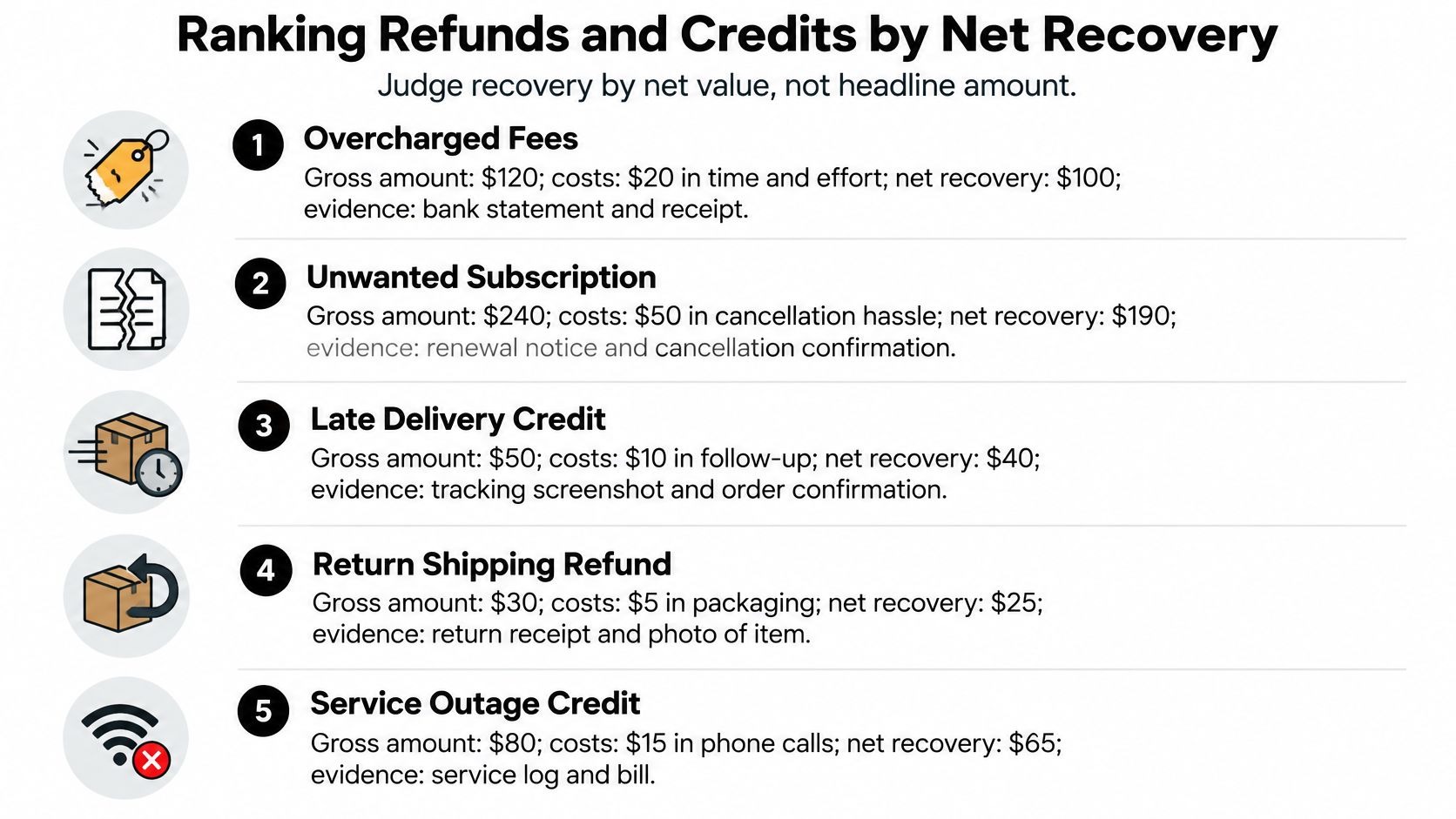
Prioritize certainty and effort together
An approved refund supported by a return receipt can deserve attention before a larger but speculative compensation request. An approaching deadline can change that order, especially when the claim takes little effort.
Keep cash costs separate from your personal estimate of time and inconvenience. Both matter to your decision, but an estimated hassle cost isn't money the merchant deducts.
Our broader approach is to find money across subscriptions, refunds, charges, renewals, and other opportunities. For missing promised credits, our guide on how to track a refund helps organize the follow-up.
Batch minor opportunities where possible rather than responding to every notification immediately. Before pursuing any claim, answer: What was promised? What will be deducted? What's the last day to act?
Subscription Renewals and What You Can Demand
A renewal alert works like a smoke detector. It warns you something needs attention; putting out the fire is still your job. The alert does not cancel a contract or create a refund right. What it gives you is time to examine the agreement while the evidence is still easy to reach.
Access limits matter here. Compass+ is read-only: it can surface an upcoming renewal, but it cannot cancel the subscription with the merchant or move money for you. The finding is the starting point, and the verified action is yours.
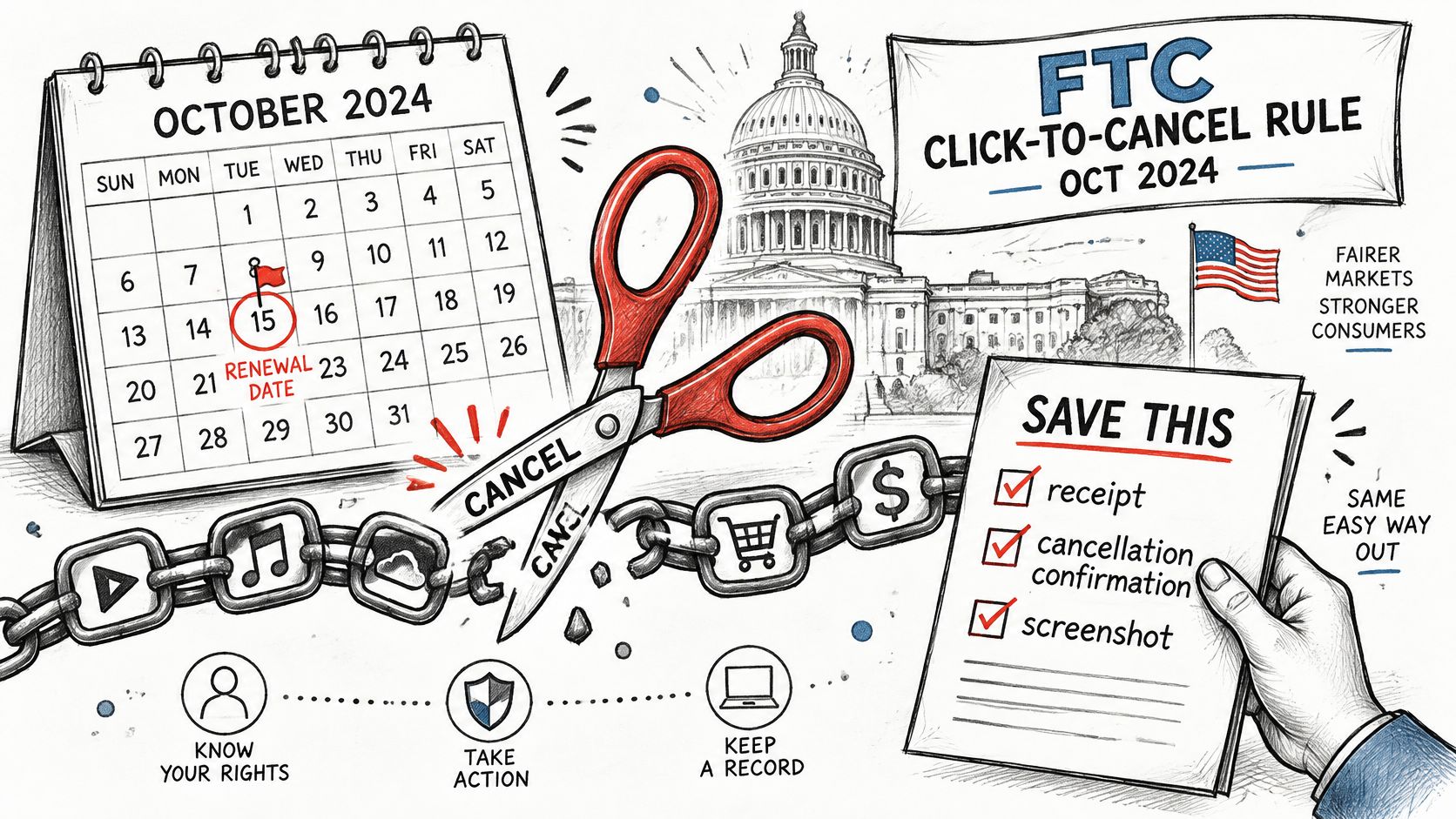
The FTC's Negative Option Rule materials describe the October 2024 Click-to-Cancel rule, which would have required cancellation to be as easy as enrollment, clearer disclosures, and express consent before converting a free service to paid. A federal court later set that rule aside on procedural grounds, so do not treat it as a universal cancellation entitlement. Older federal negative-option requirements and state protections still apply, and your actual rights depend on the agreement and the rules where you live.
The illustration depicts the easier-cancellation concept, not proof that the rule currently governs your subscription.
Preserve the agreement and your actions
- Save the merchant's terms. Capture the cancellation method, renewal conditions, and refund policy that apply to your plan.
- Save renewal notices with their dates and timestamps. Keep the original message, not a cropped image that omits the sender.
- Record authorization. Preserve enrollment confirmations and any evidence showing whether you accepted the renewal or a paid conversion.
- Follow the merchant's cancellation process and retain the confirmation. If the process fails, document the error and each attempt to contact support.
- Escalate with a defined complaint. If the merchant does not honor its terms, contact the card issuer or an appropriate regulator with your evidence. Describe the specific failure rather than saying you no longer want the service.
Ask for a remedy the evidence supports
You can ask the merchant to stop future renewals, confirm the cancellation date in writing, and apply any refund its terms promise. Whether you can compel a particular outcome depends on the agreement, applicable protections, and the circumstances, so match the request to what your saved records show.
If your subscription list is incomplete, our guide on how to find all your subscriptions can help you assemble the starting records. A missing transaction is not proof that a subscription ended, since the merchant may bill through another account.
Our information concerns your own data and isn't financial, tax, legal, or investment advice. An alert earns its keep when it helps you preserve evidence and take a verified step, not when it implies a cancellation was granted automatically.
Test the Free Window Against the Monthly Cost
Subscribe only if the findings you can verify justify the ongoing fee. Once you're comfortable with the access arrangement, the remaining decision is about useful results, not how polished the dashboard looks.
At Compass+, connecting a bank lets you see what we found for 7 days without paying. Separately, new subscribers receive a 7-day free trial, after which the Monthly plan costs $19.99 a month. Don't assume the bank-connection preview and the subscription trial are interchangeable; check your subscription screen for the billing date.
Apple handles App Store billing, and Google handles Google Play billing, under the relevant store's terms. If your Gerald Wallet membership already includes the service, you're billed through Gerald Wallet and won't be asked to pay twice.
Run a verification test before paying
- Connect narrowly. Choose the accounts carrying the recurring charges you want help managing.
- During the free window, select several findings and compare them with your bank statement and supporting records. Include different finding types rather than checking only the easiest example.
- Keep actionable results. Count a finding only when it identifies the event, amount, evidence, and practical next step. Exclude repeated alerts about an issue you already resolved.
- Compare the verified benefit with the monthly fee. Separate recovered cash, avoided future spending, and convenience rather than adding them together as though they were identical.
- Cancel through your store account before the trial ends if the results don't justify continuing. Use the subscription controls in the store that handles your billing.
Count outcomes rather than notifications
A forgotten subscription you stop paying for is different from a subscription you intend to keep. A possible refund isn't recovered money until the merchant approves it and the credit arrives.
Also distinguish an initial cleanup from ongoing usefulness. Finding old subscriptions during setup can be valuable, but it doesn't establish that you'll receive comparable benefits every month.
Pay for a monitoring service because it helps you make better verified decisions, not because it produces a busy feed.
Your decision should rest on visible connection status, current records, evidence-backed alerts, and worthwhile follow-through. If you can't explain why a finding matters or what to do next, don't count it toward the service's value.
Compass+ reviews connected bank and card history to identify recurring charges, subscriptions, and findings with concrete next steps. Visit Compass+ to explore the service and check whether its findings give you enough verified value to justify adding another monthly expense.