How to Write a Membership Cancellation Email
Write a membership cancellation email that stops renewals, gets written confirmation, and holds up as proof. Free template and checklist included.
21 min read
A recurring charge pops up on your bank statement for a fitness app, streaming bundle, or local gym you haven't touched in months. You thought you ended it weeks ago, or maybe you clicked around the account page until you gave up because there wasn't a clear cancel button in sight. Now you're staring at another billing cycle, and a polite note saying "please stop charging me" isn't going to cut it.
A membership cancellation email isn't just a customer service message. It's time-stamped evidence of your intent, your chosen cutoff date, and the exact instruction you gave the merchant before the next bill hit. Getting that email right matters more now than ever: on October 16, 2024, when the U.S. Federal Trade Commission announced its final "click-to-cancel" rule, the agency reported receiving nearly 70 complaints per day about negative-option and recurring-subscription practices in 2024, up from 42 per day in 2021, an increase of approximately 67% over three years.
Most generic cancellation templates fail for two reasons. First, they leave out the specific fields a billing team or bank needs to verify that you revoked renewal authorization on time. Second, they assume you always want a full, immediate shutdown, when you might need a pause, a downgrade, or a refund on an unintended renewal. Treating your email as an auditable record fixes both problems from the start.
Table of Contents
- Copy-Ready Template and Field-by-Field Steps
- Where to Send It When No Cancel Button Exists
- Choosing Between Cancel, Pause, Downgrade and Refund
- Timing the Email Before the Renewal Deadline
- Confirming Cancellation and Following Up When the Merchant Stalls
- Checkpoint Before Your Next Renewal
Copy-Ready Template and Field-by-Field Steps
Start with a message that leaves zero room for interpretation. Copy the block below, replace the bracketed details with your own information, and strip out anything that sounds like a debate or a venting session.
Subject: Membership cancellation request for [Your Full Name], account [Account ID or Email]
I am writing to cancel my [Service Name] membership and to disable automatic renewal effective [Date]. Do not charge [Payment Method] after that date. Please confirm the cancellation and final billing status in writing.
Member name: [Your Full Name]
Account identifier: [Account Number or Registered Email]
Requested effective date: [Date]
Given the choice, subscribers would rather avoid writing that message altogether. In a 2021 survey of 1,088 U.S.-based online subscribers published in the Brightback State of the Industry report, 60% preferred canceling online through a cancellation button rather than by phone or email. That same report notes independent academic research examining 67 subscription services where 63 (approximately 94%) could be canceled online, and 88.9% of U.S. news subscriptions plus 92.1% of European news subscriptions sent a post-cancellation email afterward.
Even when a digital path exists, businesses frequently make it hard to complete. An international review of 642 subscription websites and apps reported by the FTC, ICPEN, and GPEN found that nearly 76% displayed at least one possible dark pattern, and nearly 67% displayed multiple patterns. When a company buries its exit button behind confusing menus, or when you want a searchable timestamp that holds up against your bank statement, a direct membership cancellation email is your strongest fallback.
Template Elements and What Each One Does
Every line in the template serves a specific operational job. If you drop one piece to save ten seconds, you give a distracted support agent an excuse to bounce the ticket back for "verification," pushing your request past the billing cutoff.
| Email Element | What to Write | Why It Matters |
|---|---|---|
| Subject line | Membership cancellation request for [name], account [ID] | Reads as a clear request, not a general complaint |
| Opening sentence | State your intent to cancel in the first line | Makes the request unmistakable to whoever reads it |
| Account identifier | Member name and the account or email on file | Lets the merchant match the request to the right membership |
| Effective date | The exact cancellation date | Sets the billing cutoff everyone can check |
| Renewal revocation | Disable automatic renewal effective [date] | Removes doubt about future charges |
| Payment instruction | Do not charge [payment method] after that date, with no full card number | Stops charges without exposing payment data |
| Confirmation request | Written confirmation of cancellation and final billing status | Creates a record you can check later |
| Follow-up deadline | Reminder if no reply within three business days | Triggers escalation before the renewal date |
Notice the difference between saying "please stop billing me" and writing "Cancel my membership and disable automatic renewal effective [date]." Vague phrasing lets a billing desk claim you were only asking a question about your invoice. Explicit revocation of automatic renewal removes that ambiguity and mirrors the standard regulators expect merchants to honor.
Step-by-Step Routine Before You Hit Send
Filling in the template takes a few minutes if you pull your account details in the right order. I would never write the email from memory, because a mismatched date or email address is the easiest way to lose a billing cycle.
- Pull your exact renewal date from your account settings or app store. Check the billing screen inside the service, or look at your last renewal receipt in your inbox. Write down the exact date the next charge posts, not the date you think you signed up.
- Verify that you are sending from the registered email address. Support teams match incoming tickets to the email address tied to the profile. Writing from an address the merchant has never seen forces a manual identity check, and that back-and-forth can eat up days you do not have before the cutoff.
- Draft the subject line and opening sentence with zero backstory. Keep your frustration out of the first line. A subject line like "Disappointed with recent price hike" routes your email to a general feedback queue, whereas "Membership cancellation request" routes it straight to billing operations.
- Insert your member name and account identifier. Include the account number printed on your invoice or membership agreement alongside your registered email. If a household shares a family plan, name the primary account holder so the agent doesn't cancel the wrong seat or reject the ticket.
- Set your effective date and pick your cutoff. Decide whether you want access to stop immediately or continue through the end of the period you already paid for, then put that exact calendar date in the email. A blank date hands the timing decision to the merchant, and you lose the fixed cutoff your timestamped message was supposed to create.
- Protect your payment details. Reference your card only by brand and the last four digits, and never type a full 16-digit card number or security code into an email. Attach your latest PDF invoice only if the merchant asks for it or if your account number isn't visible anywhere else.
- Ask for written confirmation, hit send, and archive the record. Once the email leaves your outbox, save a PDF or copy of the sent message showing the exact send timestamp, and set a calendar reminder for three business days out to check for a reply.
Practical rule: Keep every cancellation email to one explicit request, one calendar deadline, and one written confirmation requirement, with no negotiation attached.
A paragraph explaining why the product got worse, or a line asking whether they might lower the price, invites a back-and-forth sales thread. Billing teams love treating mixed messages as "customer feedback" instead of an instruction to close the account. If you want a pause, a downgrade, or a refund rather than a full cancellation, that is a different email with a different ask, and it deserves its own message instead of a footnote in this one. Save your product review for a survey after you have the final confirmation in hand.
Where to Send It When No Cancel Button Exists
Say you log into a regional gym portal, a software tool, or a digital magazine, click through four sub-menus under Account Settings, and realize there is no self-service exit anywhere. Most subscribers want a quick online button, so falling back to email feels annoying, yet sending your message to the wrong inbox is just as bad as not sending it at all.
Merchants sometimes hide behind technicalities when a request lands in a general mailbox. If their terms of service name a specific billing address and you email a marketing alias instead, the company can argue it never received proper notice before your renewal date. You can block that excuse by hunting down the right destination in a strict order.
Ordered Fallback List for Finding the Right Address
Work down these four channels from top to bottom until you find an active billing destination:
- Pull the sender or reply-to address from your latest receipt. Open your last renewal notice or payment receipt and check the footer for a billing or membership support address, such as
billing@orsupport@. Ignoreno-reply@headers, because messages sent there bounce without notice or vanish into an unmonitored queue. - Match the merchant's listed address from your own registered account email. Check your account profile to confirm which email address the merchant has on file for you, then send your cancellation message from that exact address. A message arriving from an unlinked address is easy for a merchant to stall or dispute as an unauthorized third-party request.
- Use the web support form or live chat only if no email address exists, and capture proof. Paste the full text of your cancellation email directly into the support form or chat box. Before you close the tab, take a timestamped screenshot of the filled form, the confirmation screen, and any ticket number generated, and request a chat transcript by email. Submitting a bare web form without saving a copy leaves you with zero proof if the merchant denies receiving it.
- Check the terms of service or cancellation policy page for a formal notice address. Scroll to the bottom of the merchant's website, open the Terms of Service, and search the page for "cancel," "notice," or "billing." Send your email to the exact address named in those terms and turn on delivery confirmation or keep the full email header in your sent folder.
Sending your request through the exact channel named in the merchant's own terms strips away their easiest defense. Even if an automated ticketing system drops the ball on their side, your timestamped copy proves you followed their published instructions to the letter.
Choosing Between Cancel, Pause, Downgrade and Refund
Stopping a membership isn't always an all-or-nothing choice. Plenty of people fire off a generic cancellation email when what they really want is to keep their saved playlists during a slow month, drop from a premium tier to an ad-supported plan, or claw back an annual charge that hit yesterday morning.
Customer preferences reflect that split. In Great Britain, YouGov research found that cancellation channel preferences were nearly evenly divided among live chat with a representative (30%), email (30%), and phone calls (28%), with 29% specifically preferring to send an email request. Meanwhile, a 2025 US/UK consumer survey cited in the same analysis reported that 78% of consumers wanted pause-or-swap options, and 58% had paused a subscription instead of canceling when given that choice.
Matching Your Wording to the Outcome You Actually Want
Picking the right path comes down to what you're willing to trade off. Canceling at the end of the paid term lets you squeeze full value out of money already spent, while canceling immediately only makes sense if you're inside a cooling-off window or eligible for a prorated refund. For entertainment and TV services, downgrading to a slimmer plan or pausing between seasons often beats starting from scratch, especially if you want to compare cable alternatives for 2026 before deciding which streaming or live TV package stays in your budget.
Use the table below to swap the exact phrasing into your email body and check the right trap in the merchant's reply.
| Outcome | Wording to Use | Watch Out For |
|---|---|---|
| Cancel at end of paid term | Cancel my membership effective [date] and keep access until the paid period ends | Confirm the access end date in the reply |
| Cancel immediately | Cancel effective today and state whether unused time is refunded | Confirm whether unused time is refunded before you assume it is |
| Pause | Pause my membership until [date] and confirm no renewal charge before then | A pause can convert into a renewal; check the next billing date |
| Downgrade | Switch to [lower tier] effective [date] and confirm the new price | Confirm the new price and billing date in writing |
| Refund recent renewal | Request a refund of the [date] charge for [amount], which I did not intend | Cite the charge date and amount so the merchant can locate it |
| Decline retention offer | Decline the offer and keep the cancellation in effect | A reply that offers a discount without confirming cancellation is not a confirmation |
Watch Out for Silent Pauses and Retention Loops
Pausing looks harmless, which is why it catches so many subscribers off guard. A merchant might freeze your account for 30 or 60 days and then switch billing back on at full price without a prominent warning. Whenever you ask for a pause, require the reply to state the exact date your billing resumes, then drop a reminder on your calendar a week before that date.
Retention offers create a similar snag. Say you send a clean cancellation email, and two hours later a rep replies offering a temporary discount for the next three months. If you ignore that email assuming your account is already closed, the company may leave your subscription active while waiting for your answer. Reply immediately using the "Decline retention offer" line from the table so your original cancellation stays in force.
Ask for exactly one outcome per email. Mixing a pause question with a cancellation demand gives the merchant an ambiguous record and lets them process the option that keeps your card on file.
Timing the Email Before the Renewal Deadline
Even a perfectly worded email fails if it arrives after the billing engine has already queued your card. App stores are the biggest source of surprise charges here because they don't wait until the final minute of your subscription to collect the next payment.
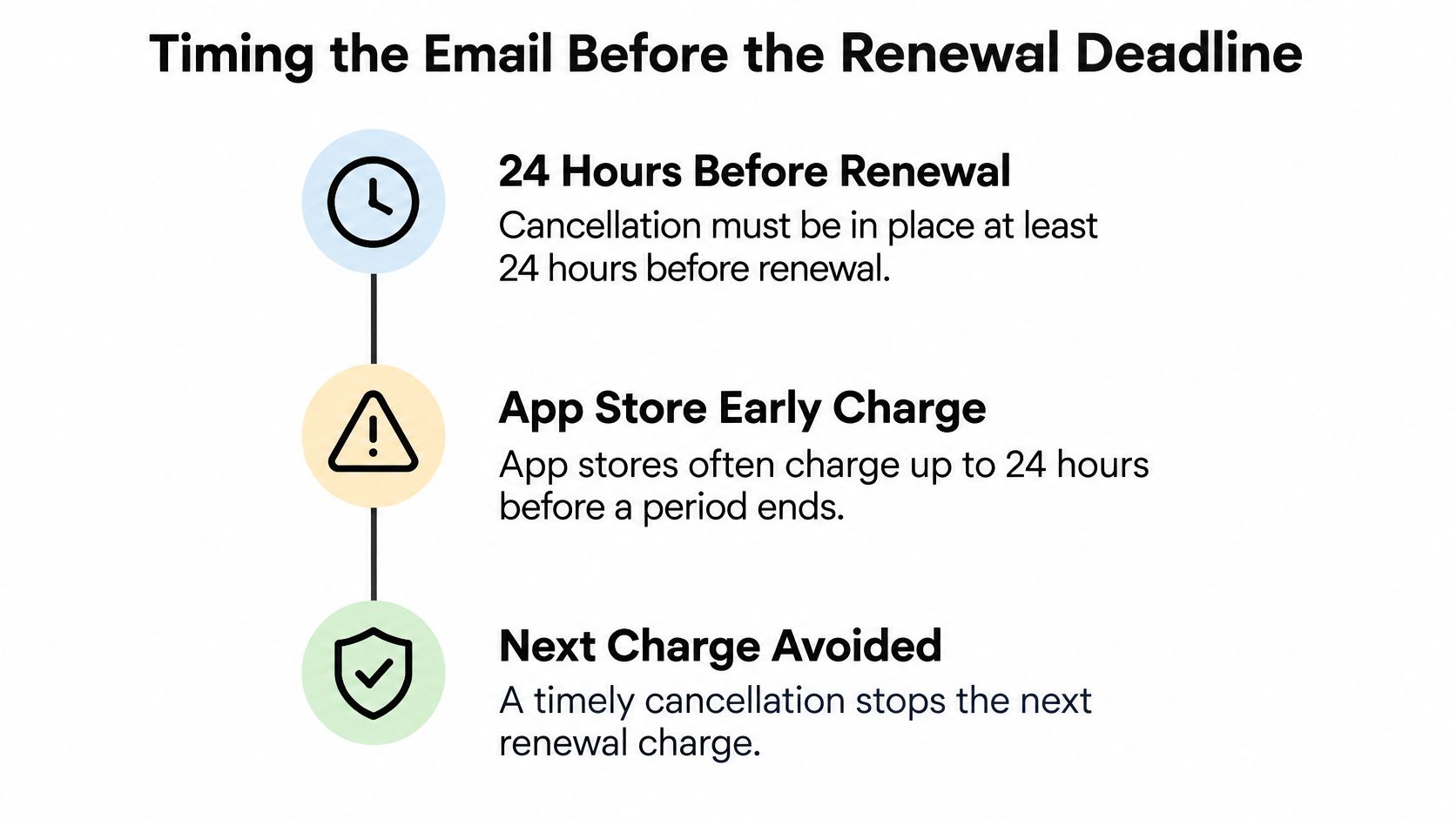
The store charges a renewal up to 24 hours before the current period ends, so you must cancel at least 24 hours before renewal to avoid the next charge. If you wait until the morning of your renewal date, the authorization is often already pending on your card, and you're forced into a slower refund request instead of a clean cancellation.
The timeline below shows how the 24-hour store billing window works in practice.
Matching Each Billing Channel to Its Deadline
Who handles your cancellation depends entirely on where you originally tapped "Subscribe," not on whose logo sits on the app icon. A subscription bought on an iPhone is managed by Apple, and you should cancel at least 24 hours before the renewal date to avoid the next charge. A subscription bought on Android is managed by Google Play, and you should cancel before the renewal date to avoid the next charge.
Sending an email to an app developer when Apple or Google controls the billing won't stop the charge, because the developer can't override your app store subscription settings. Likewise, deleting an app from your phone screen or closing your account inside the app doesn't stop recurring store payments. Deleting a Compass+ account does not cancel the subscription, so the store subscription must be cancelled separately.
| Billing Channel | Who Handles Cancellation | Send or Cancel By |
|---|---|---|
| iPhone App Store subscription | Apple subscription settings | At least 24 hours before the renewal date |
| Android Google Play subscription | Google Play subscription settings | Before the renewal date, ideally 24 hours ahead |
| Direct merchant billing | Merchant's own cancellation route | At least three business days before the cutoff in your account terms |
| Account or app deletion | Not a cancellation | Cancel the store subscription separately, before renewal |
Counting Backwards From Your Renewal Date
Direct-billed memberships carry their own traps, especially gyms or annual software plans that require written notice before the billing cycle closes. If you're testing out a new service and want to make sure a promotional offer doesn't turn into an unwanted bill, our guide on avoiding free trial charges walks through setting up trial safeguards on day one.
For any active membership, count backwards from the renewal date shown in your account and run a simple three-point schedule:
- Seven days before renewal: Set a phone or calendar reminder to check whether you're still using the membership and to locate the exact billing channel and email address.
- 48 hours before renewal: Confirm your direct membership cancellation email has been sent and check whether a written reply has landed in your inbox.
- 24 hours before renewal: Complete any App Store or Google Play cancellation directly inside your device settings, or send an urgent follow-up on a direct-billed account before the final billing window locks in.
Giving yourself a full week of runway removes the panic. It also gives you enough time to catch a bounced email or a stalled support ticket before your card gets charged.
Confirming Cancellation and Following Up When the Merchant Stalls
Hitting "Send" isn't the finish line. Written confirmation is. Without a reply that locks in your cutoff date and billing status, you're just hoping a support agent processed your ticket instead of archiving it.
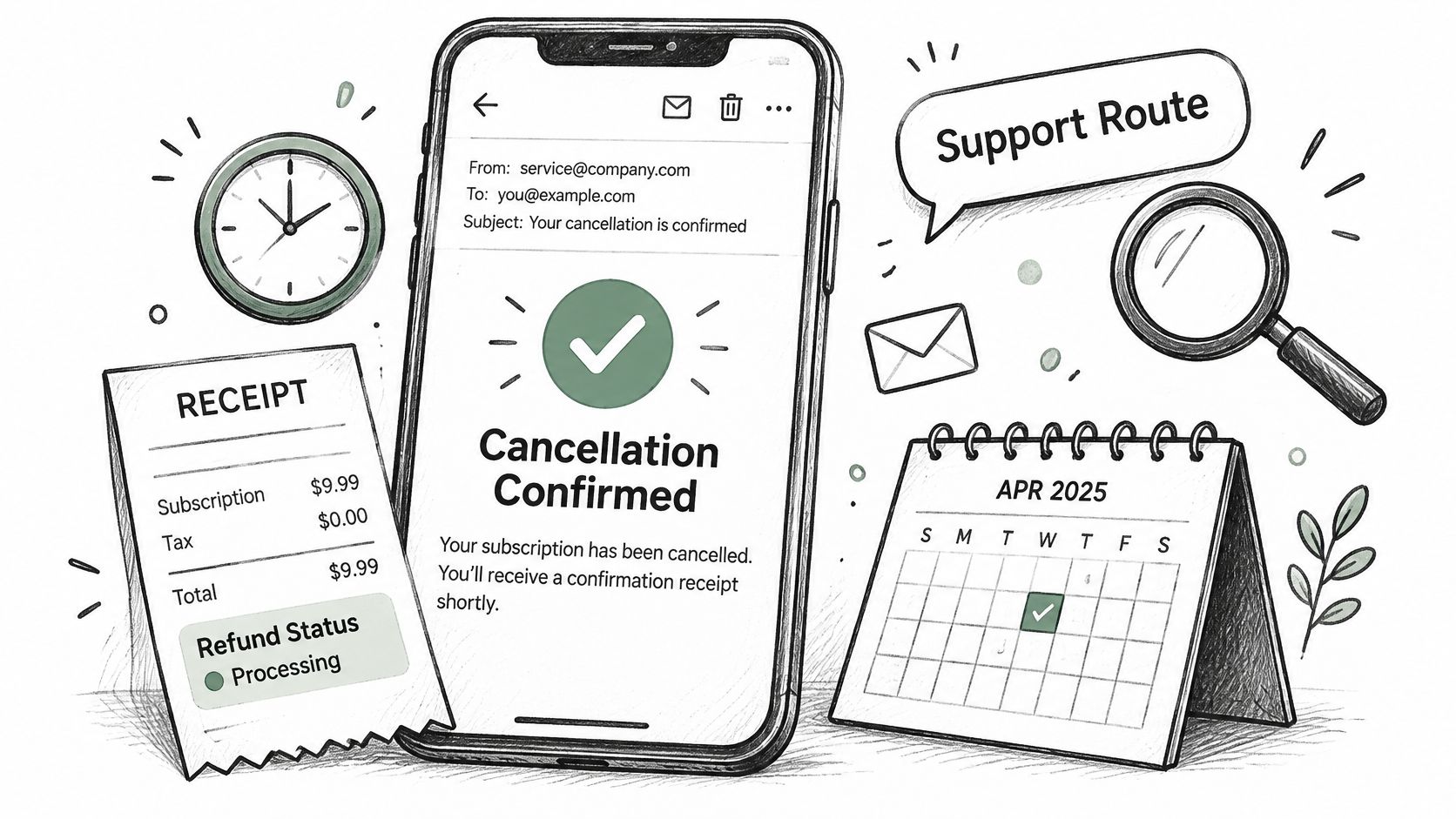
The illustration below highlights the pieces of a clean confirmation record you want saved alongside your calendar and receipt.
Friction in cancellation flows isn't accidental. In its 2022 Dark Patterns Report, the Federal Trade Commission documented subscription paths loaded with multiple pages, retention offers, and confusing alternatives, plus cases where repeated calls, emails, and support-form attempts still failed to cancel memberships. A behavioral study cited in that same FTC report found that making cancellation the default produced a 99.8% cancellation rate, which was 63.4 percentage points higher than requiring consumers to actively cancel through a complex five-paragraph letter.
That gap explains why merchants stall with multi-step replies and why your follow-up process has to be mechanical. When a company knows you're tracking dates and demanding specific confirmation fields, stalling stops working.
What a Valid Confirmation Email Must Contain
Don't treat an automated "We received your ticket" message as proof that your membership is over. A real confirmation email gives you six concrete facts you can verify later:
- Service name: Clearly identifies the exact membership or plan tier being ended.
- Cancellation timestamp: Shows the date and time the merchant processed your instruction.
- Last charge date and amount: Lists the final payment collected so you can spot stray charges.
- Refund status: States clearly whether a refund is issued, pending, or not applicable.
- Remaining access period: Gives the exact last day you can log in or use benefits.
- Dispute or support route: Provides a reference number or contact channel if billing goes wrong.
Watch out for fake confirmations disguised as polite customer service. A reply that asks you to stay, offers a discount, switches you to a temporary pause, or says "auto-renew is off" when you requested immediate termination hasn't confirmed your cancellation. Flag any retention-only reply immediately and push back until the merchant puts the cancellation date in writing.
For a quick walkthrough of how to get through stubborn cancellation loops and protect your account, watch the short video below.
Your Three-Day Follow-Up and Four-Field Tracking Log
If no valid confirmation arrives within three business days of your first email, reply directly in the same email thread so the original timestamp stays attached. Keep the follow-up to two sentences: restate your account identifier, repeat the requested effective cancellation date, and ask for written confirmation before the upcoming renewal date. If that second message gets ignored, escalate through the merchant's documented support channel (such as their formal billing portal, phone line with a call reference number, or published dispute email) while keeping every timestamp intact.
Keep a tiny log in a note or spreadsheet with four fields for every membership you cancel:
- Send timestamp: The exact date and time your first email left your outbox.
- Merchant response timestamp: When the company replied and whether it was a real confirmation or a stall.
- Confirmed effective date: The billing cutoff date stated in their written confirmation.
- Post-cancellation charge status: Verified "no charge" after the next billing date passes, or "charge disputed."
Save your sent email, the merchant's reply, and any screenshots together in a single folder named after the service. Once the next renewal date passes, pull up your bank or credit card statement and compare it line by line against the confirmation email. If a charge shows up anyway, or if the billing system hits your card twice, you have a ready-made evidence packet to contest it with your card issuer, and our guide on handling a duplicate charge on your bank statement walks through how to challenge improper entries cleanly.
Never delete the sent cancellation thread until at least one full billing cycle passes with zero charges on your statement.
Checkpoint Before Your Next Renewal
Before you close the tab and assume a membership is gone for good, run a quick three-point audit on every account you're winding down. Skipping the final check is how canceled subscriptions sneakily come back to life a month later.
First, verify that you have a written confirmation naming both the effective cancellation date and your final billing status. An auto-reply ticket number or a chat window you closed without saving doesn't qualify.
Second, mark the day after your old renewal date on your calendar and verify that your next bank or card statement matches the confirmation. If you aren't sure which recurring bills are still tied to your cards, taking five minutes to find all your subscriptions helps surface forgotten renewals before they hit.
Third, check whether the membership was billed through the App Store or Google Play, and confirm you canceled it inside your device's subscription settings rather than just deleting the app or account. After you cancel a subscription, you keep access until the end of the period you already paid for, so double-check the access end date in your confirmation reply to know when benefits stop. If you still don't have a clear written confirmation ahead of your billing cutoff, send that three-day follow-up right now instead of hoping the next charge won't post.
Tracking renewal cutoffs, spotting low-use memberships, and catching surprise post-cancellation charges takes constant statement checks when you do it by hand. Compass+ monitors your linked financial, email, calendar, and shopping accounts in the background to flag upcoming renewals, low-use subscriptions, duplicate charges, and unclaimed refunds with a clear next step and estimated savings. Visit Compass+ to join the waitlist and let automated monitoring catch recurring charges before they hit your account.