How to Manage Subscriptions and Stop the Leaks
See how to manage subscriptions with a charge audit, a keep-or-cancel table, and proof the next renewal never posts.
16 min read
Most subscription leaks aren't a willpower problem. They're a visibility problem. A charge posts under a parent company name, a trial converts on a card you rarely check, or a partner cancels a login while the payer's plan keeps renewing. Learning how to manage subscriptions means building one reliable inventory, deciding from actual use, and proving each cancellation worked after the next billing cycle passes.
Table of Contents
- What Your Subscriptions Actually Cost
- How to Find Every Recurring Charge
- Which Subscriptions to Keep Cut or Share
- How to Cancel and Confirm the Charge Stops
- Reminders, Negotiation, and Household Rules
- Run One Subscription Audit This Week
What Your Subscriptions Actually Cost
A study cited in the Federal Trade Commission's rulemaking record found that consumers estimated their monthly subscription spending at an average of $86, while their actual average was $219. The gap is $133 a month, or $1,596 a year. That difference is large enough to make a rough mental estimate a poor basis for deciding what to cut.
The same record reports that recurring charges are easy to forget, and that some consumers keep paying after they stop using a service because they forget to cancel. The 2025 CNET/YouGov survey, not the FTC evidence, found that 74% considered recurring charges easy to forget, 72% had put all subscription payments on autopay, and 42% had continued paying for a service they no longer used because they forgot to cancel.
Why the Billing Channel Matters
The service name, the billing descriptor, and the place where you cancel may differ. That mismatch matters across a household: one person may recognize the app, while another sees an unfamiliar charge on a shared card. Check the billing channel before contacting the service.
| Channel | Statement clue | Where to cancel | Timing trap |
|---|---|---|---|
| Apple App Store | Apple.com/bill or a parent company, not the app name | Settings, Apple ID, Subscriptions | Cancel at least 24 hours before renewal |
| Google Play | Google or the developer name | Play Store, Payments and subscriptions | Cancel before the renewal date |
| Merchant website | Brand, processor, or a shortened descriptor | Account billing page or cancellation link in the receipt | Check the posted trial conversion price |
| PayPal or digital wallet | PayPal and the merchant, sometimes on a card you forgot | Wallet automatic payments, then the merchant | Turning off the card does not end the agreement |
| Annual gym, phone, or software plan | One large charge, easy to miss in a monthly review | Provider account or contract terms | Check the renewal date in the account or terms |
| Family or shared plan | Another adult's card or a store family group | The account owner, not a member profile | Cancelling your login does not cancel the payer's plan |
| Free trial | The store, processor, or merchant descriptor from signup | Same channel used to sign up | Calendar the conversion date, not the day you remember |
Set Your Audit Target
Total last month's recurring debits across checking accounts, credit cards, and wallets. Then compare that figure with what you would have guessed. Include small charges; their size does not tell you whether they are duplicates, forgotten plans, or services someone in the household still uses.
Practical rule: Treat the difference between your guess and the statement total as the amount your system has to explain, line by line.
That difference is your audit target. Match each charge to its descriptor, billing channel, and household payer. The goal is to explain the total before deciding what to keep or cancel.
How to Find Every Recurring Charge
A memory list catches the services you already know about. It misses annual plans, store-billed apps, wallet agreements, and subscriptions another household member started. Run one pass through money records, app stores, email, and people. Each source catches a different kind of leak.
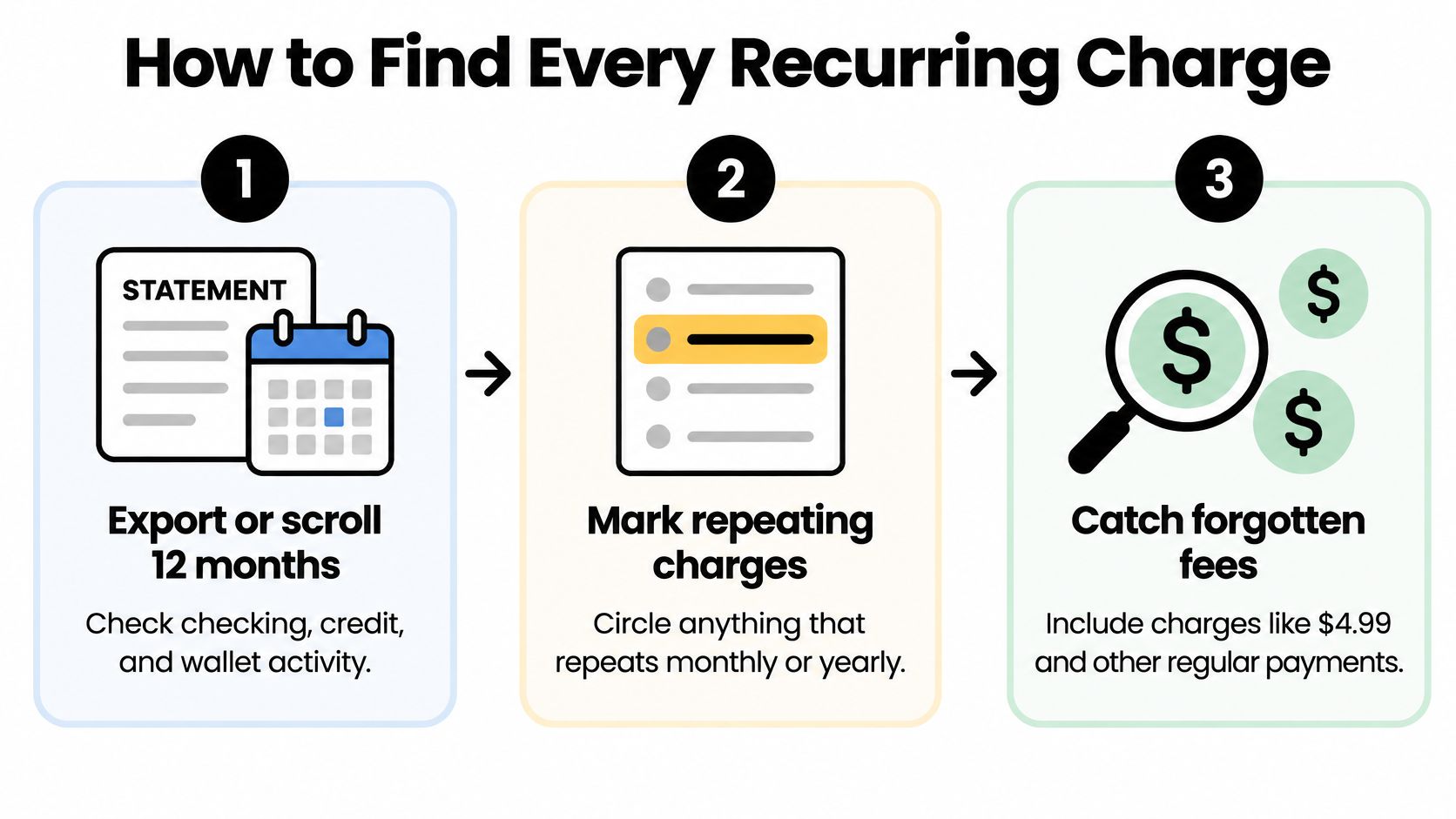
This flow shows the first sweep before you start naming owners and renewal dates.
Run the Seven-Part Search
- Export or scroll 12 months of activity. Check checking accounts, credit cards, and wallets. Mark anything repeating monthly or yearly, including small lines such as $4.99 and $9.99, because a monthly review alone misses annual renewals and makes small charges look insignificant.
- Search the descriptor, not the brand. Copy the exact statement text into your sheet before you translate it into a familiar name. It may show Apple, Google, a payment processor, a parent company, or a shortened merchant name, and that wording is what a bank or merchant will use later.
- Open both app stores on every phone in the house. Check Subscriptions under the Apple ID and Payments and subscriptions in Google Play. A store plan may never display the app name on the card statement, so the phone often reveals what the bank record can't.
- Search email for money terms. Use receipt, trial, renewal, membership, subscription, and the charge amount. Include spam and old addresses used for streaming, software, subscription boxes, gyms, and delivery services, because the receipt may identify the account owner and post-trial price.
- Inspect wallet agreements and backup cards. Open PayPal automatic payments and any second card used during signup promotions. This catches charges that survived a card replacement or moved to a funding source you no longer monitor.
- Ask who pays for each shared login. A service can look free to you while renewing on a partner's card or through a family organizer's store account. Name the payer now, because only that account can change or cancel the plan.
- Write one row per charge. Record service name, owner, amount, billing interval, next date, last use, login email, card, and exact descriptor. Flag unknowns instead of guessing, since an unnamed charge still belongs on the list until you identify or dispute it.
Turn the List Into a Decision Sheet
Add a monthly total and a yearly total at the bottom. Converting every interval to both views matters because a $15 monthly plan is also a $180 annual commitment, while one large yearly charge can disappear from an ordinary month's spending.
Don't use screenshots as your system. They capture fragments but don't sort by renewal date, owner, or last use. A simple spreadsheet or shared note works if every row has the same fields and somebody updates it when a trial starts.
Watch for the same amount posting twice under slightly different descriptors. It may be a duplicate, a family member's separate account, or a merchant retry. If two lines look identical, this guide to a duplicate charge on a bank statement can help you separate a genuine second plan from a billing error before you cancel the wrong one.
A charge you cannot name is not a minor mystery. It's an unowned renewal with a future date already attached.
Finish only when every repeating debit has a row, even if the service name still says unknown. That complete sheet, not your recollection, becomes the input for keep, change, or cancel decisions.
Which Subscriptions to Keep Cut or Share
Sorting works only after the inventory exists. Otherwise you'll debate the obvious streaming service while an annual software plan and two cloud backups stay untouched. Judge each row by named use, cheapest workable tier, and whether another plan already does the same job.
The waste is large enough to matter without cutting things people value. In 2025, U.S. adults who paid for subscriptions spent an average of $1,080 per year on them, including approximately $200 per year on subscriptions they rarely or never used, according to CNET's survey with YouGov. Removing roughly $200 in unused services is about $17 a month before you touch a nightly habit.
Apply the Same Test to Every Row
| Signal | Action | What to check first |
|---|---|---|
| Used weekly and already on the cheapest working tier | Keep | Name the person who uses it |
| Used rarely but once a month for a real task | Downgrade or pause | Whether a cheaper tier still covers that task |
| Two services do the same job | Keep one, cancel the overlap | Which account holds downloads, photos, or watch history |
| Free trial with no use | Cancel before conversion | Post-trial price and the exact conversion date |
| Price rose and a competitor matches it | Negotiate once, then switch | The old price and any annual-prepay penalty |
| Nobody can name the last use | Cancel and monitor the next statement | Owner, card, and billing descriptor |
Weekly use at the lowest tier that still does the job earns a keep. Monthly use with an annual renewal inside 45 days should trigger a downgrade, pause, or switch to monthly before that date, because waiting turns a small decision into another full year. A trial with no sessions doesn't need more evaluation time. Cancel before conversion and resubscribe later only if a real need appears.
Separate Low Use From No Value
Unused doesn't automatically mean wasteful. A cloud backup may run in the background and still protect family photos. A shared streaming plan may look idle on your profile while someone else uses it several nights a week. The test is whether a named person gets a specific benefit, not whether the account owner opens the app daily.
For each keep, write the person's name and the cheaper tier you considered and rejected. For each cut, note saved data, profiles, downloads, loyalty benefits, or files you'll lose, plus whether pausing preserves them. That prevents a cheap cancellation from creating an expensive recovery problem.
Say a household pays for two music services because one began as a phone promotion and the other holds everyone's playlists. Keep the account the household opens, export playlists if needed, and cancel the duplicate. If a video service is used only for one monthly family movie, a lower tier or rotating one service at a time may work better than paying all year.
Use your broader cash limits when several borderline plans compete. This breakdown of how much you can safely spend helps you set a household subscription ceiling instead of approving each small renewal in isolation.
Leave the sheet with only three labels, keep, change, or cancel. Maybe is how a charge survives another cycle without anyone choosing it.
How to Cancel and Confirm the Charge Stops
A cancellation confirmation is only the first piece of evidence. Save it, then check whether the charge returns on the next statement. A mismatched billing name, shared card, or family member's store account can keep a payment going after someone believes the subscription is cancelled.
Cancel Through the Billing Channel
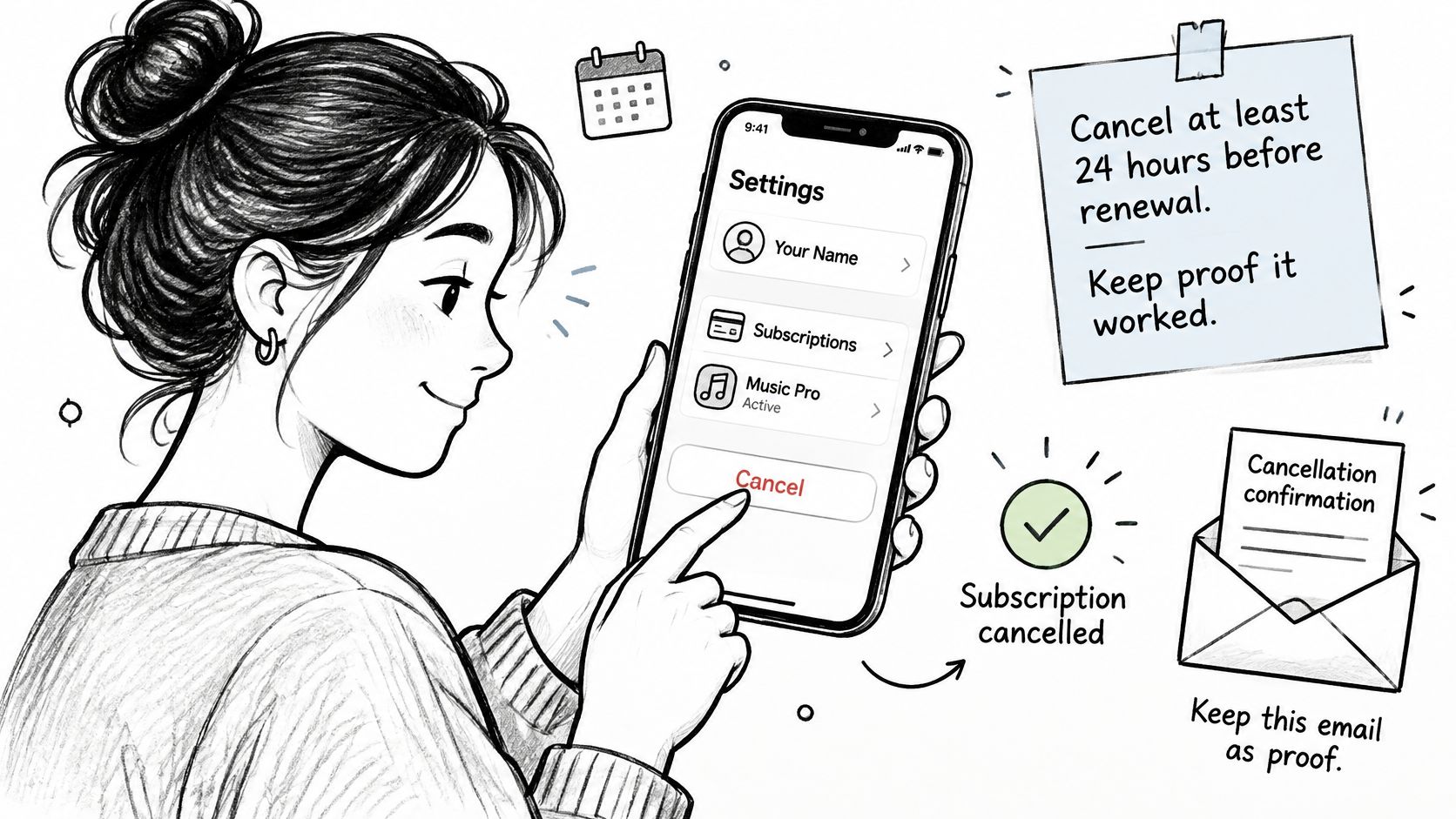
- For an iPhone subscription, use Apple's subscription settings. Open Settings, tap your name, then Subscriptions. Cancel at least 24 hours before renewal. Apple may charge up to 24 hours before the current period ends.
- For an Android subscription, use Google Play. Open Payments and subscriptions, find the plan, and cancel before its renewal date. Deleting the app does not cancel the subscription.
- For a direct plan, use the merchant's billing page or cancellation link. Check the receipt to identify the billing channel. A profile deletion may not end a subscription billed through an app store.
- Keep the confirmation. Save a screenshot or email with the account email, cancellation date, billing descriptor, and the date access ends. Access usually continues through the period already paid for, so continued access does not by itself mean cancellation failed.
- Check the next statement. Compare the descriptor and amount with the old charge. A charge under a different billing name may belong to a shared card or another household account.
- Follow up with evidence. Contact the merchant with the confirmation and charge details. If the charge continues, contact your card issuer or bank and provide the same records.
For plans sold in person or through a membership desk, ask what confirmation the business provides before you leave. These cancellation tips from Nanak Car Wash illustrate why it helps to confirm the exact process instead of assuming an app setting controls billing.
Use this walkthrough when checking store-billed plans, particularly if household members use different phones or store accounts.
Do Not Rely on One Universal Rule
The FTC click-to-cancel rule has been delayed and tied up in court. Cancellation protections can vary by state, merchant, app store, contract, and payment method, so check the terms that apply to the specific plan.
Avoid closing a card as a first response. The biller may retry the payment or use another funding source, while you lose a clear way to track whether cancellation worked. For future trials, record the conversion date and cancellation route when you sign up. These steps for avoiding free-trial charges can help you keep those details visible.
Mark a subscription resolved after the next billing cycle passes without another charge. Until then, record it as cancelled but unverified.
Reminders, Negotiation, and Household Rules
A subscription list can go stale as trials, promotions, and family plans enter through different phones and cards. The weak point is often visibility into who owns each plan, when it renews, and who is responsible for acting. Record those details for every subscription.
Build Reminders You Can Act On
A renewal alert is useful only if it gives someone enough information to make a decision. Put the amount, payer, billing channel, renewal date, and cancellation path in the reminder.
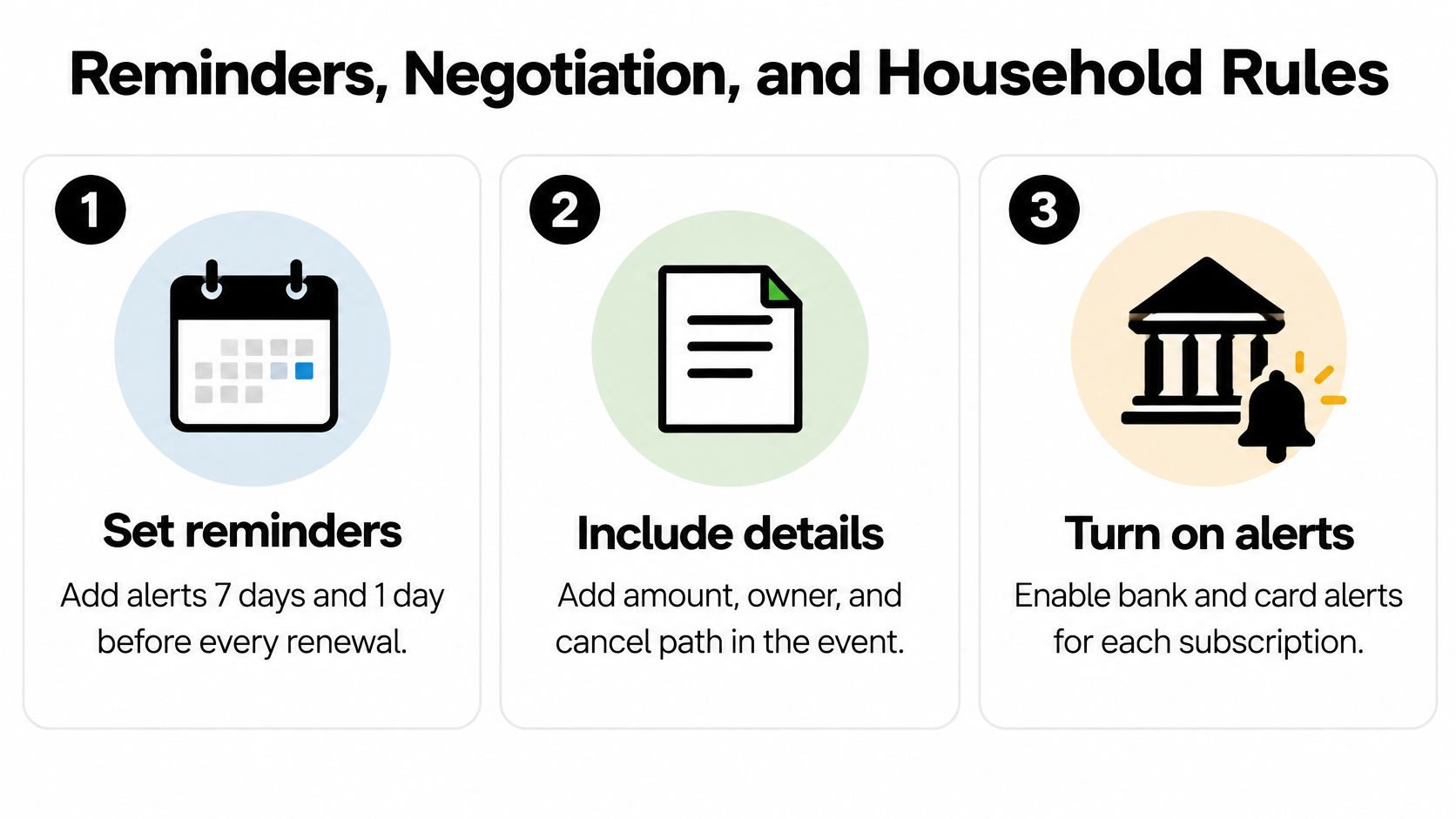
- Set two calendar alerts: Schedule one 7 days and another 1 day before renewal. Include the details above so the person who sees the alert can act without searching through email.
- Turn on transaction alerts: Enable bank and card notifications for recurring merchants where available. Label receipts, trial confirmations, and renewal notices in your inbox, then search those labels before annual charges post.
- Review the next 30 days: Once a month, check subscriptions renewing within 30 days and services nobody opened last month. A focused review is easier to keep doing.
- Re-sort after life changes: Review the full list every quarter and after a move, job change, new phone, or the end of a student or promotional discount. These changes can affect who uses a plan, how it is billed, and what it costs.
Negotiate Once, Then Decide
If a price rises, make one specific request: ask for the prior rate or a pause, name the competitor offer you are considering, and say you will cancel if neither is available. A clear request gives the representative a concrete option to consider.
If the answer is no, cancel and check the next statement. Record when any temporary credit ends and the higher price resumes. A pause may suit a service you expect to use again, but put its restart date on the calendar.
Assign Household Ownership
Give each subscription one payer and one named user or purpose. Decide who can start a free trial, which card to use, and who records the conversion date. Add a second streaming, music, or cloud plan only when the list shows a specific need the current plan does not meet.
Shared access should follow the plan's rules. Use separate profiles where available, and make sure account recovery does not depend on someone who may leave the household. This matters especially for shared photo archives and password vaults.
Keep next dates, owners, and amounts in a shared note. Ask each person to update it when they start a trial. That record makes it easier to match a charge to the person and plan behind it, even when the billing name on a statement differs from the service name.
Run One Subscription Audit This Week
Don't wait for a perfect budgeting weekend. Run a narrow audit this week and finish with one verified cancellation or downgrade.
- Export 12 months of bank and card activity. Fill the inventory sheet with amount, owner, descriptor, interval, next date, and last use.
- Label every row. Mark each service keep, change, or cancel using named use and the cheapest tier that still does the job.
- Act on the next 30 days first. Cancel or downgrade anything renewing soon that failed the test, and save every confirmation in one folder.
- Check after one full cycle. Confirm the debit stayed gone before marking the row resolved.
Some services shouldn't be cancelled when a schedule change solves the problem. For example, if deliveries arrive faster than your household uses them, you can adjust your dog supplement delivery schedule instead of letting products pile up or losing a plan you still want. Apply that same distinction to meal kits, household refills, and other physical subscriptions.
If you know you won't maintain the calendar and statement checks each quarter, paid monitoring has a clear cost test. Compass+ offers a free private audit that estimates subscriptions, duplicate charges, missing refunds, fees, renewals, and bill increases worth investigating. Its Home screen shows what it found and what to do about it, while the Recurring screen lists every repeating charge with its monthly cost.
New subscribers get a 7-day free trial, then Compass+ Monthly is $19.99 a month, billed through the App Store or Google Play. Paying makes sense when savings from unused plans and missed refunds exceed about $240 a year and you won't keep the reminders yourself. Skip it if you have fewer than five plans and already review renewals reliably.
Either way, the win is one cancelled renewal with proof, not a flawless spreadsheet you'll abandon next month.
Start with the free private audit from Compass+ to surface recurring charges, duplicate charges, missing refunds, renewals, and bill increases from your linked accounts. Review each finding on the Home screen, act on the next renewal first, and keep the confirmation until a clean billing cycle proves the charge has stopped.