24 Hour Membership Cancellation: How to Beat the Deadline
Learn how the 24 hour membership cancellation window works, which deadline applies to your plan, and how to submit proof that stops the next charge.
14 min read
The renewal notice lands on a Tuesday. The charge posts on Thursday. Between those two dates sits the only window that matters, and many members spend it clicking the wrong thing.
Cancelling a membership isn't a button. It's a deadline with paperwork attached. The 24 hour membership cancellation standard exists because a fast request and a stopped charge are two different events handled by two different systems: the provider's cancellation queue and your bank's authorization schedule.
Here's how I'd handle it with the clock inside 24 hours, starting with the date that decides the outcome, then where to send the request so it counts, then what to keep so a charge after the fact can be reversed.
Table of Contents
- How the 24-Hour Window Works for Your Plan
- Read the Terms Before You Send Anything
- How to Submit Your Cancellation the Same Day
- Records That Prove the Cancellation Took Effect
- When Money Still Leaves After You Cancel
- Confirm the Cancellation Before Your Next Billing Date
How the 24-Hour Window Works for Your Plan
Most cancellation failures don't start with a missing cancel button. They start with two dates that don't line up. You send the request on Monday, the club logs it Tuesday, and the card gets charged Thursday because the notice period ran past the billing date. A cancellation can be accepted today while the next cycle still runs, and that gap is where the money goes.
The provider's own terms make the gap visible. 24 Hour Fitness states that monthly memberships generally require 30 days' notice, that yearly auto-renewal memberships may continue until the end of the annual term, and that commitment memberships can be non-cancellable and non-refundable during the commitment period, with a cancellation fee that may apply. Nothing there contradicts a fast processing promise. The request gets accepted quickly; the contract still has to wind down.
The Three Dates That Decide the Charge
Keep them separate for every membership and every subscription you hold.
- Request date. When your notice is submitted, with the timestamp and the channel you used.
- Effective termination date. The date the provider says the agreement ends. Get it in writing, because it's rarely the day you clicked.
- Next charge date. The date the next authorization is scheduled, which is the only date your bank ever sees.
An annual fee usually runs on its own schedule, apart from the monthly charge, so it needs its own check rather than being folded into the monthly deadline.
| Membership or plan | Notice usually required | When billing can still happen | Check first |
|---|---|---|---|
| Monthly gym membership | 30 days written notice generally | Next monthly charge if notice is late | Notice clause and billing date |
| Yearly auto-renewal membership | Notice before the term ends | Full annual fee renews if the term end is missed | Renewal date and notice deadline |
| Commitment contract | Often non-cancellable during commitment | Payments continue, and a cancellation fee may apply | Commitment end date and fee schedule |
| New York health club | Cancel within 3 days of signing, or in defined cases | Billing continues outside the window or a defined case | Member agreement and cancellation clause |
| App store subscription on iPhone | Cancel at least 24 hours before renewal | Next charge if the window is missed | Renewal date in Apple subscription settings |
| App store subscription on Android | Cancel before the renewal date | Next charge if the date passes | Renewal date in Google Play subscription settings |
| Free trial | Cancel before the trial ends | No charge if cancelled during the trial | Trial end date |
The rule that saves the money: count backwards from the renewal date. Never forwards from the day you finally cancel.
Two consequences follow. Treat any advertised 24 hour membership cancellation window as the time you have to act, not as evidence that billing stopped. And read the notice requirement before you send anything, because a 30 day clause with a renewal nine days out is a charge you can predict in advance.
Store subscriptions run a tighter clock. The store charges a renewal up to 24 hours before the current period ends, so your cancellation has to land at least 24 hours before renewal to prevent the next charge. A subscription bought on an iPhone is managed by Apple, and the same 24 hour margin applies there.
Free trials are the one case where the deadline is absolute: cancel before the trial ends and there's no charge at all. When several trials are running at once, this walkthrough on avoiding free trial charges shows how to line the dates up. For how notice periods shift from one state to the next, the gym membership cancellation rules reference from Gym Membership Tips is the one to keep open.
Read the Terms Before You Send Anything
A cancellation request and the end of billing are separate dates. Your agreement sets the notice method and deadline; the provider's confirmation should state when your membership ends and whether another payment is due.
New York's Health Club Services Act generally allows cancellation within three days of signing a contract and permits cancellation in defined situations, including a club ceasing operations, a move more than 25 miles from the provider, or a physician-determined significant physical disability that prevents use for more than six months, as described in the New York Senate bill text. New York proposals also sought to require clubs to process cancellations within 24 hours of receiving notice. Those proposals were not settled rules for most members, so check the terms that apply to your agreement rather than treating 24 hours as a universal legal deadline.
Read the agreement before sending notice. Pay particular attention to the renewal date, required notice period, accepted cancellation method, and effective termination date. If the provider's terms are unclear, ask for the date in writing.
Five Checks Before You Send a Single Word
- Find the renewal clause and note the next billing date.
- Check the required notice method. The agreement may specify how to submit a cancellation.
- Identify the effective termination date. If it differs from your request date, ask which date determines whether another charge is due.
- Review fees, commitment periods, and refund terms. These can affect what you owe after giving notice.
- Save the relevant terms with the date you reviewed them. Keep the copy with your cancellation records in case a later charge is disputed.
Practical rule: If the terms are unclear, submit your request promptly and ask the provider to confirm the effective date in writing.
A request submitted after the notice deadline may still end the membership, but the terms may leave another billing cycle due. The key dates to track are the request date, the effective termination date, the next billing date, and any separately charged fee.
How to Submit Your Cancellation the Same Day
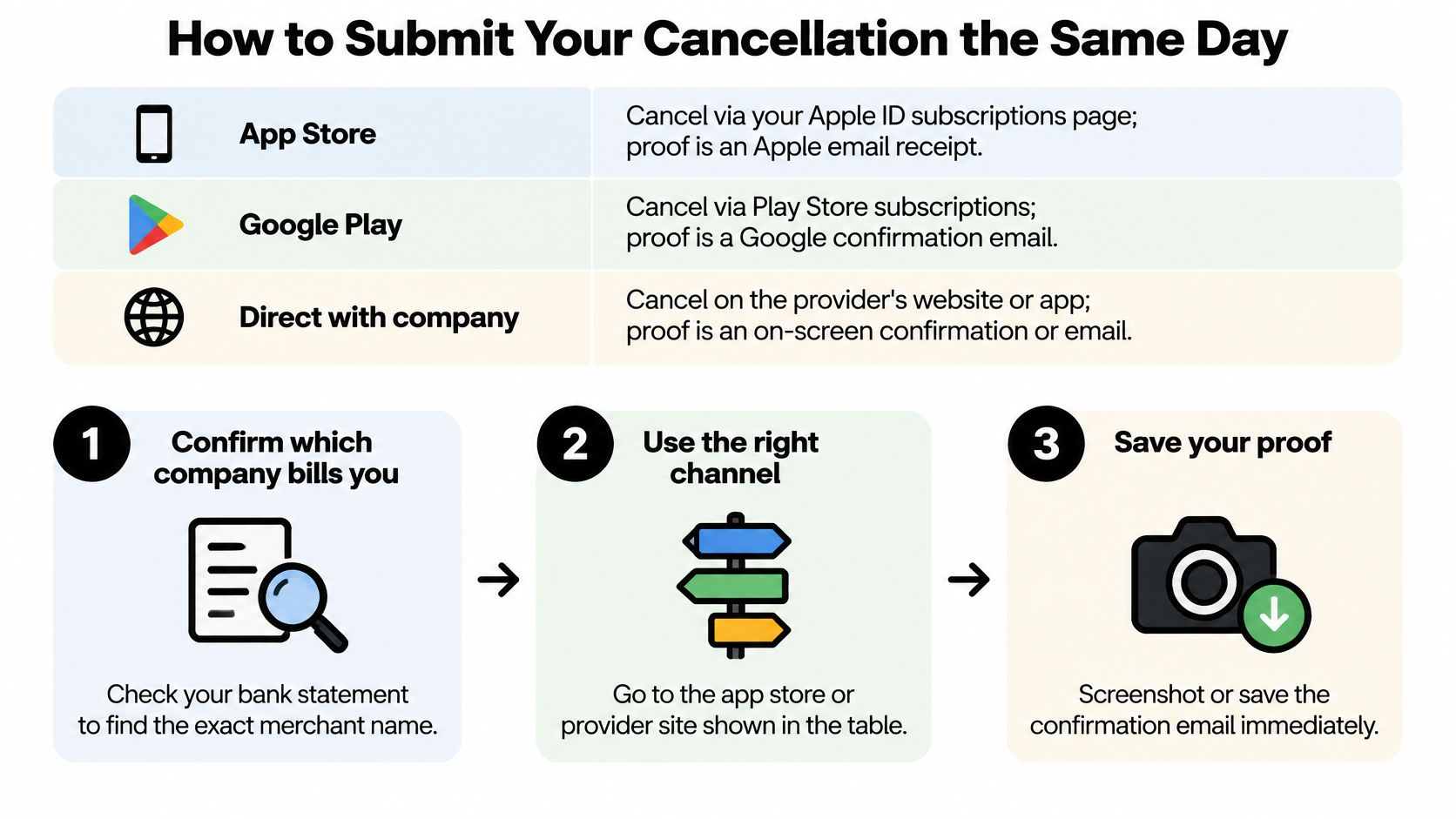
Speed is worthless in the wrong channel. A request sent to the gym when the app store does the billing isn't a cancellation, it's a note in a queue that will be answered with "contact Apple."
Here's the map I'd work from, sorted by where each cancellation has to go and what proof it produces.
| Channel | How to cancel | Proof to keep | Risk |
|---|---|---|---|
| App store subscription | Apple or Google Play subscription settings | Store cancellation screen and receipt email | Deleting the app does not cancel it |
| Merchant website or account page | Use the merchant's own cancellation route | Confirmation page screenshot and reference number | Account deletion may not end billing |
| Email to the provider | Send from the address on the account | Sent email and reply with effective date | Email from another address may be rejected |
| Phone call | Call during business hours and ask for a reference number | Call time, agent name and reference number | Verbal requests may not be recorded |
| In person at the gym | Written request at the front desk | Signed or stamped copy with date | Staff may not log the request |
| Payment wallet or employer portal | Cancel inside the wallet or portal that bills you | Subscription status screen | Cancelling elsewhere leaves billing active |
Pick the Channel Before You Pick the Words
- Confirm which company bills you. Open your statement and read the exact merchant name on the charge. That name, not the app's name, tells you who to cancel with.
- Use the provider's own cancellation route. Third-party cancellation sites aren't recognised by anyone's billing system.
- Write from the email address on the account. A request from a personal address that isn't on file gives support a reason to bounce it back.
- Ask for written confirmation with a reference number and the effective date. This is the single most useful sentence in your message.
- Log the time, the date and the name of any agent you speak with on the phone.
- If a call is the only route, call early in business hours. Late-afternoon queues push your request past the billing cut-off.
On the business side, tactics to cut gym churn from Fitness GM show why providers build a retention offer into the flow, which is useful to expect rather than argue with.
When we show you how to cancel something, we give you the merchant's own cancellation route and you complete the cancellation inside that system. It's the only version the biller honours. If you're managing several accounts at once, these guides on how to cancel subscriptions cover the common routes, and this short walkthrough covers the store settings specifically.
Records That Prove the Cancellation Took Effect
A confirmation email is a milestone, not proof. Proof is the statement staying clean after the effective date. To get there, record four dates and keep them together in one place.
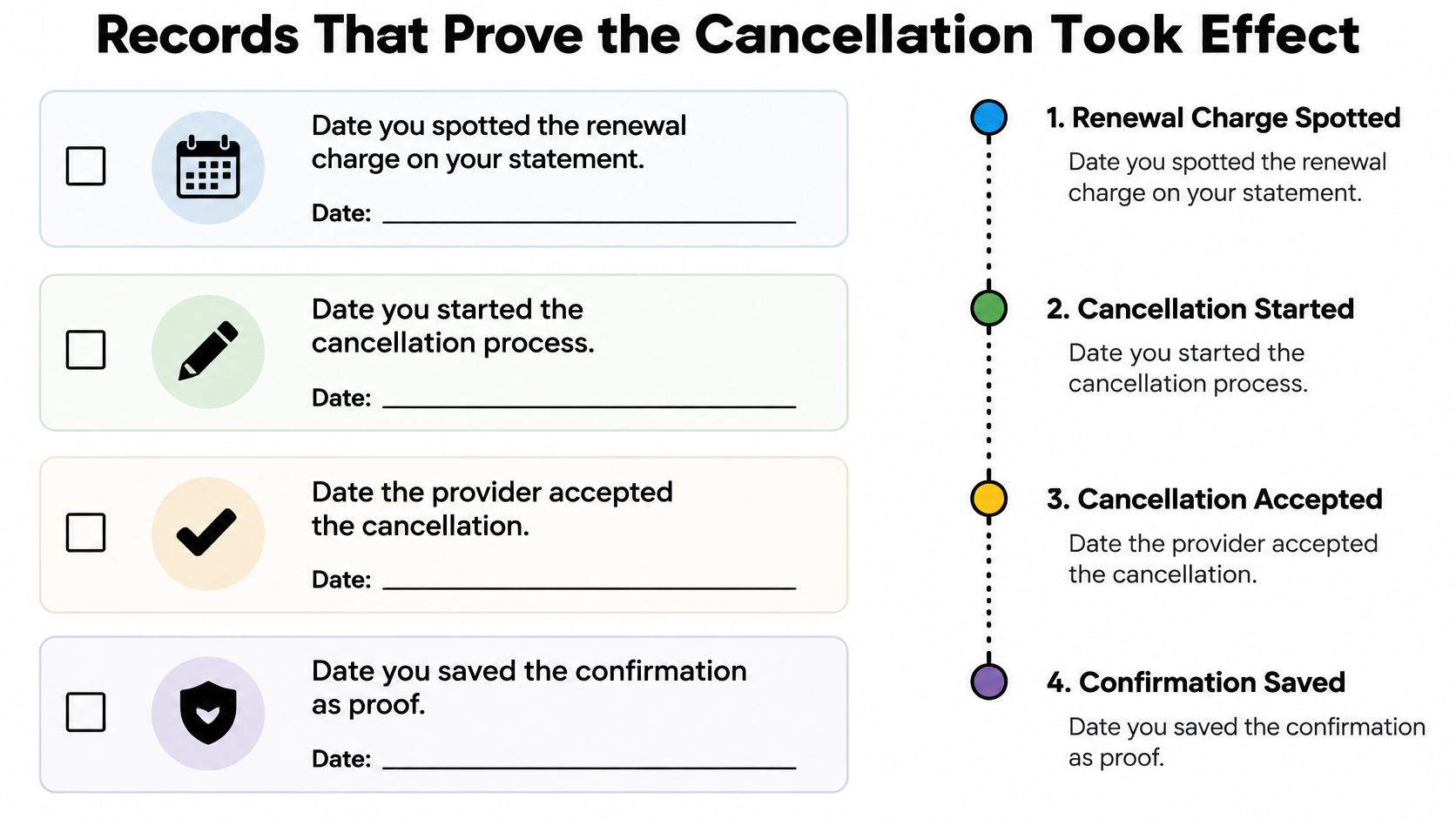
- Detected. The day you spotted the renewal or the charge.
- Started. The day you began the cancellation process.
- Accepted. The day the provider said yes, with its reference number beside it.
- Confirmed. The day the confirmation reached your inbox and you saved it.
Write the next amount due next to those four dates. That single line tells you what a correct outcome looks like.
The Checks After the Request
- Save the confirmation the same day, as a screenshot and as a forwarded email.
- Read the status word. Cancelled, paused and terminated are different states, and a paused plan can resume billing on a date you never agreed to.
- Check the card or bank feed 24 to 72 hours later for anything dated after the cancellation was accepted. The Which? analysis calls for exactly this recheck of the account and the transaction feed.
- Reopen the account page and confirm the status still reads cancelled, since some plans reinstate themselves if a step was missed.
- Keep the dates, reference numbers and amounts in one folder until a full billing cycle has passed with no charge.
Expect friction even when the process looks simple. Among adults who tried to cancel or change a subscription, 29% found cancellation difficult, and the barriers they reported included retention offers (39%), too many steps (32%) and multiple cancellation confirmations (30%), according to Which? consumer research on dark patterns.
What the confirmation must say: cancelled, not paused. A paused plan can start billing again on a date nobody told you about.
The charge that matters most is the first one after the effective date. Everything before that is history; everything after it is a dispute you either win with records or lose without them.
When Money Still Leaves After You Cancel
A cancellation request and a stopped payment are not the same event. If a charge appears afterward, compare its date with the cancellation's effective date and the billing period you already paid for. You keep access through the end of that period, so a charge for a new period may be valid if the request missed the notice deadline.
Deleting the app does not cancel a subscription. Deleting your account does not cancel it either. The subscription must be cancelled through the billing channel that manages it.
How to Dispute a Charge That Shouldn't Exist
- Compare the charge date with your cancellation record and the effective termination date.
- Contact the provider with the confirmation and reference number. State whether you are requesting a refund or reversal.
- Keep the provider's reply with your records, including any promised resolution date.
- If the provider refuses or does not respond, contact your card issuer or payment wallet and share the same records.
- Do not treat stopping a card payment as cancellation. If the contract remains active, unpaid amounts may still be owed.
Consumer protection rules on subscription cancellation vary by state and country and have changed over time. Check the terms you agreed to and your local consumer protection agency before relying on a specific rule in a dispute.
A duplicate charge is a separate billing problem. Use this guide to identify and dispute a duplicate charge on your bank statement.
Confirm the Cancellation Before Your Next Billing Date
One date decides what you do next: the nearest renewal. Not the date you joined, not the date you meant to cancel.
If the notice deadline falls within the next few days, send the request today through the channel that bills you, then keep the confirmation and diarise the first charge after the effective date. If the deadline has already passed, stop trying to beat it and move to the dispute path above, because a late request that's documented is worth more than a perfect plan you never executed.
Free trials are the exception worth checking first. Cancel before the trial ends and there's no charge at all, so a trial ending in 48 hours outranks a gym membership renewing next month.
Tracking several at once is where manual notes break down. The free private audit estimates subscriptions, duplicate charges, missing refunds, fees, renewals, and bill increases worth investigating, which turns a scattered set of dates into a list with amounts attached. Two calendar reminders per membership usually do the job: one for the notice deadline, one for the first charge after the effective date.
Do this today: open your statement, find the membership with the nearest renewal date, and send that one cancellation before you close the app.
Compass+ watches the accounts you already have and surfaces the renewals, duplicate charges and missed refunds that are easy to lose track of, then hands you the merchant's own cancellation route so the request lands where the biller will honour it. It also gives you the dates and amounts you need to prove a charge shouldn't have happened. Visit Compass+ to start the free private audit and see which of your memberships is worth acting on first.