Internet Bills Per Month What You Actually Pay and Why
Learn what internet bills per month really cost, what drives the price, and proven ways to lower your bill without losing speed.
15 min read
A typical U.S. household pays $81.16 per month for home internet, or about $973 per year. Another large pricing review puts the average at $75.72 per month, so a realistic starting range is the high-$70s to low-$80s before extra fees.
That sounds simple until a promotional offer ends, a router rental appears, or a bill adds taxes and provider surcharges. You may sign up for a plan advertised at one price and discover that the amount leaving your bank account is higher.
The useful question isn't only, “What are internet bills per month?” It's, “What will this connection cost me each month after every recurring charge, and how likely is that amount to change?” Averages help you set a starting budget, but they don't tell you whether you're paying for more speed than you need, whether equipment is inflating the total, or whether an introductory credit is hiding the standard rate.
Table of Contents
- Introduction What Internet Bills Per Month Really Look Like
- How Your Monthly Internet Bill Is Built
- Why Internet Bills Per Month Vary So Much
- Comparing Common Internet Plans and Speed Tiers
- Hidden Fees and Promo Pricing That Inflate Your Bill
- Proven Ways to Lower Your Internet Bill Without Losing Speed
- Keep Your Bill Low With Ongoing Monitoring and Smart Habits
Introduction What Internet Bills Per Month Really Look Like
You open your statement expecting the promotional price you saw online. Instead, the total is higher because the introductory credit disappeared, the Wi-Fi equipment charge remained, and several smaller line items were added. None of those charges alone seems dramatic, but together they can turn a seemingly affordable plan into a noticeably larger monthly expense.
The U.S. national average provides a useful benchmark. BroadbandNow's 2026 home internet pricing review reported an average monthly cost of $81.16, which works out to about $973 annually. A separate large pricing review cited in the same research placed the average at $75.72 per month, or just over $900 per year. Those figures point to a typical household bill in the high-$70s to low-$80s before you account for all possible fees and discounts.
That range isn't a promise that your bill should match it. A small apartment with modest online needs may spend less, while a household paying for gigabit capacity, premium Wi-Fi hardware, or bundled services may spend more. Location, competition, technology, taxes, and the end of a promotional period all change the final number.
Budgeting rule: Treat the advertised plan price as the opening line of your estimate, not the finished bill.
A practical budget should answer four questions:
- Service price: What is the regular charge for the connection?
- Add-ons: Are equipment, security, whole-home Wi-Fi, or other features included?
- Temporary credits: When do promotional discounts expire?
- Annual exposure: What will the bill cost over a full year if the standard rate applies?
This guide moves from the average to the mechanics behind it, then to plan comparisons, fee auditing, savings actions, and ongoing monitoring. By the end, you'll be able to calculate your true monthly cost instead of relying on a headline price that may only apply for a limited time.
How Your Monthly Internet Bill Is Built
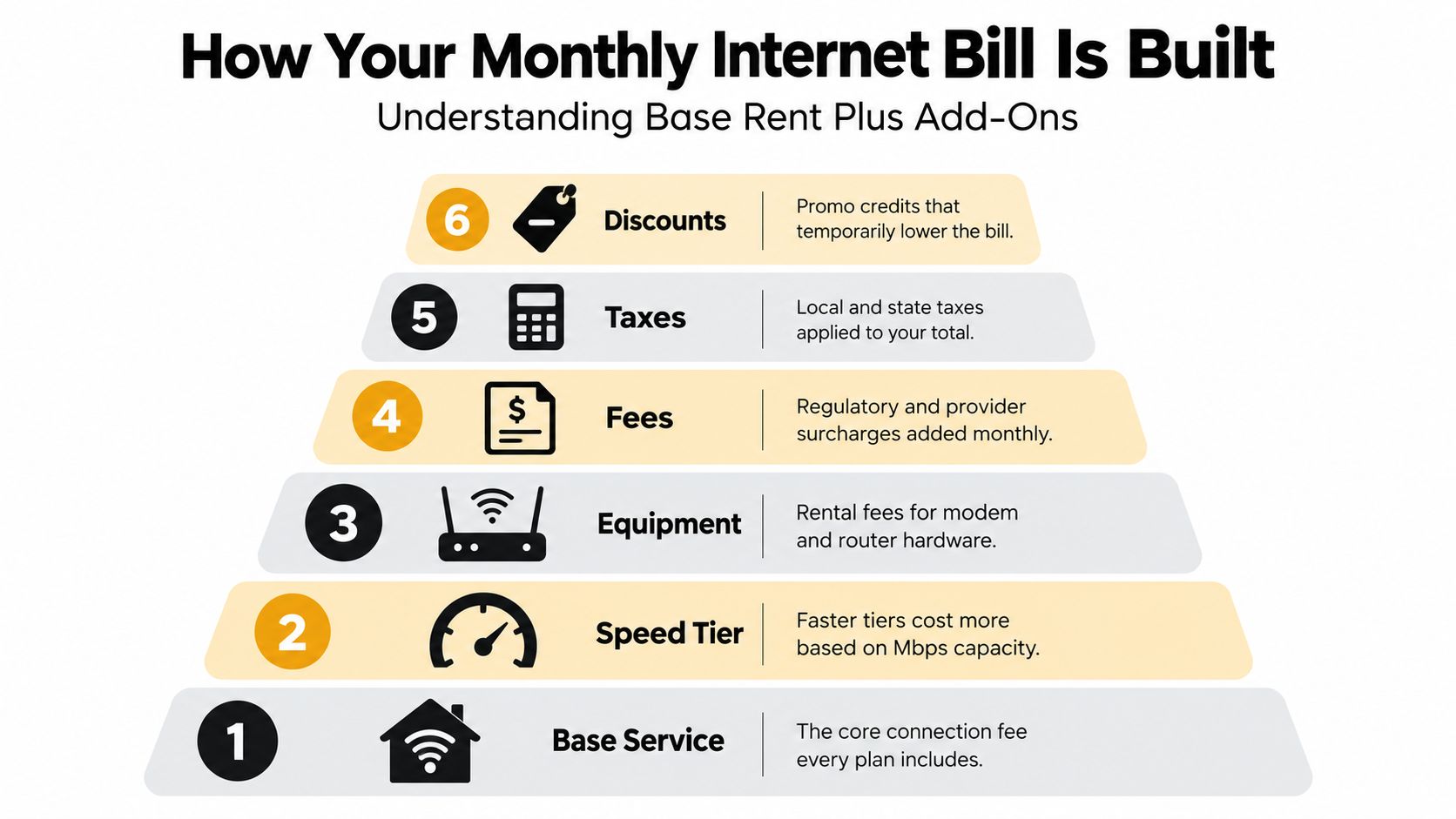
An internet bill works like a base rent with add-ons. The base service gives you access to the provider's network, while speed, hardware, fees, taxes, and temporary discounts sit on top of that foundation.
Start with the recurring service charge
The first line is the plan itself. It reflects the connection type and the selected speed tier, often described in megabits per second, or Mbps. This is the amount most advertisements emphasize, but it may be a promotional rate rather than the provider's standard price.
Look for language such as “introductory,” “new customer,” or “first-year pricing.” A promotional credit can make the opening bills look attractive while leaving you responsible for a higher regular charge later. Your budget should record both amounts and the date when the lower amount ends.
Separate hardware from access
Some providers include a modem, router, or gateway. Others charge a recurring rental fee, offer upgraded equipment for an additional charge, or let you use compatible hardware you own.
A modem connects your home to the provider. A router distributes that connection around your home. A gateway combines both functions. If a bill lists equipment separately, decide whether the hardware is necessary, whether a lower-cost option is available, and whether using your own device is permitted and supported.
Read the less prominent lines
Taxes, regulatory charges, network surcharges, activation costs, installation charges, and paper billing fees can all affect the final amount. Some appear only on the first bill, while others recur every month.
Discounts deserve equal attention. A credit may be tied to autopay, paperless billing, a bundle, a contract, or a limited promotional window. Don't subtract a discount permanently unless the terms say it continues.
Use this simple formula when reviewing a bill:
True monthly cost = service charge + recurring equipment + recurring fees + taxes − active discounts
Then create a separate first-bill estimate that includes one-time activation, installation, shipping, or setup charges. That prevents a low ongoing estimate from masking an unexpectedly expensive first month.
Why Internet Bills Per Month Vary So Much
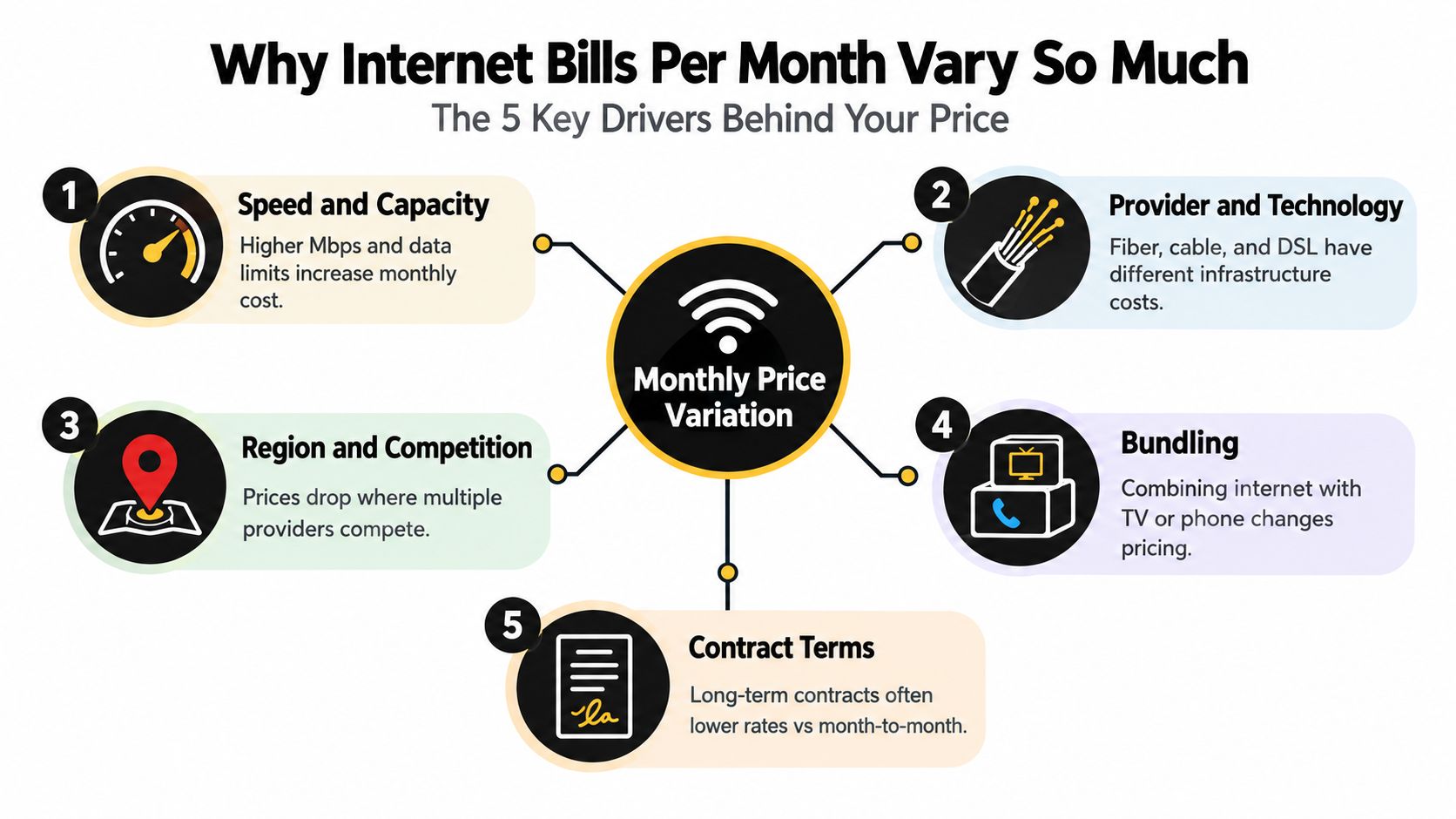
Two households can use the same provider and pay different amounts because they purchase different levels of capacity and receive different local offers. The average is a reference point, not a universal price tag.
Speed changes the price
Speed is often the clearest driver. A basic plan may handle ordinary browsing and occasional streaming, while higher tiers support more simultaneous devices, large downloads, video calls, and demanding uploads.
The premium becomes especially visible at the top of the market. An OECD analysis of broadband bundling and pricing found that gigabit plans clustered around $105 to $110 per month, while 100, 50, and 25 Mbps plans were much lower and had declined over time. The practical lesson is that you're not merely paying for “internet.” You're paying for capacity, network performance, and the provider's positioning of that tier.
Technology and local infrastructure matter
Fiber, cable, DSL, and fixed wireless rely on different infrastructure. Fiber can provide strong upload performance and high capacity, while cable availability and performance may depend more heavily on neighborhood network design. DSL and fixed wireless may be the practical choices in places where wired competition is limited.
The same plan label can therefore mean different value in different locations. A provider may advertise a low entry price where it faces strong competition, while a household with only one viable option has less bargaining power.
Competition affects bargaining power
When several providers serve an address, you can compare offers and ask your existing provider to match a competing deal. Where choice is limited, switching may not be realistic, so equipment selection, speed reduction, and fee negotiation become more important.
Bundling complicates the comparison. Internet combined with television or phone service may reduce the advertised combined price, but it can also add services you don't use or make the bill harder to audit.
International benchmarks tell a different story
The U.S. average also looks different against peer markets. A 2026 international broadband pricing report found that average fixed broadband pricing across 52 EU and OECD markets fell to €31 per month from €33 in 2023, while mobile broadband averaged €34. The report places the U.S. figure from BroadbandNow in a higher-cost context.
That comparison doesn't determine what any one household should pay. It does show why country, market structure, speed expectations, and equipment policy belong in any serious discussion of internet bills per month.
Comparing Common Internet Plans and Speed Tiers
The fastest plan isn't automatically the best plan. A household should match capacity to simultaneous use, not choose a premium tier because its advertised number is larger.
| Plan Tier | Typical Speed | Best For | Price Signal |
|---|---|---|---|
| Basic | 25 to 100 Mbps | One or two light users, browsing, email, standard streaming, and occasional video calls | Usually the lower-cost entry point, but check upload performance and data rules |
| Mid-tier | 200 to 400 Mbps | Several users, frequent streaming, remote work, gaming, and connected devices | A practical balance for many households, with a moderate speed premium |
| Gigabit | About 940 Mbps or more | Heavy simultaneous use, large downloads, multiple high-demand users, and advanced home networks | Expect a substantial premium for capacity and top-tier performance |
A single person who mostly browses, streams, and joins occasional calls may not notice a meaningful everyday difference between a basic and mid-tier plan. A larger household with several video streams, work calls, game downloads, and smart-home devices can benefit from additional capacity.
Cable versus fiber
Cable plans can offer strong download speeds and broad availability. Fiber often stands out for upload performance, which matters when you send large files, back up photos, livestream, or work with cloud-based tools. Fixed wireless can be useful where wired options are unavailable, but performance may vary with location and network conditions.
Don't compare only the headline download number. Check upload speed, data limits, equipment rules, expected price after promotion, and whether the provider guarantees or merely advertises the displayed rate.
A simple self-selection test
Choose the lowest tier that comfortably supports your busiest normal period.
- Light use: Pick a basic tier if your household has few simultaneous users and mostly performs routine online tasks.
- Mixed use: Consider a mid-tier plan if people regularly work, study, stream, game, or make calls at the same time.
- Heavy use: Look at gigabit service when several users need high capacity at once or when large transfers are a routine part of your work.
- Uncertain use: Start with a lower tier if the provider allows an easy upgrade and doesn't impose a costly commitment.
Overpaying often happens when a household buys for rare peak moments rather than ordinary usage. A faster plan can't fix weak Wi-Fi placement, an outdated router, or poor device coverage throughout the home, so diagnose those issues before upgrading.
Hidden Fees and Promo Pricing That Inflate Your Bill
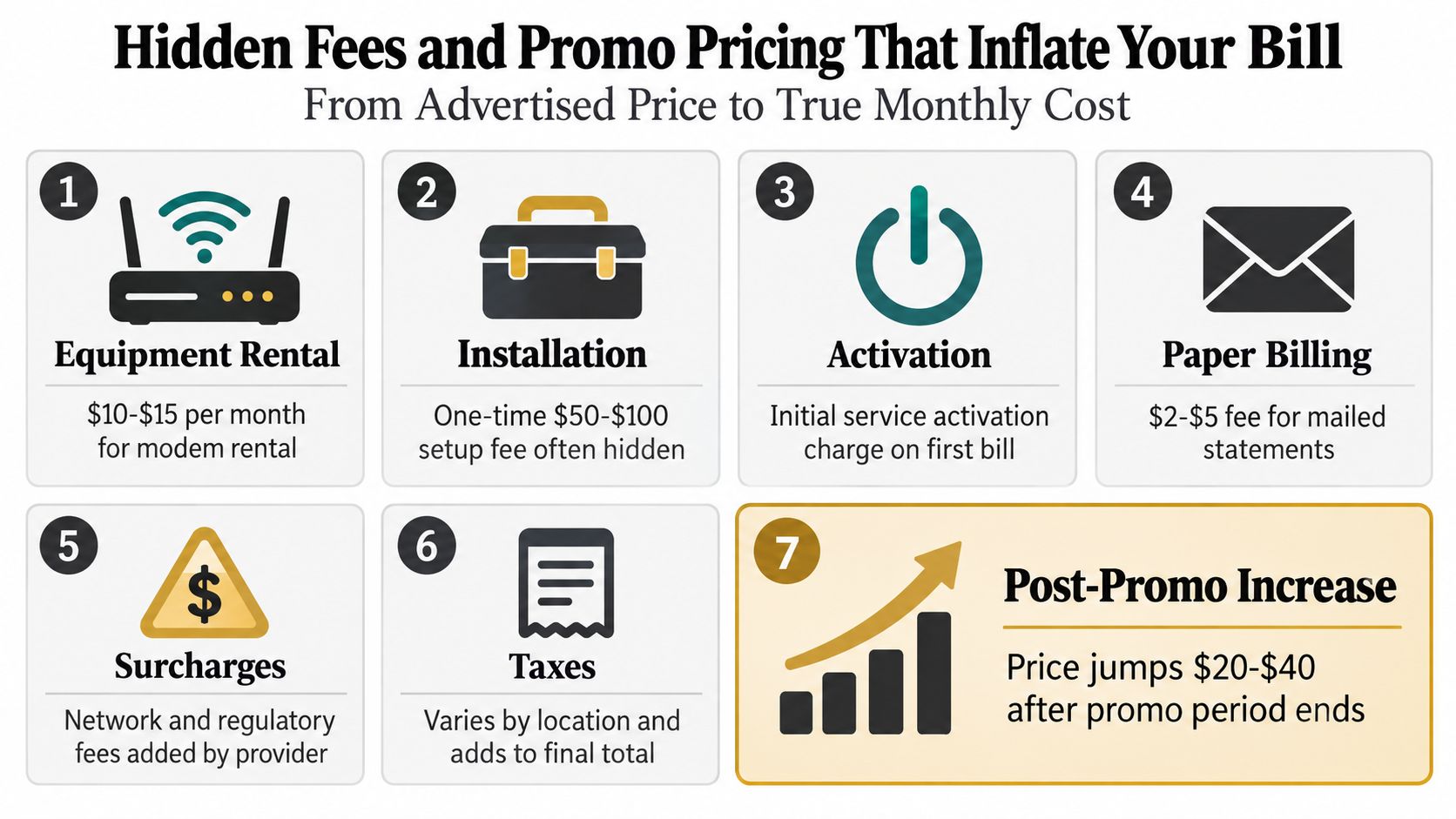
The advertised price is only the first line of your internet cost. Your actual monthly bill can add equipment rental, paper billing, installation, activation, taxes, surcharges, and a higher standard rate after the promotion ends. Treat the total like a recipe: the advertised service is the base, while fees and later price increases change the final amount.
A CNET guide to spotting hidden internet fees lists recurring equipment charges, paper billing fees, activation and installation costs, taxes, and provider-imposed surcharges as common reasons the final bill exceeds the sticker price. It describes equipment rental as often about $5 to $15 per month and paper billing as potentially adding $5 to $10, although your provider's terms determine the actual amount.
Equipment can change the comparison substantially. A cross-region connectivity cost study reported that U.S. consumers averaged $84.37 per month with equipment rental included, compared with $68.38 for service alone. Its calculated equipment difference was about $15.99 monthly, showing why the service line alone does not reveal the true cost.
Sticker price is the invitation. The recurring total is the commitment.
Before signing up, request a written estimate for the first bill and the normal bill after all credits expire. Check whether you can use your own modem and router, whether professional installation is optional, and whether taxes or surcharges sit outside the advertised price.
After activation, compare the first statement with the order summary. Mark each unfamiliar line and ask whether it is recurring or one-time. A recurring-charge review tool can also help identify charges that deserve a closer look.
Put the promotional end date on your calendar. If the bill rises later, compare it with the promised post-promotion rate and investigate promptly. A higher charge may be allowed, but it should not catch you unprepared.
Proven Ways to Lower Your Internet Bill Without Losing Speed
Your true monthly cost is more than the advertised rate. Add recurring fees, equipment rental, speed premiums, and any annual increase before deciding whether a plan is affordable. That total gives you a better target for savings than the headline price.
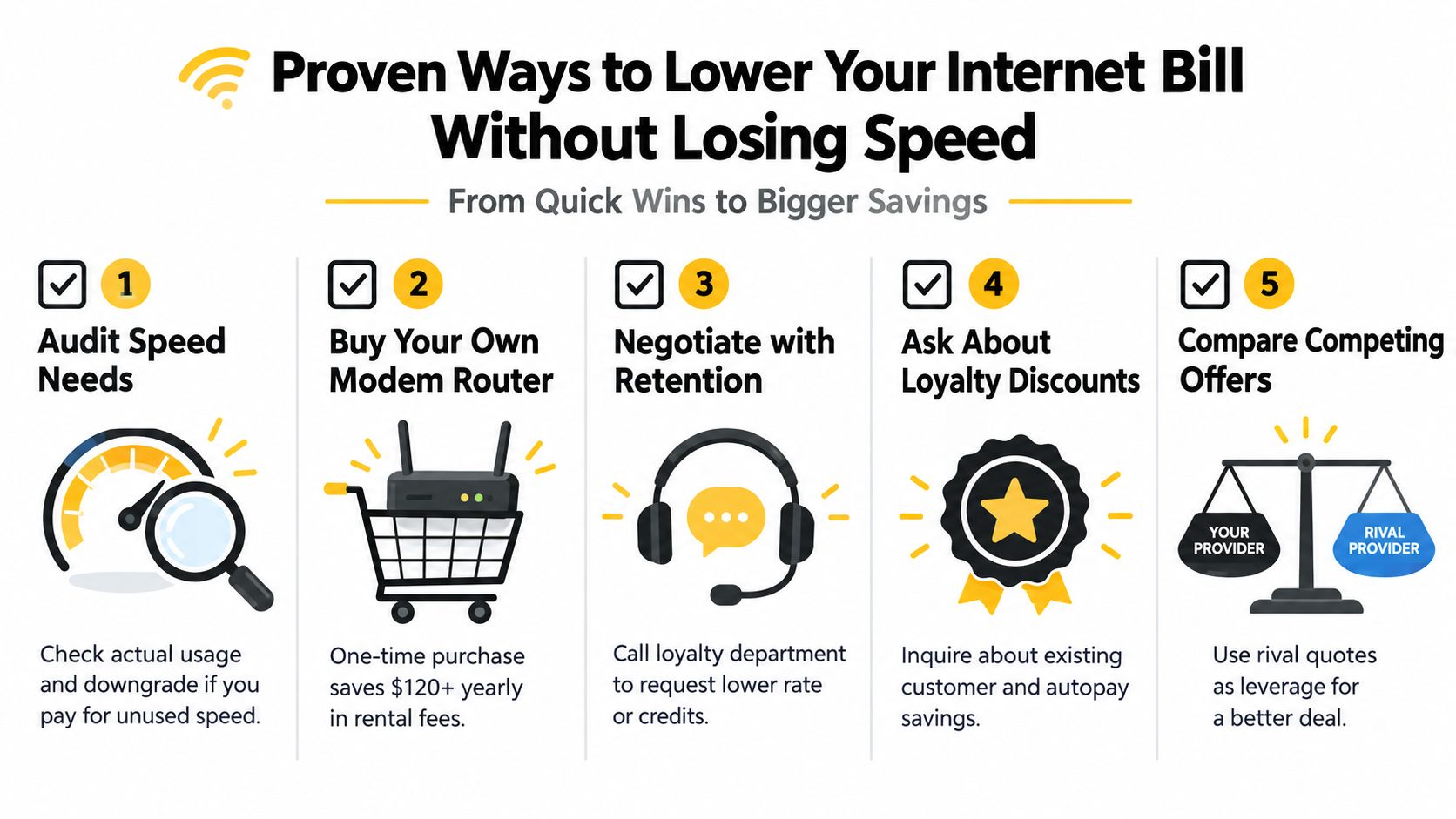
Audit what you actually use
Review your plan's download speed, upload needs, data policy, and connected devices. If your household rarely experiences slowdowns during busy periods, a lower tier may provide the same practical experience at a lower price.
Check the cause before paying for faster service. Test a wired connection if possible, then review router placement and hardware performance. A speed upgrade cannot fix a dead zone created by walls, distance, or an outdated router.
Reconsider rented equipment
If your provider allows compatible customer-owned equipment, compare the monthly rental with the purchase cost of a modem-router combination. Confirm compatibility first, and ask whether support will troubleshoot third-party hardware.
Rental charges can materially increase the recurring total. Buying may reduce that monthly line, but the equipment becomes your responsibility if it fails. Compare the expected ownership cost with the rental, warranty, replacement risk, and time required to handle problems.
Negotiate with a prepared script
Call before a promotional rate expires, or after finding a comparable local offer. Ask for the loyalty or retention team and use a specific request:
Negotiation script: “My current total is no longer competitive. What lower-priced plans, loyalty credits, or equipment options are available at my address?”
Keep your target speed and competing offer nearby. Ask for the regular price after credits, the credit duration, and every recurring fee. Record the representative's name and the call date so you can check the next bill against the agreement.
Check eligibility before switching
Ask about loyalty discounts, autopay savings, paperless billing, community programs, and income-qualified assistance. Request each program's name and application requirements rather than assuming you qualify.
If the provider cannot offer a workable total, compare another service. Before canceling, confirm installation timing, equipment-return instructions, final-bill rules, and whether the new price is promotional. For other recurring charges, use this subscription cancellation guide to document cancellation steps and deadlines.
Here is the companion video for negotiating and reducing recurring bills:
Keep Your Bill Low With Ongoing Monitoring and Smart Habits
A low internet bill usually comes from maintenance, not one perfect signup decision. Providers change rates, credits expire, equipment remains on accounts after upgrades, and optional features can continue billing after you stop using them.
Set a reminder for the promotional end date and another for the month when you expect the standard rate to appear. Each month, compare the current statement with the previous one and check four items:
- Base service: Did the plan price change?
- Credits: Did a promotional or loyalty discount disappear?
- Equipment: Is the hardware charge still necessary?
- Extras: Did a security feature, extender, or other add-on appear?
A spreadsheet works well for a single household. Record the billing date, total, service tier, recurring fees, active credits, and expected standard price. The purpose isn't complicated accounting. It's creating a reference point so a quiet increase becomes visible.
You can also use this guide to finding all your subscriptions to identify recurring charges that may be easy to overlook. Internet service belongs on the same review list as mobile plans, insurance, streaming services, and memberships.
Broadband prices have also shown signs of ongoing pressure in the U.S. A Benton Institute analysis of 2025 broadband pricing reported an average sticker-price increase of nearly $7 from 2024 to 2025, along with 4.8% real growth. It also reported that fiber prices rose 12.8% in real terms in 2025 and 40.1% since 2020, making periodic bill checks especially important for households that assume fiber pricing will remain unchanged.
Compass+ can monitor linked bank transactions, email receipts, and calendar dates to flag recurring bill increases, duplicate charges, renewal dates, and low-use subscriptions. It presents a finding with a recommended next step, such as contacting a provider, requesting a credit, or reviewing a recurring charge.
For the next 30 days, save your latest internet statement, record the promotional end date, check equipment ownership, compare your actual speed needs with your tier, and schedule a review before the next rate change. That small routine turns internet bills per month from a surprise expense into a manageable line in your budget.
Compass+ helps you monitor recurring charges, compare current bills with earlier statements, and surface specific opportunities to reduce expenses or recover money. Visit Compass+ to review your internet bill alongside other household costs and get a concrete next step when a charge changes.