How to Track Subscriptions and Stop Losing Money
Learn how to track subscriptions across bank, email, and calendar with a clear workflow. Discover hidden charges, set alerts, and automate monitoring
19 min read
You probably have the same bad system. You remember the big subscriptions, ignore the small ones, and assume you'd notice anything important on your statement.
You won't.
The charges that hurt you aren't usually the obvious ones. They're the free trial that rolled into paid, the annual renewal that hit when you weren't looking, the family plan nobody uses but nobody cancels, and the weird merchant name on your card that doesn't match the app icon you'd recognize.
That's why how to track subscriptions isn't really a list problem. It's a discovery problem. If you want to stop losing money, stop maintaining a tidy little list of services you already know about and start reconciling the places where subscription evidence shows up.
Table of Contents
- Why Most People Track the Wrong Subscriptions
- Finding Every Recurring Charge You Pay
- Testing Usage and Setting Renewal Alerts That Fire
- Choosing Between Cancel, Downgrade, or Claim a Credit
- Letting Compass+ Run the Reconciliation in the Background
- Why Automation Beats a Monthly Self-Audit Every Time
- A Repeatable Subscription Tracking Cadence and Common Questions
Why Most People Track the Wrong Subscriptions
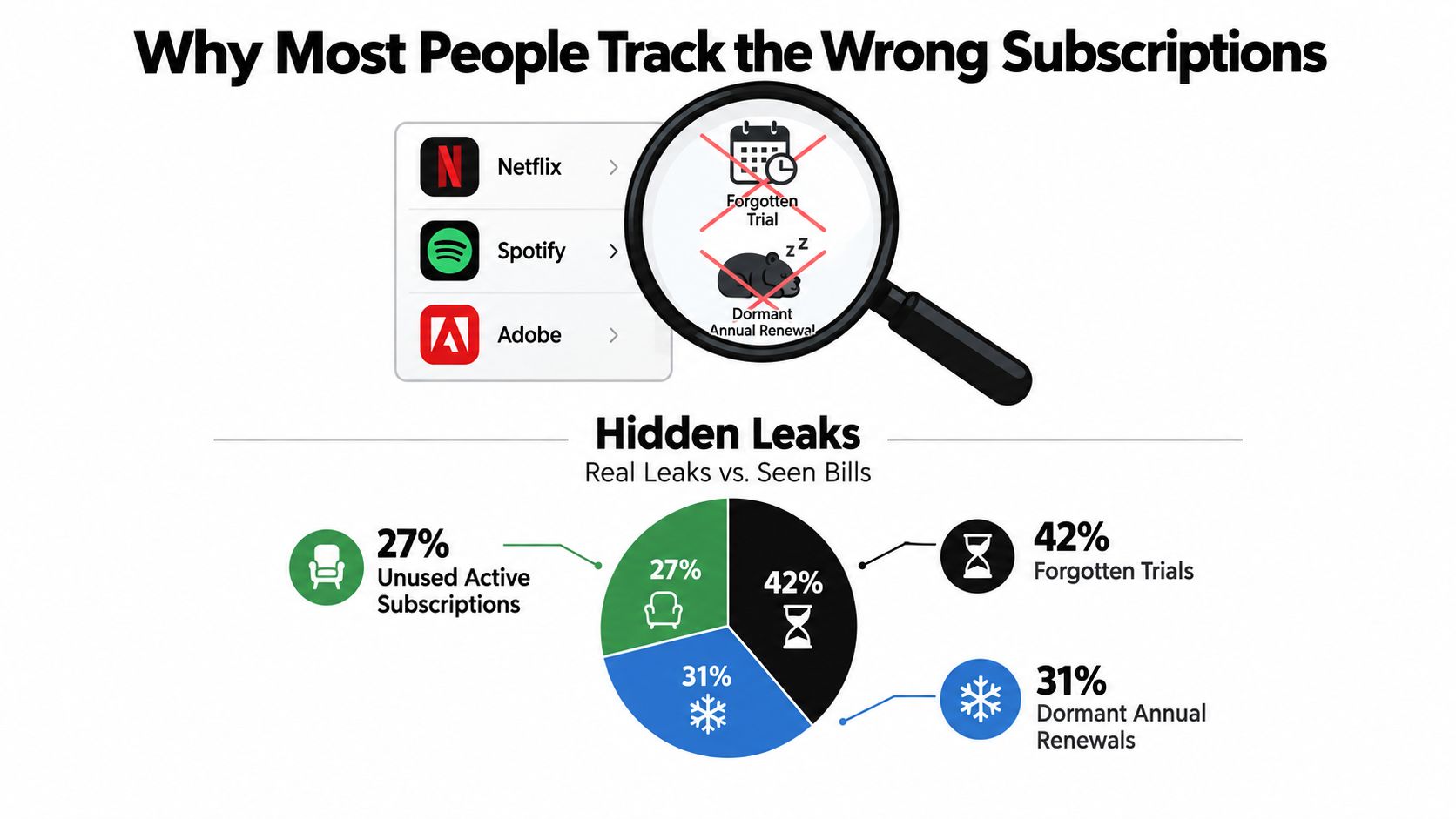
You open your banking app, spot Netflix and the gym, and assume you have the full picture. You do not. Subscription tracking fails when it depends on recall instead of transaction evidence.
The charges that slip through are predictable. A free trial converts under a merchant name you do not recognize. An annual plan renews eleven months after you stopped using it. A family or team account keeps billing because everyone assumes someone else handled it.
As noted earlier, a large share of paid subscriptions go unused. The point is simple. Unused subscriptions survive because people track the services they remember, not the charges that recur.
Your list only captures known subscriptions
A handwritten list, budgeting app category, or notes file is biased from the start. It records the subscriptions you already know exist. That makes it weak at catching the exact charges that waste money.
Here is what usually gets missed:
- Trial conversions: You signed up for a short test and never came back.
- Annual renewals: The charge returns long after the service left your mind.
- Shared plans: One person pays, someone else uses it, nobody owns the decision.
- Merchant-name mismatches: The bank descriptor looks unfamiliar, even when the product would be obvious in the App Store or your inbox.
Track evidence, not memory.
That means building one reconciliation loop across three places. Transactions show what posted. Email receipts show what the merchant says you bought. Calendar dates show when the next decision point hits. If one of those records disagrees with the other two, you have found the subscription worth investigating.
Discovery works better than maintenance
Cancellation behavior has changed because subscription fatigue is real, but that still does not solve the actual problem. People cancel the obvious services and leave behind the hidden ones. Analysts summarized in these 2026 subscription fatigue statistics found heavy cancellation activity, which fits what shows up in real audits. People are pruning. They are not reconciling.
That distinction matters. Maintenance says, "keep your list updated." Discovery says, "prove every recurring charge with matching evidence." Discovery is the system that finds forgotten renewals, duplicate plans, billing descriptor confusion, and services you meant to cancel months ago.
If you want a practical model, start with a discovery-first audit for finding money you're owed or wasting. Compass+ runs that same reconciliation logic in the background by matching recurring transactions, billing emails, and renewal timing so you are not stuck doing the detective work by hand every month.
Finding Every Recurring Charge You Pay
Friday night, you open your card app and spot a charge you do not recognize. It is only $9.99, so it has slipped through for months. Then you find a second one with a parent-company billing name, and a third tied to a free trial you forgot to cancel. That is how subscription creep works. It hides in plain sight and survives because people rely on memory instead of proof.
Use a three-record audit. Match transactions, email receipts, and calendar dates against each other. A single source always leaves blind spots.
Start with bank and card transactions
Open the last 90 days of checking, debit, and credit card activity. Go line by line. Do not scan for the brands you remember signing up for. Scan for repetition.
You are looking for patterns the merchant hopes you will ignore. Same amount each month. Same week each year. Slightly different billing names tied to the same service. Weird descriptors that look nothing like the app, gym, or newsletter you bought.
Exporting to CSV helps because you can sort fast and force the repeats to the surface.
Check for:
- Repeated amounts: monthly or annual charges posting at the same price
- Merchant variations: billing names, parent companies, or abbreviations linked to one service
- Small charges: the cheap plans that survive because they never feel urgent
- Stacked charges: two plans from the same company, often from an old account or an upgrade that never replaced the original
Search your inbox like you are building a case
Your inbox is the merchant's paper trail.
Search terms such as “receipt,” “renewal,” “membership,” “subscription,” “trial ending,” “invoice,” “billing,” “payment received,” and “auto-renew” pull up services your statement cannot explain cleanly. If you find a mystery charge, search the merchant name, the billing descriptor, and the amount. One of them usually cracks it.
Email also catches charges before they post. Trial reminders, annual renewal notices, and price-change emails often show up days or weeks before the bank record does. That gives you time to act instead of reacting after the money is gone.
If a charge shows up on your card and you cannot find a matching receipt or renewal trail, treat it as unresolved. Do not shrug and move on.
Put decision dates on a calendar
The calendar is your control point.
As soon as you confirm a subscription, add the next renewal date, trial end date, or annual billing month. Put the billing cycle in the event title. Add the cancellation path or account login in the notes. Set the alert far enough ahead to do something useful, not ten minutes before renewal.
This is the difference between discovery and list maintenance. A list is static. A reconciliation loop keeps forcing the next decision back in front of you.
| Data Source | What It Catches | What It Misses |
|---|---|---|
| Bank or card transactions | Posted recurring charges, odd merchant descriptors, duplicate billing patterns | Upcoming renewals that have not charged yet, pricing notices buried in email |
| Email receipts and renewal notices | Trial conversions, annual renewal confirmations, price increase notices, account-level billing details | Charges with no easy-to-find receipt, card activity outside the inbox owner's email |
| Calendar dates | Upcoming billing deadlines, trial endings, action windows before renewal | Hidden subscriptions you have not identified yet |
Count a subscription as confirmed only when the records line up. The charge appears in transactions. The receipt or renewal trail appears in email. The next decision date sits on your calendar. That is a clean record.
If you want this running in the background, Compass+ applies the same loop automatically by matching recurring transactions, billing emails, and renewal timing. The point is not keeping a prettier list. The point is catching every recurring charge before it keeps draining money unnoticed.
Testing Usage and Setting Renewal Alerts That Fire
Friday night. You get a renewal email for a service you barely remember signing up for, and by Monday the charge has posted. That is what happens when subscription tracking stops at discovery. Finding the charge is step one. Proving that the subscription still earns its place is step two.
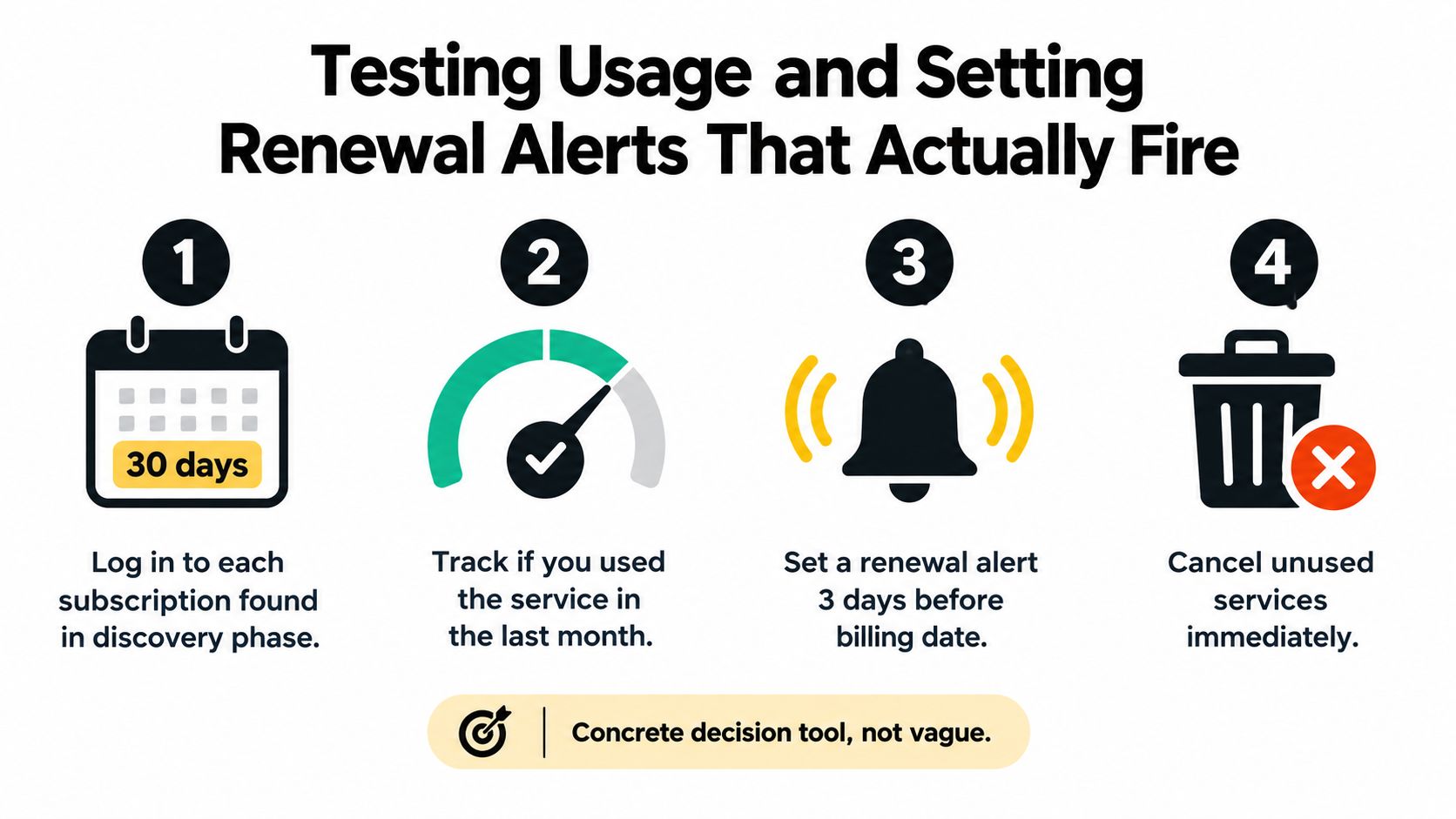
Use a hard 30 day rule. If you have not used the service in the last 30 days, treat it as inactive until it proves otherwise. That standard is simple, strict, and hard to argue with. It cuts through guilt, habit, and the fantasy that you will "get back to it next month."
Test real usage, not intent
Log in and look for proof. Check watch history, file activity, class attendance, exports, saved work, project edits, shipping frequency, or whatever the service records. You are not asking whether you like having access. You are asking whether you used what you paid for.
A few common cases make the answer obvious:
- You used the design app once for a project that ended. That is not recurring value.
- You stopped opening the fitness or meditation app weeks ago. Good intentions do not justify a monthly charge.
- You read one or two articles from a news subscription because someone sent you links. That might justify a free account, not a paid one.
Sort each subscription into one of three buckets:
- Used within 30 days: keep it on the list for the next review.
- No use within 30 days: put it in the action pile.
- Light use: compare your usage to the plan you are paying for.
That third bucket matters. A subscription does not need to be useless to be overpriced.
Set alerts early enough to act
A reminder that pops up after the charge hits your card is a postmortem, not a control system.
Set two renewal alerts for every paid subscription. Put the first one 7 days before renewal. Put the second one 1 day before. One alert gives you room to review usage, check alternatives, or find the cancellation page. The second alert forces a decision before the merchant bills you again.
Build the reminder so it can stand on its own. Include:
- Service name and billing amount
- Renewal date and billing frequency
- Where to cancel, pause, or downgrade
- A short note on last confirmed usage
Now your calendar is part of the reconciliation loop. Bank charges show what posted. Email shows what is coming. The calendar tells you when to decide.
Make the alert trigger a reconciliation check
Do not maintain one list for subscriptions and another system for decisions. Tie them together.
When the alert fires, verify three things fast. Did you use it in the last 30 days? Does the upcoming charge match the price in the latest receipt or renewal email? Is there a cheaper tier or credit option worth taking before the billing date? If those records do not line up, the subscription is not fully tracked yet.
This is also where automation starts earning its keep. Compass+ can run the same check in the background by matching recurring transactions, billing emails, and renewal timing. The point is simple. Every renewal should trigger a decision before the charge lands, not a regret after it does.
Choosing Between Cancel, Downgrade, or Claim a Credit
Once you've found a subscription and tested usage, you need to choose the right move. Too many people jump straight to cancellation when the better answer is a lower tier, a refund request, or a credit they never claimed.
I use three buckets: cancel, downgrade, and claim.
Cancel when the service is dead
Cancel means the subscription has no current role in your life.
That includes the meditation app you haven't touched, the old domain renewal you forgot existed, the second cloud storage account you no longer need, and the class membership you keep “meaning to get back to.” If it's been sitting there unused and you don't have a clear return date, cut it.
A simple refund request can help if the renewal was recent: ask for cancellation and mention that the service was not actively used after renewal. Keep it direct. Don't write a novel.
Downgrade when usage exists but the plan is wrong
Some subscriptions aren't useless. They're just oversized.
Move down a tier when you still use the service but not enough to justify the current price. Family plans often linger after household needs change. Premium software tiers stick around after a project ends. Annual plans can be a bad fit when usage is sporadic and you'd be better off paying only in the months you need access.
Claim when the charge is valid but the cost isn't final
This is the category people miss.
If a price went up, a promotional rate expired, a duplicate charge appeared, or a card benefit already covers part of the service, don't treat the only options as “keep” or “cancel.” Ask for a credit. Request a partial refund. Apply the card perk. Push for a plan adjustment.
Use this quick matrix:
| Subscription Signal | Recommended Action | Expected Monthly Savings | Example |
|---|---|---|---|
| No use in the last 30 days and no clear future use | Cancel | Varies by plan | Unused app, forgotten domain, dead membership |
| You use it, but current tier exceeds actual needs | Downgrade | Varies by tier change | Family plan reduced to individual, premium software moved to basic |
| Charge looks wrong, increased, duplicated, or eligible for reimbursement | Claim a credit | Varies by outcome | Promo expired, duplicate billing, card benefit not applied |
If you need help with the actual shutdown process, use a clean owner-first method like this guide on how to cancel subscriptions. The billing owner matters because the app store, bank card, wireless carrier, and direct merchant can all sit between you and the cancel button.
Letting Compass+ Run the Reconciliation in the Background
Manual reconciliation works. It's also annoying.
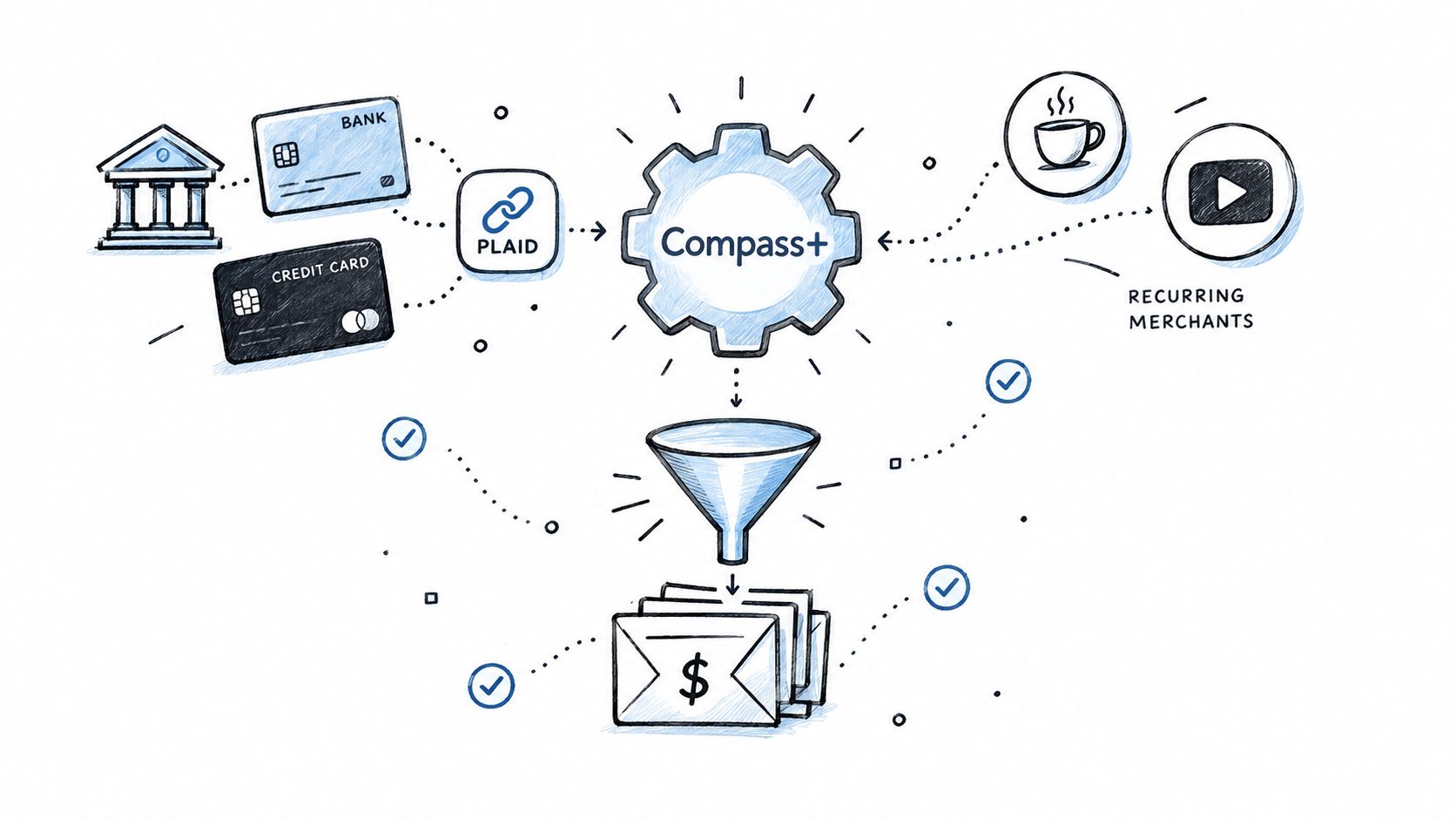
The smarter model is to let software run the same loop in the background: bank transactions for recurring charges, email for receipts and renewals, and calendar for deadlines. That's the exact job a monitoring tool should do.
What the automated loop should catch
A solid subscription tracker shouldn't just store a list. It should detect patterns you'd otherwise miss.
That includes a streaming charge under an old merchant descriptor, a domain renewal approaching in a few weeks, or a trial conversion that only appeared in a billing email you never opened. The point is not organization. The point is surveillance of money-relevant signals.
Compass+ is one tool built around that model. It uses read-only Plaid connectivity to analyze bank and card transactions for recurring charges, checks money-relevant emails such as receipts and renewals, and uses calendar signals to catch deadlines and renewal windows. It also surfaces related issues like duplicate charges, increased bills, refunds owed, and shopping credits, which you can explore with its money leak finder tool.
What a useful dashboard should show
If a subscription tool is doing its job, each detected service should show the details you'd otherwise have to piece together yourself:
- Merchant identity: not just the raw card descriptor
- Billing amount and cycle: monthly, annual, or trial conversion
- Last charge and next expected charge
- Confidence level: how certain the system is that the recurring charge is a real subscription
- Suggested next step: keep, cancel, downgrade, review, or claim
That matters because modern subscription management isn't just about voluntary cancellation. Industry benchmark research summarized in these churn and retention statistics notes that 50% of subscription churn can be involuntary, caused by failed card payments rather than deliberate decisions. That's one reason a good system has to monitor both user intent and billing mechanics.
Here's what that kind of workflow looks like in motion:
Why background monitoring changes the job
Once the reconciliation runs continuously, you stop rebuilding the same list from scratch. You review findings instead of hunting for clues.
That's the right division of labor. Software should detect. You should decide.
Why Automation Beats a Monthly Self-Audit Every Time
The monthly self-audit sounds responsible. In practice, it's unreliable.
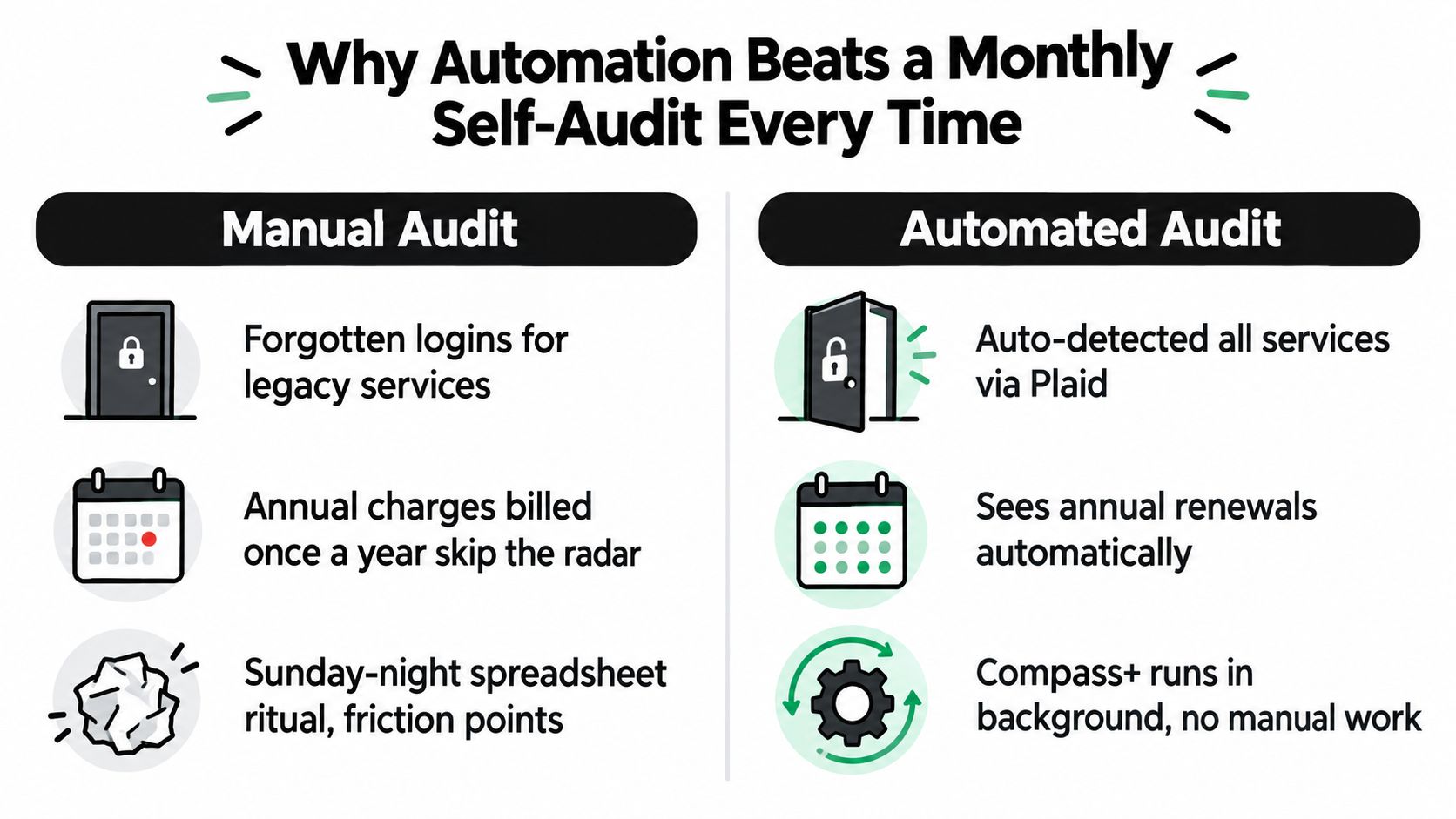
People sit down once a month, scroll a statement, swear they'll clean things up, and still miss the stuff that doesn't line up neatly with that schedule. Annual charges don't care about your Sunday spreadsheet ritual. Trial conversions happen in between audits. Renewal emails get buried long before your review day.
Manual reviews fail in predictable ways
The failure points are boringly consistent:
- Legacy logins disappear: You can see the charge but can't remember where the account lives.
- Annual renewals slip through: You don't notice them because your review habit is built around monthly spending.
- Shared plans blur ownership: One person uses it, another person pays it, and nobody closes the loop.
- Price increases hide in email: The notice was sent. You just never acted on it.
A manual audit also assumes you'll stay disciplined enough to compare card records, inbox receipts, and upcoming dates every single time. Many won't. They'll check one source, skim another, and call it done.
Automation watches when you won't
Always-on monitoring fixes the exact failure points people create for themselves.
A transaction feed catches a recurring charge when it posts. Email parsing catches renewal notices and billing changes before they become old news. Calendar checks surface deadlines while there's still time to cancel, downgrade, or claim something. The system doesn't get bored, rushed, or overly optimistic about how much it will “definitely deal with later.”
The best subscription system is the one that still works when you're busy, distracted, or tired.
If you care about results, pick the method that removes your own inconsistency from the process.
A Repeatable Subscription Tracking Cadence and Common Questions
You don't need a complicated routine. You need a repeatable one.
Run a full subscription reconciliation every 30 days, which lines up well with the 30-day unused standard described in User Intuition's subscription UX and retention guidance and with the usage rule covered earlier. Then do a lighter weekly glance at upcoming renewals and new recurring charges. That keeps the heavy work infrequent and the decisions timely.
The monthly cadence that actually works
Use this sequence every month:
- Pull fresh records. Review bank and card transactions, recent billing emails, and your upcoming subscription calendar.
- Match each subscription across sources. If you can't identify a charge cleanly, investigate it immediately.
- Apply the 30-day usage test. Keep, downgrade, cancel, or claim based on actual use and value.
- Update renewal alerts. Watch annual charges especially closely because they can post earlier than you expect.
- Log one action note. Write what you decided, when you decided it, and what happens next.
That's it. Don't turn this into a hobby.
Common questions people ask
How often do I need a full reconciliation
Every 30 days is enough for many individuals. Weekly, you just need a quick look at anything renewing soon or any new recurring charge that appeared. Annual subscriptions deserve extra attention because some billing windows can hit 7 to 14 days earlier than you expect.
Is linking financial accounts and email actually safe
The key is scope. Read-only financial access matters. Tokenized access matters. Narrow email permissions matter. If a tool can't move money and focuses only on money-relevant messages like receipts, renewals, and confirmations, that's the right setup. You should also be able to revoke connections individually.
What should a household do with shared subscriptions
Tag the payer, the primary user, and the actual purpose. If one spouse pays and the other uses the service, write that down. If adult kids moved off a family plan, update the plan. If reimbursements happen between household members, log them next to the subscription so nobody mistakes a personal expense for a shared one.
Shared subscriptions don't become organized by being “understood.” They become organized when one person owns the record.
Your one-line commitment for this week is simple: reconcile your bank charges, renewal emails, and calendar dates once, then stop trusting memory.
Compass+ gives you a way to run that reconciliation loop without rebuilding it by hand every month. It monitors linked financial, email, calendar, and shopping accounts for recurring charges, low-use subscriptions, refunds, credits, and other money leaks, then shows the next step in plain English. If you want a system that finds the charges you forgot existed, visit Compass+.