Bill Monitoring App: How It Actually Saves Money
Learn how a bill monitoring app works, the must-have features to look for, and why proactive tools recover more money than basic subscription trackers.
15 min read
A bill monitoring app saves the most money when it does more than warn you about due dates. The strongest tools look for duplicate charges, price drops, billing errors, failed autopay, and refunds after money has already left your account.
Most advice about bill monitoring starts with the same instruction: track every due date and avoid late fees. That advice is useful, but it treats your finances like a calendar problem. In practice, many of the expensive mistakes happen after a payment succeeds. A merchant charges twice, a subscription price rises without notice, a promised refund never arrives, or a delivery credit goes unclaimed because nobody checked the order again.
That distinction changes what you should expect from a bill monitoring app. A basic tracker gives you visibility. An advanced monitoring system turns transaction, email, calendar, and shopping data into a recovery queue. It tells you what happened, why it matters, and what action could return money to your account.
Table of Contents
- Why Standard Bill Reminders Fall Short
- How Transaction Parsing Detects Hidden Charges
- Essential Features for Security and Recovery
- Passive Trackers vs Proactive Money Agents
- Setting Up Your Monitoring Profile Safely
- Choosing the Right Tool for Long-Term Savings
Why Standard Bill Reminders Fall Short
A due-date reminder answers one narrow question: when should money leave the account? It doesn't answer whether the amount was correct, whether the merchant charged the right account, or whether the promised refund appeared afterward. If the app confirms that an autopay went through, it may consider the job complete even when the transaction was duplicated or the price changed without your attention.
That limitation matters because subscription-heavy households have many recurring opportunities for small errors. A Bango survey found that 77% of consumers want to pay for multiple subscriptions through one monthly bill, while 78% want one app to manage all subscription services and accounts. The same source reported that 35% of users who pay for unused subscriptions don't know how much they're spending (Bango subscription research). Centralized visibility is clearly valuable, but visibility alone doesn't recover a missed credit.
The popular “never miss a payment” framework also misses failed autopay. Payments can fail because of insufficient funds, expired cards, or billing errors, as outlined in this guide to avoiding overdrafts through bill timing. A confirmation-only system might show a successful charge from last month and never alert you that this month's payment was rejected, leaving the service at risk of suspension or a late fee.
The overlooked post-payment problems
A useful bill monitoring workflow should investigate the transaction after it posts. That means checking for:
- Duplicate charges: Two similar transactions from the same merchant may indicate a repeated checkout, a processing error, or two legitimate orders that need confirmation.
- Bill creep: A recurring service can become more expensive without an obvious notification that reaches the account holder.
- Missing refunds: A merchant may approve a refund, but approval isn't the same as money returning to the card or bank account.
- Unclaimed credits: Delivery guarantees, price-adjustment policies, and service commitments can create credits that customers won't receive automatically.
- Unused renewals: A service can remain active because the charge is familiar, even though nobody in the household uses it.
Practical rule: A payment marked “completed” is the beginning of an audit, not the end of one.
The recovery perspective is especially important because subscription costs are spread across many merchants and payment methods. One consumer-focused source estimates that the average American spends about $219 per month across roughly eight active subscriptions, which means small billing discrepancies can accumulate without looking dramatic in isolation (subscription bill management coverage). The right question isn't only “Will I pay on time?” It's “Did I receive exactly what I paid for, and did the merchant honor every promise attached to that payment?”
How Transaction Parsing Detects Hidden Charges
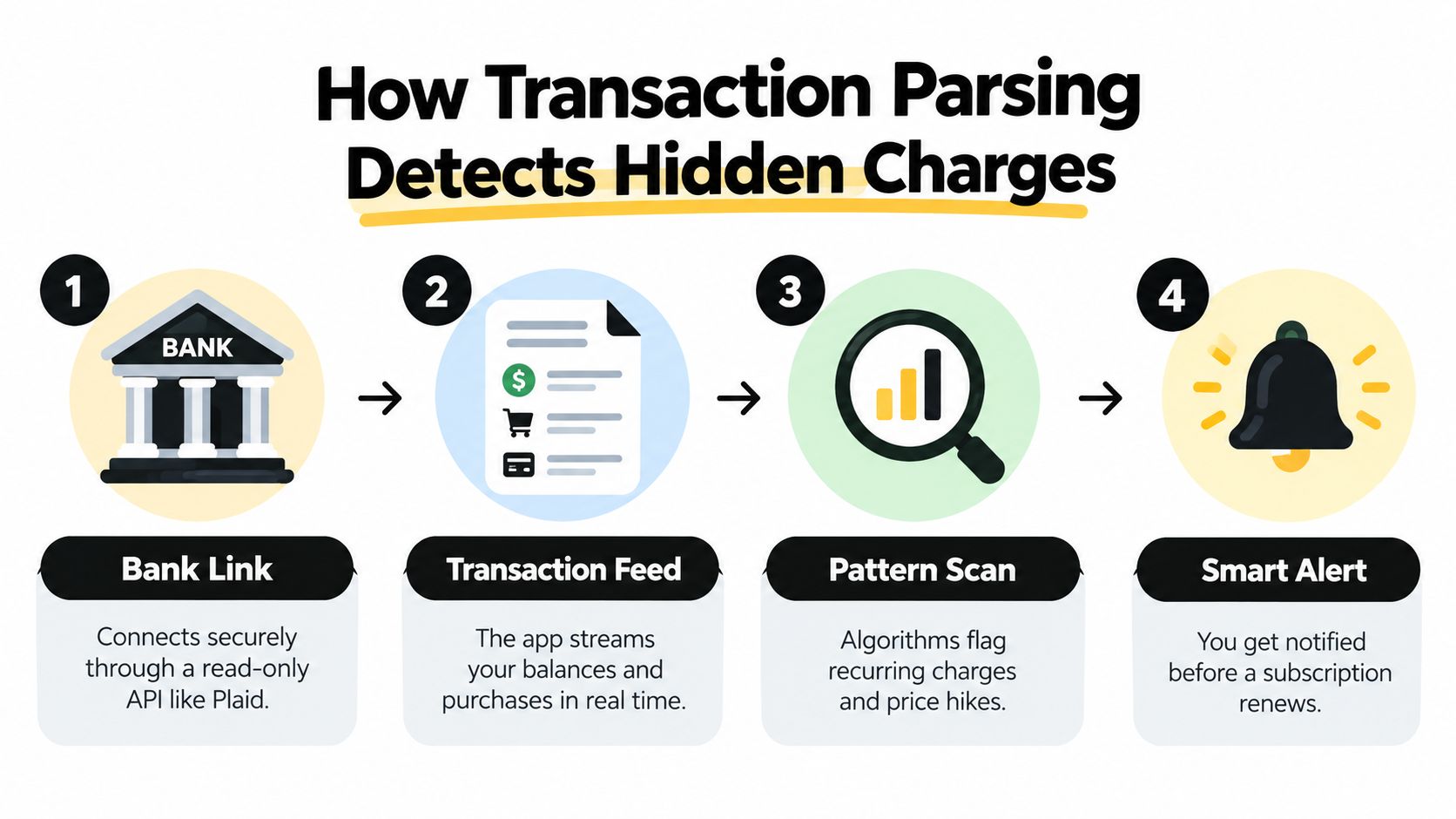
A modern bill monitoring app usually starts with a read-only connection to financial accounts. Through an integration such as Plaid, the service can inspect transaction history without receiving permission to transfer money. It reads the records needed for analysis, such as the merchant description, amount, account, and transaction date.
The system then groups transactions into recurring streams. It compares the description, amount, and cadence of outflows to distinguish a repeat bill from a one-time purchase. The recurring-transactions model described in this technical reference on bank transaction analysis returns information such as category, merchant, last amount, frequency, and whether a stream appears active or inactive.
Why history changes the result
Detection becomes more reliable as the system observes more comparable transactions. A matured recurring stream has at least three occurrences, according to the referenced recurring-transactions documentation. Before that point, the system can identify early signals of a new repeat pattern, but it may still need later transactions to confirm that the charge is genuinely periodic rather than an isolated purchase.
That distinction explains why a newly started subscription can be harder to classify than a familiar monthly bill. A one-off purchase from a merchant may resemble the first payment in a recurring plan. An early warning is useful, but a responsible app should show uncertainty rather than present every suspected pattern as a confirmed subscription.
Lookback length also matters. The referenced system exposes up to 24 months of historical transaction data, which can help identify annual renewals and gradual price increases that a short statement window could miss. This is one reason manual spreadsheet tracking often breaks down. A spreadsheet may record the amount you expect, but it won't automatically compare that expectation with a transaction that appears many months later.
For teams that work with downloaded statements, the same principle applies to document processing. A practical explanation of how to extract data from bank PDFs can help convert static statements into structured records for review. Structured data makes it easier to compare merchant names, dates, and amounts across accounts.
What parsing can and can't prove
Transaction parsing can flag a likely duplicate, a recurring charge, or a changed amount. It can't always determine whether two similar charges represent an error. A household may intentionally place two orders, a merchant may use different descriptors for the same service, or a renewal may include a legitimate plan change.
That is why the useful output isn't just an alert saying “something changed.” The app should provide the evidence that supports the flag, then suggest a human decision. A transaction review feed such as the money leak finder is more useful when it gives you the merchant, dates, amounts, related context, and a clear next step.
The best systems combine detection with restraint. They identify patterns early, confirm them as history accumulates, and let you dismiss or correct a finding without turning every unusual transaction into an emergency.
Essential Features for Security and Recovery
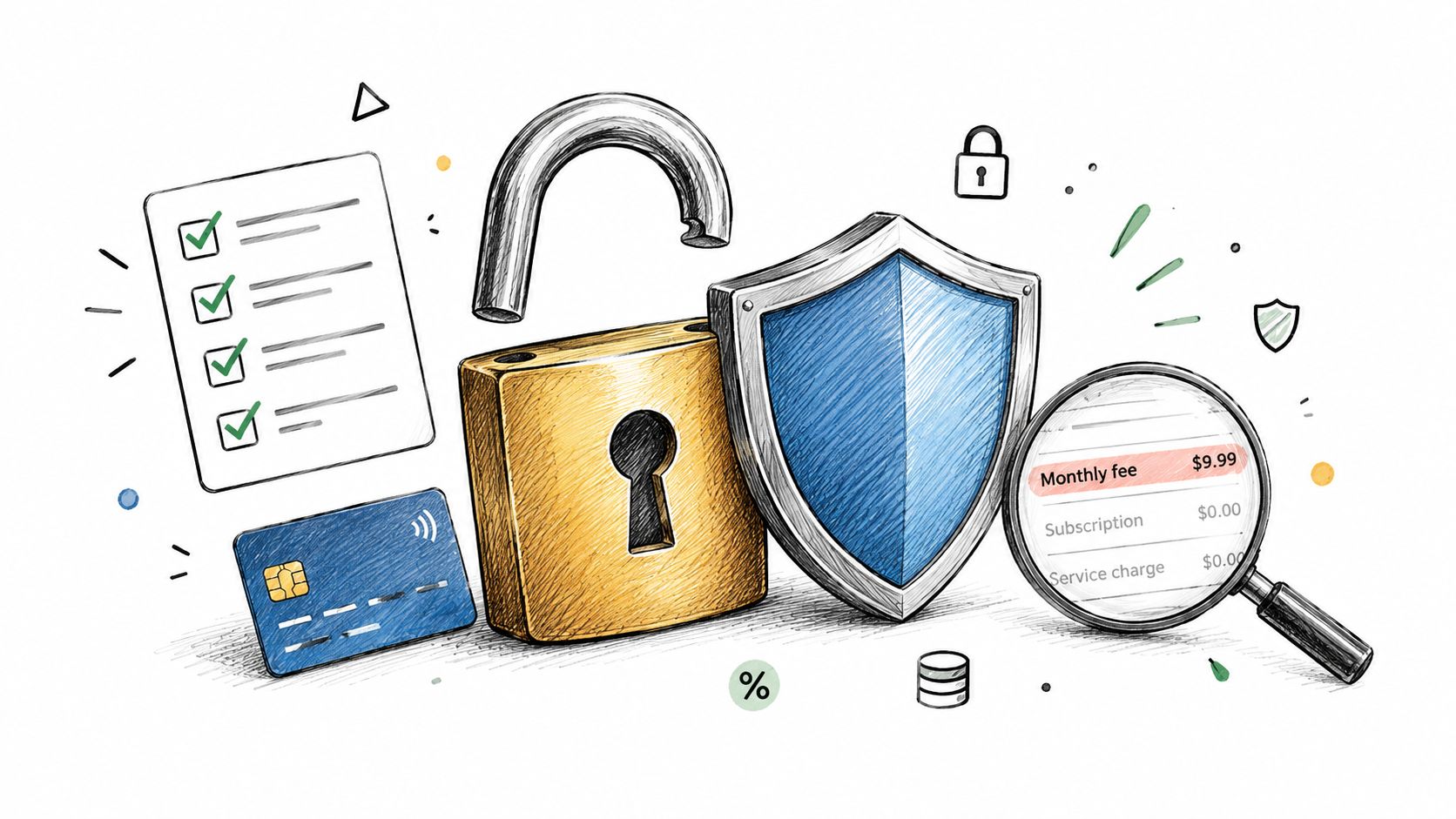
Security starts with limiting what the app can do. For bank accounts, look for read-only access that allows the service to view balances and transactions but not move money. The connection should be individually revocable, so you can disconnect one institution without deleting every other data source.
Email, calendar, and shopping connections deserve the same discipline. They should be optional, clearly scoped, and separately removable. An app that needs access to receipts doesn't need unrestricted access to every personal message. A calendar connection should support renewal dates and return windows without becoming a general-purpose archive of your schedule.
A buyer's security checklist
Before connecting an account, check whether the product explains:
- Permission boundaries: Confirm whether the bank integration can only read transaction information. The product should state plainly whether it can initiate transfers or payments.
- Connection controls: Look for per-account disconnect and deletion options instead of one global switch.
- Data purpose: Email access should focus on relevant messages, such as receipts, renewals, and refund confirmations.
- Review access: You should be able to see which institutions, inboxes, calendars, and shopping accounts are connected.
- Retention choices: Find out how the service handles stored transaction history and what happens after you disconnect.
Security isn't only about preventing unauthorized access. It also protects you from an app taking an action you didn't intend. A read-only bill monitoring app can recommend a cancellation or refund request while leaving the decision and execution with you.
Alerts need context
A useful alert should explain what happened, why it matters, and what to do next. “Subscription charge detected” is weak because it doesn't tell you whether the amount changed, whether the service is low-use, or whether the charge has already been disputed.
For a duplicate transaction, the alert might identify matching merchant descriptions and dates, then recommend checking the receipt and contacting the merchant if both charges cover the same purchase. For a failed autopay, it should identify the failure and point you toward the account that needs attention. For a missing refund, it should connect the original purchase with the merchant's confirmation and tell you to verify the credit on the receiving account.
This context reduces false urgency while improving follow-through. Users don't need more notifications. They need fewer, better-supported decisions.
Passive Trackers vs Proactive Money Agents
A passive subscription tracker waits for financial activity and organizes it. It may show recurring merchants, renewal dates, spending categories, and cancellation reminders. That model is useful for visibility, especially when someone wants to replace manual lists with a single dashboard.
A proactive money agent takes a wider view. It compares bank activity with receipts, renewal messages, calendar deadlines, and order status. Instead of asking you to investigate every charge, it looks for a mismatch that could lead to a recovery action.
| Capability | Passive tracker | Proactive monitoring |
|---|---|---|
| Recurring charge visibility | Lists likely subscriptions | Identifies recurring charges and changes that need review |
| Renewal awareness | Shows known dates | Combines transaction history with renewal messages and calendar context |
| Refund handling | May record a refund manually | Checks whether a promised refund appears after the purchase |
| Shopping protection | Usually outside the workflow | Can connect orders, delivery status, and price changes |
| User action | Requires manual investigation | Presents a finding with a recommended next step |
Where cross-channel context matters
Consider a purchase followed by a lower listed price. Bank data can show the original transaction, but it can't establish whether the merchant changed the price afterward. An email receipt can identify the product and order, while shopping data can reveal the later price. Together, those sources create a practical reason to request an adjustment.
The same logic applies to late-delivery credits. A transaction record shows what you paid. An order record can show the promised delivery date. A later status update can reveal that the merchant missed its commitment. Without those records in one workflow, the customer has to search through an inbox, compare dates, and remember to contact support.
A person evaluating expense tools may also find it useful to compare the workflow with a best mobile expense app overview. Expense reporting and bill monitoring overlap in their use of transaction data, but their goals differ. Expense apps often emphasize categorization and reporting, while recovery-oriented monitoring asks whether a charge should be corrected, reversed, or followed up.
Recovery beats reassurance
The highest-value finding isn't always a large recurring bill. It may be a small duplicate charge, a missed delivery credit, or a refund that was approved but never posted. These amounts are easy to ignore because each one requires a separate merchant interaction.
That creates a useful division between a tracker and an agent. The tracker answers, “What recurring payments do I have?” The agent asks, “Which recent payments deserve an action?” A comparison such as Compass+ versus Rocket Money is most meaningful when it evaluates that difference rather than comparing only subscription lists.
A proactive system still can't guarantee that a merchant will approve a claim. It can, however, preserve the evidence, surface the deadline, and reduce the chance that the customer forgets. That changes the product from a passive ledger into an operating queue for financial recovery.
Setting Up Your Monitoring Profile Safely
Start with the account that carries the most recurring activity, usually the primary checking account or the card used for household subscriptions. Don't connect every possible source on the first day. A smaller setup makes it easier to understand what the app is collecting, which findings are relevant, and whether the permission model matches your expectations.
The next high-value connection is the email account that receives receipts and renewal notices. Keep the scope narrow if the product allows it. Receipt, renewal, delivery, and refund messages contain useful evidence, while unrelated correspondence adds privacy exposure without improving bill detection.
Build the profile in stages
Use this sequence:
- Connect one main financial account. Review the permissions and confirm that the connection is read-only.
- Inspect the imported history. Look for recognizable merchants, inactive services, and amounts that need correction.
- Add the receipt inbox selectively. Confirm that the app identifies relevant financial messages rather than treating the inbox as an unrestricted data source.
- Add a calendar only if it improves deadlines. Renewal and return-window reminders are useful when they lead to a specific action.
- Connect shopping accounts after the core feed works. Order data can add price-drop and delivery context, but it shouldn't distract from unresolved bank findings.
Expect a learning period. Recurring-stream detection depends on transaction history, and early pattern signals may need later confirmation. During that period, don't judge the app only by the first list of subscriptions. Check whether it improves its classifications, catches amount changes, and separates household purchases from recurring services.
Judge the review feed by actionability
A crowded dashboard isn't proof of value. The review feed should help you decide what to do next, preferably with the transaction, merchant, reason for the finding, and estimated recoverable amount in one view.
Useful findings have a concrete action attached:
- Verify the charge against the receipt when two transactions appear similar.
- Contact the merchant when a promised refund or credit doesn't appear.
- Request a price adjustment when a post-purchase reduction matches the merchant's policy.
- Cancel or downgrade a low-use service before another renewal.
- Document the issue when an autopay fails or a billing amount changes unexpectedly.
A monitoring profile earns its place when it reduces the number of accounts you must remember to check, not when it produces the longest list of transactions.
Review recommendations carefully before acting. A flagged duplicate may be legitimate, a price drop may fall outside a merchant's adjustment policy, and a refund can take time to post. The app should support your decision with evidence, not replace your judgment with an automatic cancellation or dispute.
Finally, revisit permissions periodically. Remove accounts you no longer use, disconnect a former inbox, and delete stale shopping connections. Continuous monitoring should reduce financial maintenance, but it shouldn't become an excuse to leave unnecessary access active forever.
Choosing the Right Tool for Long-Term Savings
Choose a bill monitoring app that works in the background and produces a specific savings feed, not just a manual bill list. It should identify recurring charges, explain unusual transactions, track relevant deadlines, and show the action needed to pursue a refund, credit, cancellation, or correction.
The strongest fit will combine read-only bank analysis with carefully scoped email, calendar, and shopping context. It should also acknowledge uncertainty, protect your control over connected accounts, and show enough evidence for you to verify each recommendation.
The benefit comes from repeated recovery. One unused renewal avoided, one duplicate charge challenged, or one unclaimed credit collected can justify the habit of reviewing findings. Over time, the shift is from worrying about whether bills are due to systematically checking whether every payment delivered the value and terms you were promised.
Compass+ monitors linked financial, email, calendar, and shopping accounts to surface refunds, price drops, late-delivery credits, duplicate charges, bill increases, and low-use subscriptions with a recommended next step. Visit Compass+ to join the waitlist or explore how its savings feed can support post-transaction recovery.